KAVAN Plus R-120SB – Instruction manual
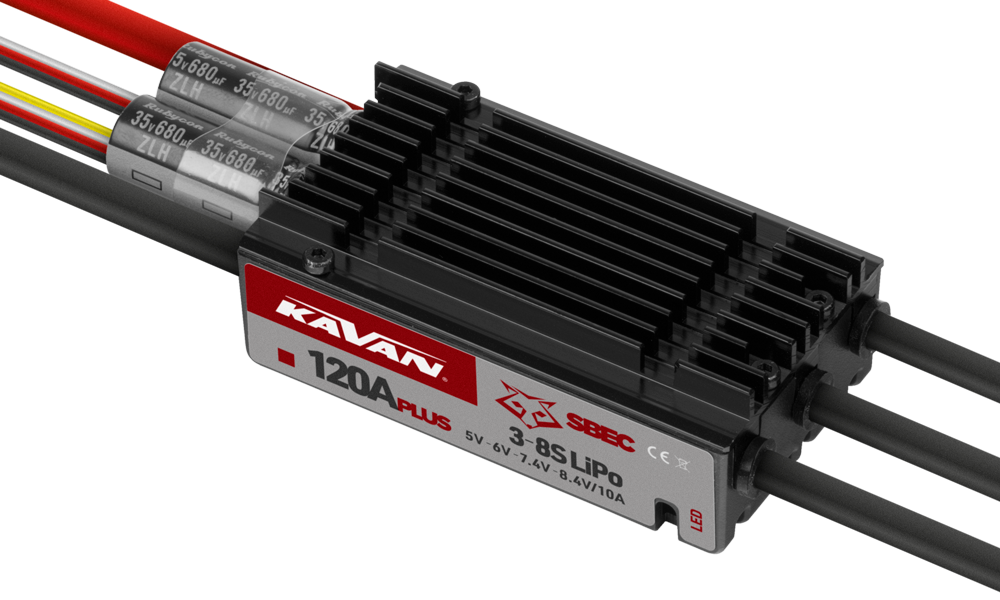
KAVAN Plus R-120SB
Introduction
The KAVAN Plus R-120SB is a programmable brushless speed controller for model aircraft, with a switched BEC and a separate programming cable. Use your transmitter or the optional KAVAN PRO programming card to change its settings.
Warnings
- Read through the manuals of all power devices and aircraft and ensure the power configuration is rational before using this unit.
- Ensure all wires and connections are well insulated before connecting the ESC to related devices, as a short circuit will damage your ESC. Ensure all devices are well connected, to prevent poor connections that may cause your aircraft to lose control or other unpredictable issues like damage to the device. If necessary, please use a soldering iron rated at least 60 W with quality solder and flux suitable for electronics to solder all input/output wires and connectors.
- Never get the motor locked up during high-speed rotation, otherwise, the ESC may get destroyed and may also get your motor damaged. (Note: move the throttle stick to the bottom position or disconnect the battery immediately if the motor really gets locked up.)
- Never use this unit in extremely hot weather or continue to use it when it gets overheated. High temperature will activate the ESC thermal protection or even damage your ESC.
- Always disconnect and remove batteries after use, as the ESC will continue to consume current as long as it's connected to the batteries. Long-time contact will cause batteries to completely discharge and damage batteries and/or ESC. This will not be covered under warranty.
Features
- The ESC features a high-performance 32-bit microprocessor with a running frequency of up to 120 MHz and is compatible with various brushless motors.
- DEO (Driving Efficiency Optimization) Technology greatly improves throttle response & controlling efficiency and reduces ESC's temperature.
- A separate programming cable for connecting the ESC to an LED program card allows users to program the ESC anytime, anywhere. (For details, see the KAVAN PRO/Plus programming card manual.)
- Normal, Reverse and Linear Reverse brake modes can shorten the landing distance of the aircraft.
- Search mode helps locate an aircraft that has landed in difficult terrain by making the motor beep.
- Multiple protection features like start-up, ESC thermal, capacitor thermal, over-current, over-load, abnormal input voltage and throttle signal loss effectively prolong the service life of the ESC.
Specification
| Cont. current | 120 A |
|---|---|
| Peak current | 150 A |
| Input voltage | 3–8S LiPo |
| BEC output | Switched SBEC; 5 V / 6 V / 7.4 V / 8.4 V; 10 A continuous, 30 A peak |
| Weight | 117 g |
| Dimensions | 85×35×22 mm |
Main section
Remove the propeller before wiring checks, throttle calibration or programming. An incorrect setting, signal recovery or automatic restart can start the motor unexpectedly. Connect the battery only when ready to work, keep clear of rotating parts and disconnect it before touching the wiring.
Connecting the ESC for the first time
ESC wiring diagram

The default throttle range of this ESC is 1100–1940 μs (Futaba standard); users need to calibrate the throttle range when they start using a new KAVAN Plus brushless ESC or another transmitter.
- Long white/red/black cable: connect to the receiver or flight-controller throttle channel. White carries the throttle signal; red (+) and black (−) supply BEC power.
- Yellow reverse signal wire: for Reverse brake, connect to a free receiver channel assigned to a two-position switch. For Linear Reverse, assign a proportional knob or slider. Follow the signal-range and start-up settings below.
- Short white/red/black cable: dedicated programming lead for the KAVAN PRO LED card. Use this cable for programming; the yellow wire is the reverse-control signal.
Please bear in mind improper polarity or short circuit will damage the ESC, therefore, it is your responsibility to double check all plugs for proper polarity, and proper connection BEFORE connecting the battery pack for the first time, (+) RED, (−) BLACK.
ESC/Radio Calibration
- Turn on the transmitter and move the throttle stick to the top position.
- Connect a battery to the ESC; the motor will emit „♪ 123“ to indicate the ESC is normally powered on.
- Then the motor will emit two short beeps to indicate the maximum throttle endpoint is accepted.
- Move the throttle stick to the bottom position within 5 seconds after the two short beeps, the minimum throttle position will be accepted 1 second later.
- The motor emits „Number“ beeps to indicate the number of LiPo cells you plugged in.
- The motor emits a long beep to indicate the calibration is complete.
Normal ESC start-up procedure
- Turn on the transmitter, and then move the throttle stick to the bottom position.
- After connecting the ESC to a battery, the motor will emit „♪ 123“ to indicate the ESC is normally powered on.
- The motor will emit several beeps to indicate the number of LiPo cells.
- The motor emits a long beep to indicate the ESC is ready to go.
Programming
Using the KAVAN PRO programming card (optional)

- With the battery disconnected, plug the short white/red/black programming cable into the card’s ESC socket, observing polarity.
- Connect the battery to the ESC. The programmable items appear after a few seconds. If the card was connected while the ESC was powered, disconnect and reconnect the battery to enter programming mode.
- Use ITEM and VALUE to select the item and value, then press OK to save all new settings. The item-selection button is labelled MENU on the card illustrated in the programming-card manual.
For details, see the KAVAN PRO/Plus programming card manual.
You need to power your ESC OFF and then ON after adjusting the parameters, otherwise the new parameters won’t take effect.
Programming with your transmitter
Programming consists of four steps: enter programming mode → select a parameter → select its value → exit programming mode.
Enter program mode
Turn on the transmitter, move the throttle stick to the top position, and connect a battery to the ESC, 2 seconds later, the motor will beep „B-B-“ first, then emit „♪ 56712“ 5 seconds later to indicate that you are in the ESC programming mode.
Select programmable items
The following 12 signals repeat in a loop. Move the throttle to the bottom within 3 seconds of the required signal to select that item. One long beep equals five short beeps.
- „B-“ Brake Type (1 short beep)
- „B- B-“ Brake Force (2 short beeps)
- „B- B- B-“ Voltage Cutoff Type (3 short beeps)
- „B- B- B- B-“ LiPo Cells (4 short beeps)
- „B——“ Cutoff Voltage (1 long beep)
- „B—— B-“ Start-up Mode (1 long beep and 1 short beep)
- „B—— B- B-“ Timing (1 long beep and 2 short beeps)
- „B—— B- B- B-“ Active Freewheeling (1 long beep and 3 short beeps)
- „B—— B- B- B- B-“ Search Mode (1 long beep and 4 short beeps)
- „B—— B——“ BEC voltage
- „B—— B—— B-“ Factory reset
- „B—— B—— B- B-“ Exit
Set item value (Programmable value)
The motor will beep different kinds of beeps circularly, move the throttle stick to the top position after you hear some kind of beeps will get you to the corresponding parameter value, then you’ll hear the motor emit „♪ 1515“ to indicate the value is saved, then get back to „Select Parameter Items“ and continue to select other parameter items that you want to adjust.
Exit program mode
After two long and two short beeps (item 12), move the throttle to the bottom within 3 seconds. The motor then reports the LiPo cell count and gives a long ready tone. Keep the throttle at minimum.
Programmable functions
The highlighted values are factory defaults. Verify the actual settings, especially BEC voltage, before connecting the receiver and servos.
| No. | Value | 1 | 2 | 3 | 4 | 5 | 6 | 7 |
|---|---|---|---|---|---|---|---|---|
| 1 | Brake type | Disabled | Normal | Reverse | Linear Reverse | |||
| 2 | Brake force | Low | Medium | High | ||||
| 3 | Voltage cut-off type | Soft | Hard | |||||
| 4 | LiPo cells | Auto Calc. | 3S | 4S | 5S | 6S | 7S | 8S |
| 5 | Cut-off voltage | Disabled | Low | Medium | High | |||
| 6 | Start-up mode | Normal | Soft | Very Soft | ||||
| 7 | Timing | Low | Medium | High | ||||
| 8 | Active freewheeling | Enabled | Disabled | |||||
| 9 | Search mode | Off | 5 min | 10 min | 15 min | |||
| 10 | BEC voltage | 5 V | 6 V | 7.4 V | 8.4 V |
Brake Type
- Normal Brake: After selecting this option, the brake function will be activated when you move the throttle stick to the bottom position. In this mode, the brake amount equals to the brake force you’ve preset.
- Reverse Brake: After selecting this option, the Reverse Brake signal wire (its signal range must be the same as the throttle range) must be plugged into any vacant channel on the receiver, and you can control the motor direction via that channel. The channel range of 0–50 % is the default motor direction, the channel range of 50–100 % will cause the motor to spin counterclockwise. The channel stick should be within the channel range of 0–50 % (0 would be better) when the first time you power on the ESC. After the Reverse function is activated, the motor will stop first and then spin in the reversed direction and then increase to the speed corresponding to the throttle input. Either signal loss, no matter whether reverse brake signal loss or throttle signal loss during the flight can cause the throttle signal loss protection to be activated.
- Linear Reverse Brake: Connect the yellow reverse signal wire to a free receiver channel controlled by a proportional knob or slider. Match its signal range to the throttle channel. Moving this control activates reverse and determines motor speed. Reverse starts at 10 % throttle, with a fixed signal pulse range of 1.34–1.79 ms. The reverse control must be at 0 % when first powering the ESC. Loss of either the reverse signal or the throttle signal activates signal-loss protection.
Brake Force
This setting applies only to Normal brake. Low, Medium and High correspond to 60 %, 90 % and 100 % braking force respectively.
Voltage Cut-off Type
- Soft Cut-off: After selecting this option, the ESC will gradually reduce the output to 60 % of the full power in 3 seconds after the low-voltage cut-off protection is activated.
- Hard Cut-off: After selecting this option, the ESC will immediately cut off the output when the low-voltage cut-off protection is activated.
LiPo Cells
The ESC will automatically calculate the number of LiPo cells you have plugged in as per the „3.7 V/cell“ rule if „Auto Calc.“ is selected, or you can set this item manually (recommended).
Cutoff Voltage
Disabled switches off low-voltage protection. Low, Medium and High correspond to approximately 2.8 V, 3.0 V and 3.4 V per cell. The pack cutoff voltage is the selected per-cell value multiplied by the automatically detected or manually set LiPo cell count. For example, Medium with a three-cell pack gives 3×3.0 = 9.0 V.
Start-up Mode
This sets the throttle response time when accelerating from 0 % to 100 %. Normal, Soft and Very Soft correspond to approximately 200 ms, 500 ms and 800 ms respectively.
Timing
Low, Medium and High correspond to 5°, 15° and 25° respectively.
Active freewheeling (DEO)
This item is adjustable between „Enabled“ and „Disabled“, and it is enabled by default. With it enabled, you can have better throttle linearity or smoother throttle response.
Search mode
When enabled, the ESC makes the motor beep for the selected time while the throttle remains at 0 %.
BEC voltage
Select 5 V, 6 V, 7.4 V or 8.4 V. Before powering the receiver and servos, verify that every connected device supports the selected voltage. Do not rely on the factory default after programming or a reset.
Troubleshooting and protection functions
| Troubles | Warning tones | Causes | Solutions |
|---|---|---|---|
| After powering on, the motor does not work and no sound is emitted. | — | The connection between the battery pack and ESC is not correct. | Check the power connection. Replace the connector. |
| The ESC didn’t work after it was powered on while the motor kept beeping. | „BB, BB, BB……“ | The input voltage was beyond the operating voltage range of the ESC. | Adjust the power-on voltage and ensure it’s in the operating voltage range of the ESC. |
| The ESC didn’t work after it was powered on while the motor kept beeping. | „B-, B-, B-, B-……“ | The ESC didn’t receive any throttle signal from the receiver. | Check if the transmitter and receiver are well paired or if any poor connection exists between the ESC and receiver. |
| The ESC didn’t work after it was powered on while the motor kept beeping. | „B, B, B, B……“ | The throttle stick has not been moved to the bottom position. | Move the throttle stick to the bottom position and calibrate the throttle range. |
| The ESC didn’t work after the throttle calibration while the motor kept beeping. | „B, B, B, B……“ | The throttle range you set was too narrow. | Increase the transmitter’s throttle-channel travel, then re-calibrate the throttle range. |
| The ESC output suddenly reduced to 60 % during the flight, the motor kept beeping after the flight was completed but the battery was still connected to the ESC. | „BB, BB, BB……“ | The ESC thermal protection has been activated. | Improve the heat-dissipating condition (i.e. add a cooling fan) or reduce the ESC load. |
| The ESC output suddenly reduced to 60 % during the flight, the motor kept beeping after the flight was completed but the battery was still connected to the ESC. | „BBB, BBB, BBB……“ | The low-voltage cutoff protection has been activated. | Change another pack; lower the cutoff voltage or disable the LVC protection (we do not recommend this). |
Start-up Protection
The ESC will monitor the motor speed during the start-up process. When the speed stops increasing or the speed increase is not stable, the ESC will take it as a start-up failure. At that time, if the throttle amount is less than 15 %, the ESC will try to restart automatically; if it is larger than 20 %, you need to move the throttle stick back to the bottom position first and then restart the ESC. (Possible causes of this problem: poor connection/ disconnection between the ESC and motor wires, propellers are blocked, etc.) A blocked rotor or damaged gearbox can also prevent a normal start.
ESC Thermal Protection
If the ESC temperature exceeds 120 °C, Soft cut-off gradually limits output to about 60 % of full power. With Hard cut-off selected, the output is cut immediately.
Throttle Signal Loss Protection
When the ESC detects loss of signal for over 0.25 seconds, it will cut off the output immediately to avoid an even greater loss, which may be caused by the continuous high-speed rotation of propellers or rotor blades. The ESC will resume the corresponding output after normal signals are received.
Overload Protection
The ESC will cut off the power/output or automatically restart itself when the load suddenly increases to a very high value. Possible cause of the sudden load increase is that the propellers are blocked or the motor and the ESC are out of sync.
Low-voltage protection
If the battery voltage falls below the set threshold, the ESC activates low-voltage protection. Soft cut-off reduces motor output to 60 % of full power; Hard cut-off stops output immediately. After the throttle returns to 0 %, the motor emits a warning tone.
Abnormal input voltage protection
If battery voltage is outside the ESC’s supported input range, input-voltage protection activates and the motor emits a warning tone.
The source does not specify peak-current duration, start-up protection behaviour between 15 % and 20 % throttle, or separate capacitor-temperature and over-current thresholds. These are not user-set limits. Obtain KAVAN confirmation if required for your installation.
Appendix
Safety precautions
- Do not install the propeller on the motor when you test the ESC and motor for the first time to verify the correct settings on your radio. Only install your propeller after you have confirmed that the settings on your radio are correct.
- Never use ruptured or punctured battery cells.
- Never use battery packs that are known to overheat.
- Never short circuit battery or motor terminals.
- Always use proper insulation material for cable insulation.
- Always use reliable, polarised cable connectors.
- Do not exceed the number of cells or servos specified for the ESC.
- Wrong battery polarity will damage the ESC and void the warranty.
- Install the ESC in a suitable location with adequate ventilation for cooling.
- Use only batteries supported by the ESC and ensure the correct polarity before connecting.
- Switch your transmitter ON first and ensure the throttle stick is in the minimum position before connecting the battery pack.
- Never switch your transmitter OFF while the battery is connected to your ESC.
- Only connect your battery pack just before flying and do not leave your battery pack connected after flying.
- Once the battery is connected, handle the model as if the motor could start at any time. Keep fingers, your face and loose clothing away from the propeller. Keep yourself and bystanders out of the plane of rotation and never stand directly in front of rotating parts.
- Do not immerse the ESC under water, do not allow it to get wet while powered up.
- Always fly at a designated flying site and follow the rules and guidelines set by your modeller’s club.
Warranty and post-warranty service
All KAVAN ESCs are covered by a 2-year warranty covering all manufacturing defects and faults. When making a claim within the warranty period, please always present a copy of the proof of purchase with the product and provide the service personnel with as detailed and complete information as possible about the defect found, your usage and other information that will facilitate the assessment of the claim and speed up its settlement. Please make your claim at the shop where you purchased the product. If this is not possible, you can directly contact KAVAN Europe s.r.o.:
KAVAN Europe s.r.o. | Doubravice 110, 533 53 Pardubice | Czechia | +420 466 260 133 | info@kavanrc.com
Warranty and limitation of liability
As the manufacturer of this product, we have no control over your compliance with these instructions when wiring and installing the ESC into your model. Likewise, we have no control over the way you build, operate and maintain the RC set parts. For this reason, KAVAN must disclaim all liability for any loss, damage or financial cost that is caused by the improper use or operation of products imported by us, or that is in any way connected with such activity.
Except as otherwise provided by law, KAVAN’s obligation to pay compensation shall (regardless of the legal arguments asserted) be limited to the purchase price for those KAVAN products that were directly involved in the event that caused the damage. This does not apply if the manufacturer has been judicially obliged to make unlimited compensation on the basis of proven wilful or gross negligence. We warrant that our products are in compliance with current legal provisions. The warranty does not cover failures and defects caused by:
- Misuse or improper use.
- Delayed, improper or no maintenance, or maintenance performed by an unauthorised service.
- Incorrect wiring.
- Use of accessories not approved or recommended by KAVAN Europe s.r.o.
- Modifications or repairs not carried out by an authorised KAVAN Europe s.r.o.
- Inadvertent or deliberate damage.
- Normal wear and tear.
- Operation of the equipment outside the operating limits specified in the specification.
KAVAN Europe s.r.o. warrants that this product is free from defects in both material and workmanship at the time of sale. KAVAN Europe s.r.o. also reserves the right to change or modify this warranty without notice. The equipment is subject to continuous improvement and refinement – the manufacturer reserves the right to change the design without notice.
This warranty certificate entitles you to a free warranty repair of the product supplied by KAVAN Europe s.r.o. within a period of 24 months. The warranty does not cover natural wear and tear due to normal use, as this is a product for modelling use, where the individual parts operate under much higher loads than normal toys are subjected to.
The warranty also does not cover any part of the equipment that has been improperly installed, roughly or improperly handled, or damaged in an accident, or any part of the equipment that has been repaired or altered by an unauthorised person (this includes the application of any waterproof sprays/coatings by the user). Like other fine electronics products, do not expose this equipment to high temperatures, low temperatures, moisture, dusty environments, violent mechanical shocks and impacts. Do not leave it in direct sunlight for extended periods of time.
Improper installation includes inadequate mounting, mechanical strain on cables and insufficient cooling.
Please claim warranty repairs from the shop where you purchased the product.
If possible, use the original packaging when returning the product for service. Include a dated description of its use and the fault, together with your full address and telephone number.
Recycling (European Union)
Electrical equipment bearing the crossed-out bin symbol must not be disposed of in normal household waste. Instead, it must be taken to a specialised collection and recycling facility. In EU (European Union) countries, electrical equipment must not be disposed of in normal household waste (WEEE – Waste of Electrical and Electronic Equipment, Directive 2012/19/EU). You can take unwanted equipment to your nearest collection or recycling centre. The equipment will then be disposed of or recycled safely, free of charge. By handing in your unwanted equipment, you can make an important contribution to protecting the environment.
EU Declaration of Conformity
KAVAN Europe s.r.o. hereby declares that the KAVAN Plus R-120SB brushless electronic speed controller complies with the essential requirements of the applicable EU directives concerning electromagnetic compatibility. The full text of the EU Declaration of Conformity is available at www.kavanrc.com/doc.