KAVAN Smart PRO Opto ESCs - Instruction manual
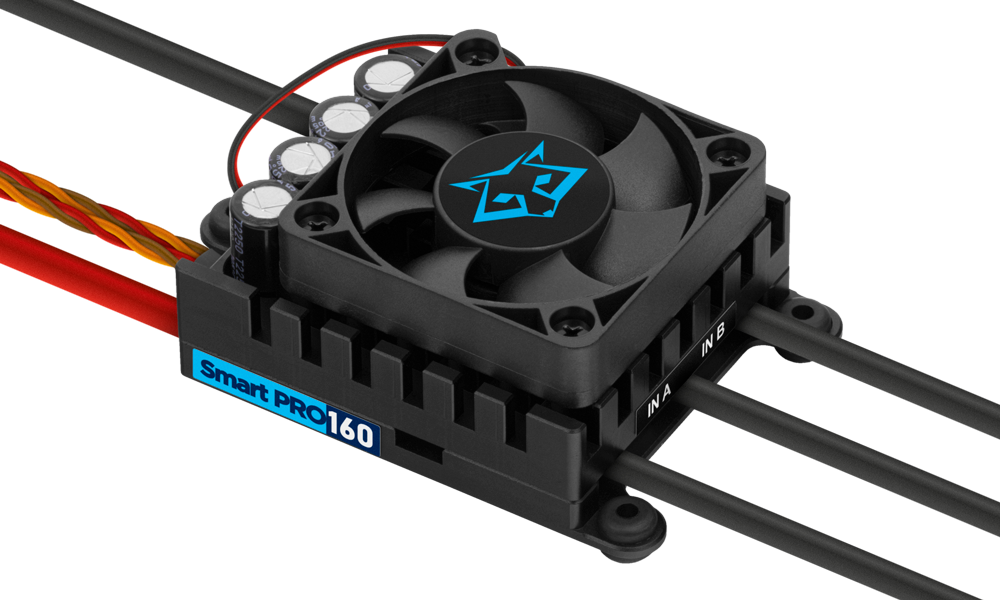
KAVAN Smart PRO Opto range
Introduction
The KAVAN Smart PRO product line represents advanced brushless motor controllers used exclusively in RC model aircraft. With integrated telemetry and various user configuration options, the controllers offer high efficiency, low weight and precise motor control. All the ESCs can be quickly programmed using your transmitter, PC or an external terminal.
Models and catalogue references
| Model | SKU | Product |
|---|---|---|
| 80HV | KAV32.31061 | 80HV |
| 120HV | KAV32.31063 | 120HV |
| 130HV | KAV32.31062 | 130HV |
| 200HV | KAV32.31066 | 200HV |
| 220HV | KAV32.31065 | 220HV |
Features
- Small size combined with high power for motor control.
- Over-voltage and under-voltage protection, over-temperature protection, motor sudden stop protection.
- Adjustable current limiter.
- Fast and accurate heli/governor mode with many settings.
- Optically isolated throttle input.
- Safety motor shutdown when the throttle pulse is lost.
- Configurable acceleration, timing, electromagnetic brake, motor reverse, etc.
- Low acoustic noise due to high-frequency switching.
- Telemetry support depends on the installed firmware: FrSky/KAVAN FPort with Lua configuration, Duplex EX, Hott, MSB, PowerBox P²Bus, S.Bus2 and Spektrum SRXL2. Select the firmware for your radio system.
- Telemetry (depending on the RC system): voltage, current, power, capacity, temperature, RPM, energy.
- Logged are the maximum and minimum values of the telemetry.
- Configuration via a transmitter, PC software MAV Manager or external terminal (JETIBOX/SMART-BOX).
- Firmware update via USB interface.
- Languages: CZ/DE/EN/FR/IT.
| ESC-80 | ESC-120 | ESC-130 | ESC-200 | ESC-220 | |
|---|---|---|---|---|---|
| Dimensions (mm) | 57×35×28 | 58×53×24 | 58×53×28 | 81×63×35 | 81×63×35 |
| Weight incl. cables (g) | 60 | 110 | 110 | 270 | 270 |
| Continuous current (A) | 80 | 120 | 130 | 200 | 220 |
| Peak current (A/2 s) | 120 | 160 | 180 | 260 | 280 |
| Supply voltage (V) | 8–51 | 10–59 (max. 64 V) | 10–51 | 12–59 (max. 64 V) | 10–51 |
| LiPo cells | 3–12 | 4–14 | 4–12 | 4–14 | 4–12 |
| LiFe cells | 3–14 | 4–16 | 4–14 | 4–16 | 4–14 |
| Battery/motor cables (mm²) | 4/2.5 | 4/4 | 4/4 | 6/6 | 6/6 |
| Antispark circuit | No | Yes | |||
| Recommended connectors | G4 (75 A) XT90 (90 A) | G5.5 (150 A) | G5.5 (150 A) | G8 (170 A) | G8 (170 A) |
| Temperature range (°C) | −10–110 | ||||
| PWM frequency (kHz) | 20 | ||||
| Operating current (mA) | 50 | 50 | 50 | 60 | 60 |
| Standby current (mA) | 4 | 4 | 4 | 10 | 10 |
| Propeller positioning | With additional Hall sensor | ||||
| Telemetry | Duplex EX, Multiplex MSB, Futaba S.Bus2, Graupner Hott, PowerBox P²Bus, Spektrum SRXL2™ | ||||
| Status LED | Yes | ||||
| Active brake (freewheeling) | Yes | ||||
| BEC | No | ||||
| Optical isolation | Throttle input only | Throttle input only | Throttle input only | Complete | Complete |
| Maximum RPM (eRPM) | > 300 000 (two-pole motor) | ||||
Main section
Installation
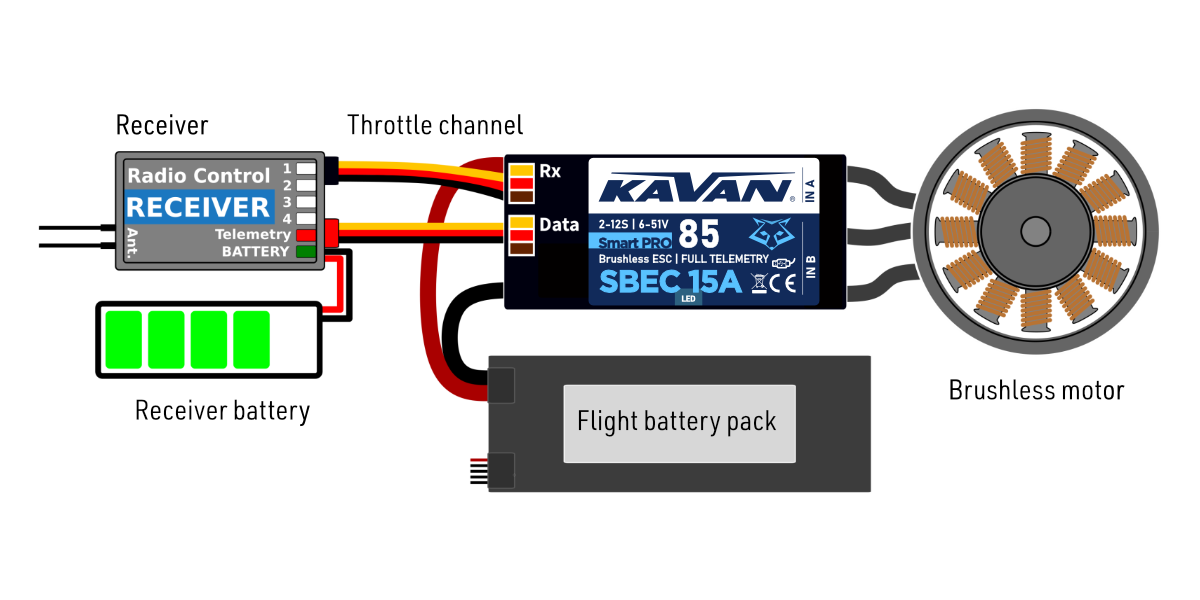
Attach the ESC to your model with the screws. Alternatively, you can use hook-and-loop or double-sided tape to secure it. Connect the motor and receiver. You can connect the motor cables in any order you like, as changing the direction of rotation is done by swapping either of the two cables (alternatively also by the „Direction“ parameter in the configuration). Turn the transmitter on. The receiver uses a separate battery. Normally, turn the receiver on before connecting the main flight battery. For Smart PRO 200/220 with Spektrum telemetry, turn on the ESC before the receiver; see Spektrum Integration.
The red LED on the controller will light up for two seconds to indicate proper initialization. After the correct throttle impulse is detected (meaning off position), the controller plays a predefined melody. Now it’s ready to fly. If the throttle impulse is not detected for more than 4 seconds (e.g. after disconnecting the receiver battery), the controller will enter standby mode.
Always use brand new, high quality connectors and make sure that the cables are soldered perfectly. Any possibility of losing connection during motor run represents a risk of damaging your electronics.
If you start the controller for the first time, or make any significant changes in the setup, please make sure that the propeller is removed from the motor shaft.
Always disconnect batteries after the flight session ends. Even if the speed controller is turned off by the switch, it still draws some small current. This could result in a completely drained battery within a few days or weeks.
Controller mode
You can select from multiple basic controller modes:
- Normal (ramped) - the preset acceleration curve is always used when accelerating. This is the default mode for normal use.
- Fast mode - the selected acceleration time is only applied when spinning from zero RPM. Then the minimum possible delay is applied (0.2 s for zero to full throttle response).
- Normal with reverse - behaves similarly to normal mode. In addition, you can select a throttle reverse channel that will control the direction of the motor during flight.
- Heli/governor - fast and precise constant RPM control with many adjustable parameters.
Throttle input signal
The controller expects positive pulses from the receiver with a maximum refresh rate of up to 400 Hz. When the endpoints are set automatically, the controller will work with most RC systems. In this case, a minimum throttle signal pulse is loaded upon startup. The maximum output is then dynamically adjusted when you first apply full throttle.
If you need the exact positions of the sticks, where the motor starts and where the throttle is full, you can configure using manually entered endpoints.
The controller waits for throttle-low position after startup and also every time the motor is stopped due to any error condition. If the throttle stick is not at the correct position during startup, the ESC plays a warning tone.
Motor settings
Many motor parameters can be configured including acceleration, timing, gear ratio or number of poles. The gear ratio and pole count are important for telemetry and correct display of RPM.
- Acceleration affects the motor's response to the throttle channel. Reducing the acceleration time will speed up the motor response and give the pilot a sense of instant control during aerobatics. However, the motor consumes more power and the controller generates more heat. For most types of models, including electric gliders, semi-scales, EDFs, etc., we recommend a default acceleration of 1.0 s. For 3D aerobatic flight, you can go down to 0.5 s or even less (with caution). You can also set the controller's „Fast mode“ in the General Settings menu for the fastest possible motor response.
- Timing is determined by the type of motor and is usually recommended by the motor manufacturer. Timing also affects the power and current consumption. A higher timing value can increase motor performance, but care must be taken to avoid overloading the system.
- Automatic timing: the timing is continuously adjusted by the internal algorithm. This is a universal solution compatible with most motor types.
- 0–10° timing: recommended for inrunners, i.e. motors with internal magnets.
- 15–20° timing: recommended for most outrunners (motors with rotating casing). It offers a good combination of power and efficiency.
- 25–30° timing: high-torque motors with many poles require the highest timing.
- Motor type should be modified only in some specific cases where it is necessary by the application. There are three options available:
- Standard - recommended for most types and applications (default).
- High Torque - if you have problems with motor synchronization during fast acceleration, use this mode. Preconditions: large outrunner with more than 20 poles, heavy propeller, large current peaks. We also recommend increasing the timing to more than 20°.
- High Speed - use this mode if your drive unit exceeds 250 000 eRPM (revolutions per minute calculated for a 2-pole motor). Startup power influences the first few motor revolutions. If you are not satisfied with the automatic mode, you can set the motor start to be more aggressive (positive values), or as smooth as possible (negative values).
Brake configuration
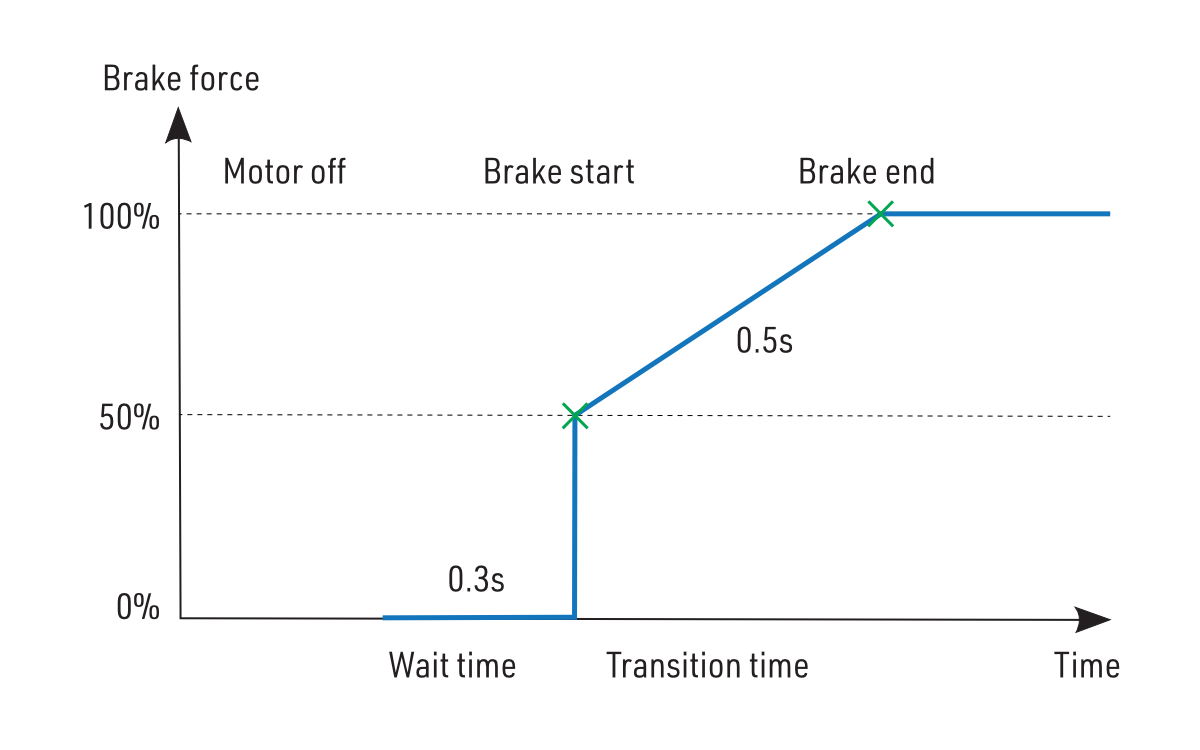
The electromagnetic brake is a standard feature of all ESCs used in electric glider models. The KAVAN Smart PRO controller offers several additional parameters to fine-tune the braking function. You can use one of the preconfigured brake settings or specify all the parameters as you wish.
Brake options
- Off: The propeller spins freely without braking.
- Soft: Transition from zero to full braking force in 1.0 s.
- Medium: Transition to full braking force in 0.7 s.
- Hard: Transition from 50 % to 100 % braking force in 0.5 s.
- Manual: you can specify all brake parameters manually:
- Start power (start of brake) - braking force applied from the first moment of applying the brake.
- End power (end of brake) - braking force applied after the transition time elapses (usually the full braking force that stops the motor completely).
- Transition - the time between brake start power and brake end power. During this time, the braking force continuously transits from start to end power.
- Wait time - the time between unpowering the motor and applying the brake. During this time the motor spins freely without power.
Example: motor brake with the following parameters: brake start = 50 %, brake end = 100 %, ramp = 0.5 s, wait time = 0.3 s.
Propeller positioning
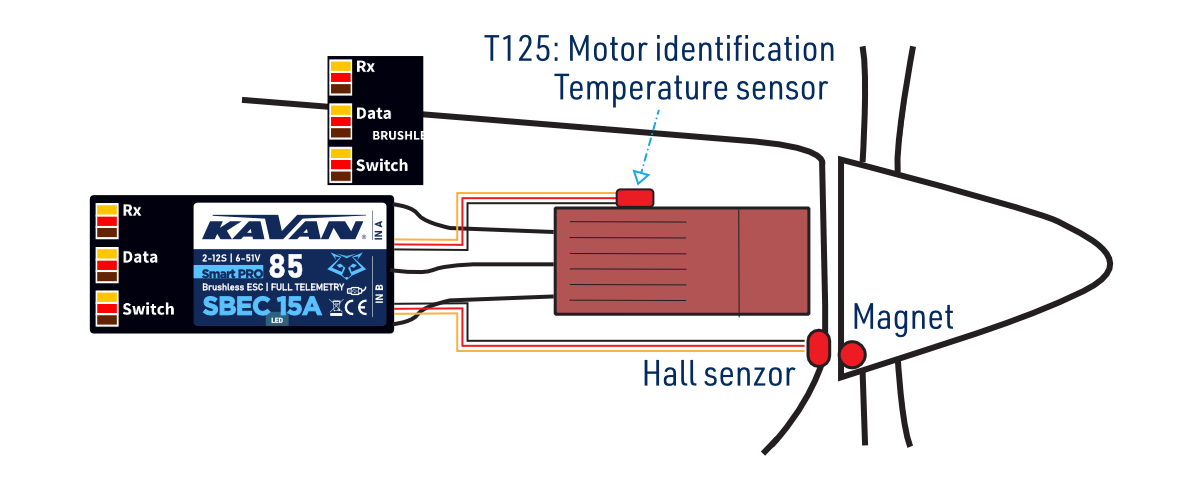
The positioning feature allows moving the motor/propeller to the exact position required for a safe landing, or which is just comfortable for further flying. With just a few external components (a Hall sensor and a small magnet) you can enable this feature and prevent the risk of damaging your propeller during landing. The magnet needs to be properly fixed to the rotating part (either the motor or the propeller), and the Hall sensor has to be located in the fuselage so that the magnet matches the Hall sensor at the target propeller position. After enabling the positioning feature in the menu (Prop Position = Hall Sensor), set also the Positioning PWM, so that the motor spins slowly but smoothly. You may also change the duration of the actively held motor position (Position Hold Time) which is applied after the correct position is found. The position-hold feature is useful in the case of a retractable engine since it doesn’t allow the propeller to be moved while retracting.
Connect the Hall sensor of the propeller positioning function to the IN-B port of the controller.
Use a high-quality CA or Epoxy glue to fix the magnet in the rotating part. You can also drill a small hollow in the spinner and fix the magnet in it.
Do not use higher PWM than necessary otherwise the motor may overheat. Generally use as low PWM as possible so that the motor holds its position reliably. Check the current consumption using the telemetry.
Motor identification
Some motor brands contain an integrated temperature sensor compatible with the KAVAN Smart PRO speed controller. This sensor (T125-ID) might be used as a standalone telemetry sensor with Duplex/Hott/S.Bus2/FPort telemetry support. Alternatively, the sensor can be directly connected to the Input port „A“ of the controller (Fig. 3). From this moment on, the KAVAN Smart PRO controller will know the basic motor parameters (minimum acceleration, recommended timing, gear ratio, number of poles…) and motor temperature as well. Some parameters are adjusted automatically (gear ratio, poles), and the other settings are configured after resetting the controller to factory defaults. Connect the motor-identification sensor into the IN-A port of the controller.
The IN-A/IN-B ports use 3.3 V logic. Do not apply an external supply voltage to these ports. Check connector orientation before connecting an accessory.
Active freewheeling
„Active freewheeling“ or „Active braking“ is a feature of the speed controller that reduces heat generated by the ESC during partial load operation. This mode is useful for aerobatic pilots who want not only fast acceleration but also rapid deceleration. The motor follows throttle stick input in both ways and the pilot feels more „locked-in“.
Current limiter
The current limiter is a part of safety controller features. It doesn’t stop the motor but rather continuously monitors the immediate current consumption and adjusts the motor power. You can enable this feature, specify the maximum allowed current and the ESC will reduce the motor power immediately as soon as the current threshold is exceeded. After the current returns back to the safe level, the motor power is restored.
Battery protection
The integrated battery protection is based on undervoltage detection and reducing motor power, alternatively shutting down the motor completely. You can freely set the number of cells (or leave automatic detection) and low voltage threshold per cell. Supported battery types are NiXX (1.2 V), LiFe (3.6 V max) and Li-ion/LiPo (4.2 V max).
Antispark function
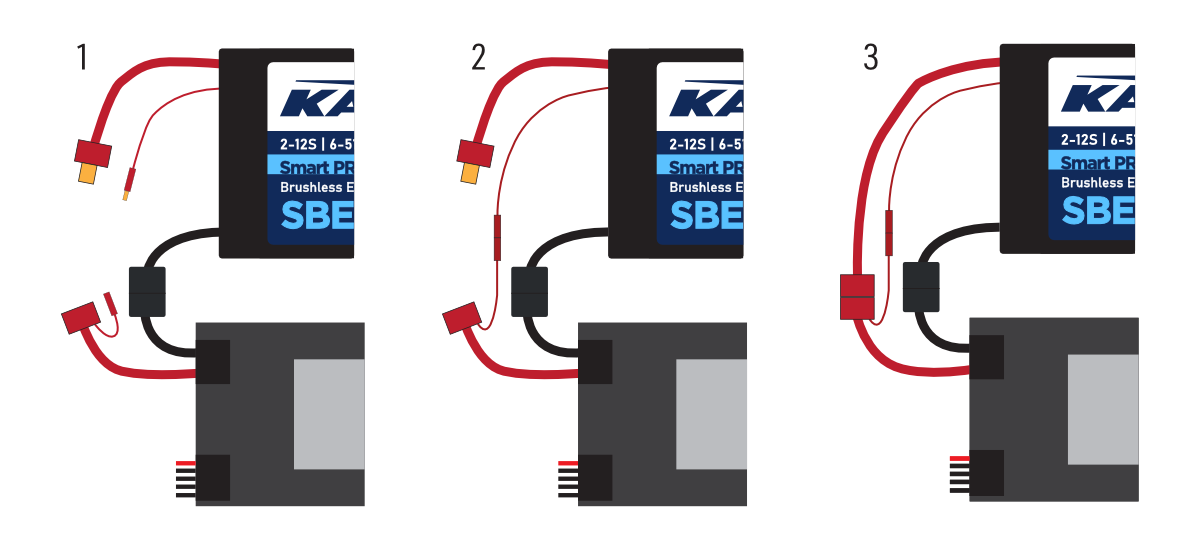
The KAVAN Smart PRO 120/130 and KAVAN Smart PRO 200/220 controllers contain an additional circuit that can be optionally used to prevent sparks when connecting the drive battery. This circuit is connected to the propulsion using a separate cable. Use the „Antispark“ cable only for pre-charging the controller capacitors. Never use this cable to power the motor or any external electronic components.
- Connect the negative (−) battery pole.
- Connect the Antispark cable to the positive (+) battery pole.
- Connect the positive (+) battery pole.
If you use the power connectors with integrated antispark mechanism, it is not necessary to use the antispark feature of the ESC anymore. For example, the XT90 connectors with integrated antispark can be used.
Status codes
Status codes are displayed on the screen (JETIBOX/SMART-BOX) if any error event occurs. If any status code is activated, the red LED flashes continuously.
Available status codes
- Low Voltage (UL): the battery voltage has fallen below the threshold value specified in the Battery Protection menu, and the controller has either reduced the maximum power or shut down the motor completely.
- High voltage (UH): If you use a soft battery or mains power supply, the voltage may rise above the initial level during braking. In this case, an alarm is triggered and all braking functions are disabled.
- High current (IH): the current is higher than the maximum peak current defined in the product specification (e.g. 120 A for KAVAN Smart PRO 80, 180 A for KAVAN Smart PRO 130).
- High temperature (T100, T110, T120): the temperature is above a safe level. The numeric value indicates the maximum temperature detected and the safety protocol that has been activated.
- Commutation error (COM): a synchronisation error was detected while the motor was running. This usually occurs when the motor stops suddenly or in the case of very fast acceleration on some specific power units. This error may indicate a serious problem in the motor-controller installation.
Heli/governor mode
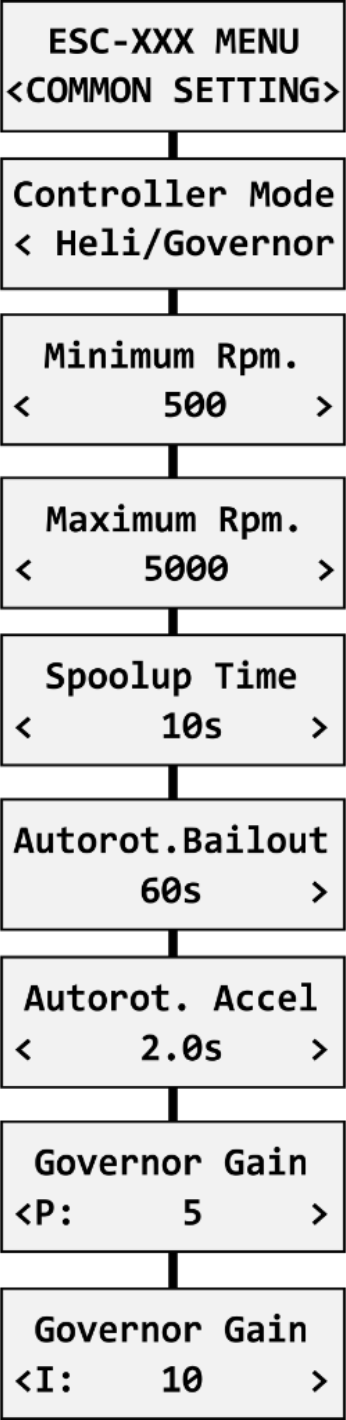
The speed controllers contain a fast and precise governor function. You can configure the governor mode in many aspects according to your preferences.
Before enabling the governor mode, remove the main and tail rotor blades. In the Common Setting menu, set the Controller Mode to „Heli/Governor“ and proceed through the settings below:
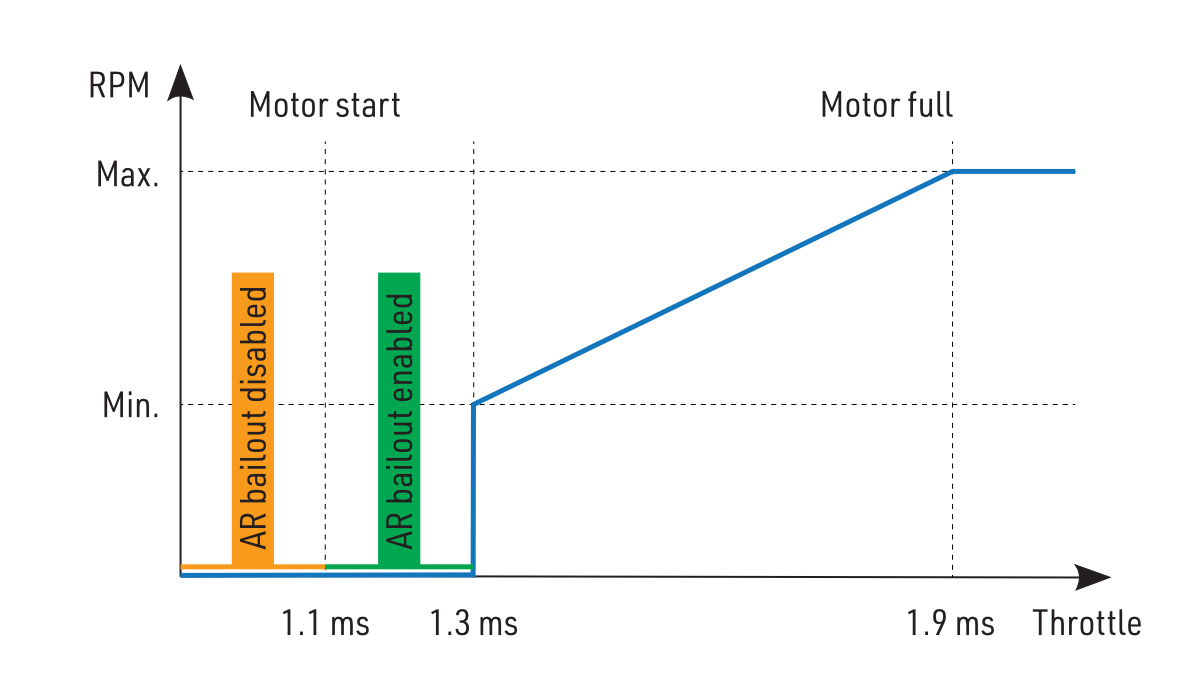
- Set the minimum and maximum RPM of the main rotor according to your preferences. As soon as you move the throttle away from the idle position, the controller slowly spools up until it reaches the target speed. The speed is calculated according to the throttle channel value, where low throttle corresponds to the „Minimum RPM“ and high throttle corresponds to „Maximum RPM“.
- Set the Spool-up Time to make the motor startups as smooth as possible. You may set the time up to 60 s. The spool-up time is applied when the motor starts from zero revolutions or if the autorotation bailout is disabled.
- Configure the Autorotation bailout time and autorotation acceleration time. The autorotation bailout function is used in case you need to quickly exit the autorotation and prevent your model from crashing. In this case, as soon as you move the throttle channel away from the idle position, the „Autorotation acceleration“ will be used to spin the motor until it reaches the required speed. The „Autorotation bailout“ parameter sets the time after switching off the motor, when the autorotation bailout function may be activated. After exceeding this time, a standard spool-up time will be applied.
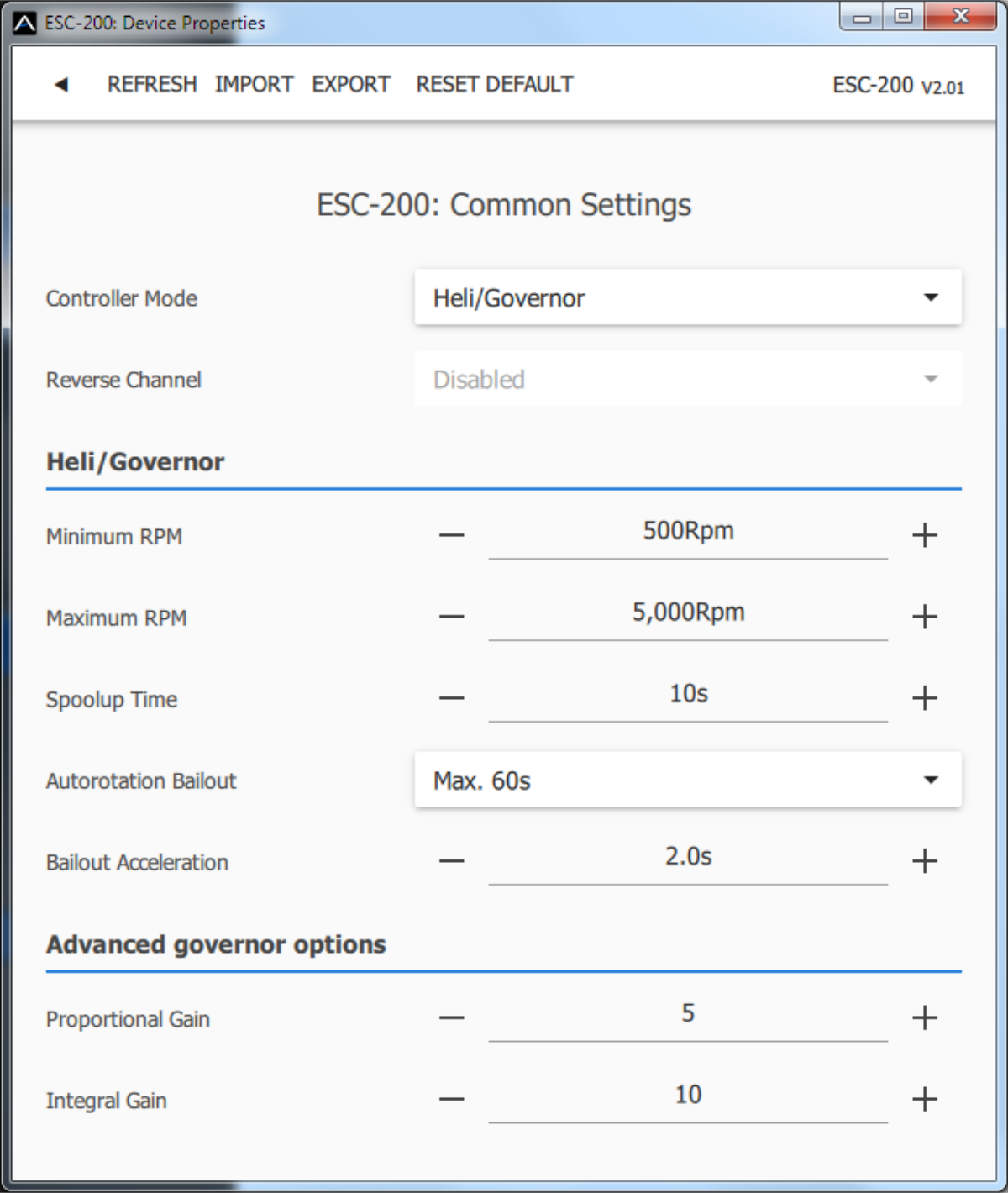
- Advanced settings: Governor gains – (P)roportional and (I)ntegral. You may modify the gains to fine-tune the controller response to fast changes in the load during flight manoeuvres. Please perform the changes only in small steps and verify the resulting behaviour in a short test flight.
- Increase the P gain to eliminate small RPM fluctuations during straight flight, e.g. while hovering. If you hear some unexpected noise in the motor/gearbox (which means fast oscillations), reduce the P gain by 20 %.
- Increase the I gain to hold the precise revolutions during manoeuvres. If the motor speed starts oscillating noticeably, reduce the I gain by 20 %.
- In the Governor mode, manual throttle endpoints are always used (by default 1.1–1.9 ms) and Active braking is enabled as well.
The following diagram shows RPM response versus throttle position. In this case, default throttle endpoints have been used (1.1–1.9 ms).
Please make sure the gear ratio and number of motor poles are correctly set in the Motor Setting menu. Also, please verify that the brake is disabled and disable the propeller positioning function.
Please note that dynamic changes of the motor revolutions in flight are limited by the „Acceleration“ parameter configured in the Motor Setting menu. Please make sure the acceleration is slow enough so that changing revolutions in flight does not lead to sudden changes in model attitude.
Motor direction reversing
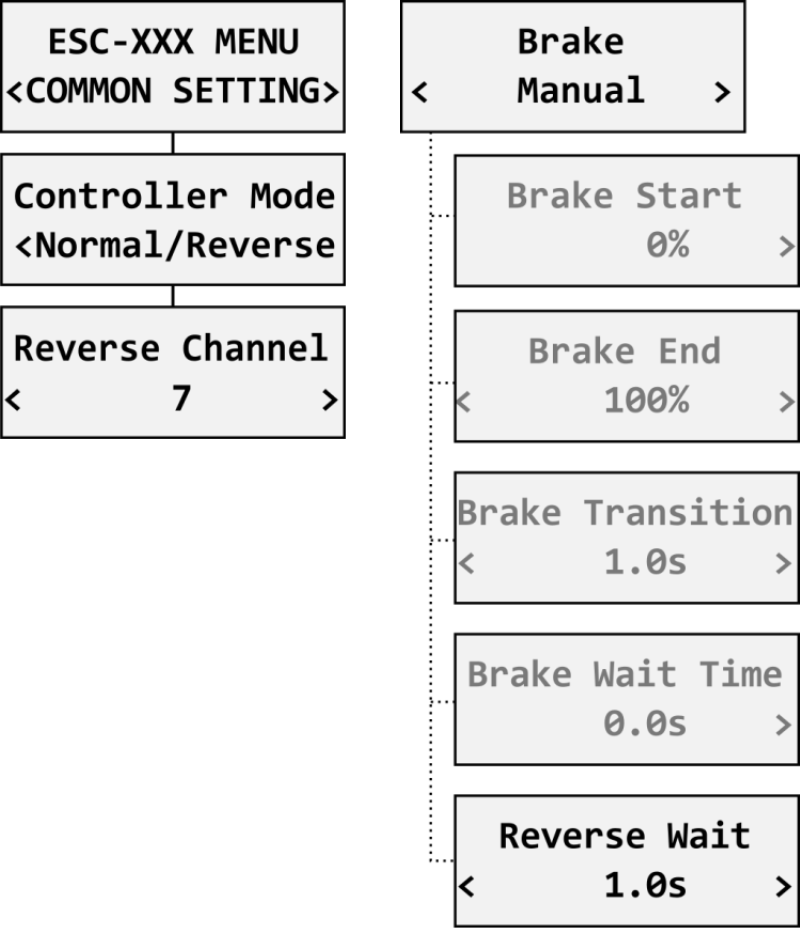
The motor reverse feature is available for RC systems with bidirectional bus support (EX Bus, P²Bus, SRXL2, S.Bus2, FPort). To control the motor direction you need to define an additional channel transferred through the bus system. Both cables (red and black) of the KAVAN Smart PRO speed controller must be properly linked to the receiver. First, you need to create an additional channel on your transmitter to control the motor direction. This channel should be operated by a two-position switch.
Futaba/Spektrum
Use one of the AUX channels and remember the channel number. It is not necessary to use just the channels available on your receiver since the RC systems usually offer more channels over the bus than the physical number of receiver ports.
Example: If you use Spektrum NX6 and a 6-channel receiver, you may still use channel No. 7 (AUX2) to control the reversing feature over the bus.
JETI
Create a new model function in the Model - Functions Assignment menu and assign a spare two-position switch. After that, in the Model – Servo Assignment menu, assign the function to one of the receiver channels (1–16). Again, you may use the channels that are not directly available on the receiver outputs (e.g. 13–16) since they will be transferred through EX Bus without limitation.
PowerBox
Create a new model function in the Function menu by pressing the „+“ button and assign it a 2-position control switch. Choose one of the available servo output channels (1–16). The switch position will be transferred over the P²Bus to the speed controller.
To enable the motor reverse function in the controller, set the „Controller Mode“ to „Normal/Reverse“ and set the correct channel from the previous step. You may also play with the brake settings and reverse wait time under the „Manual“ brake type.
Check the function: As soon as you flip the direction switch, the controller activates braking, and after some short pause, the motor starts spinning in the opposite direction.
The brake is always enabled in the „Normal/Reverse“ mode. Even if you set the brake type to „Off“, the Soft braking will be applied.
Galvanic isolation
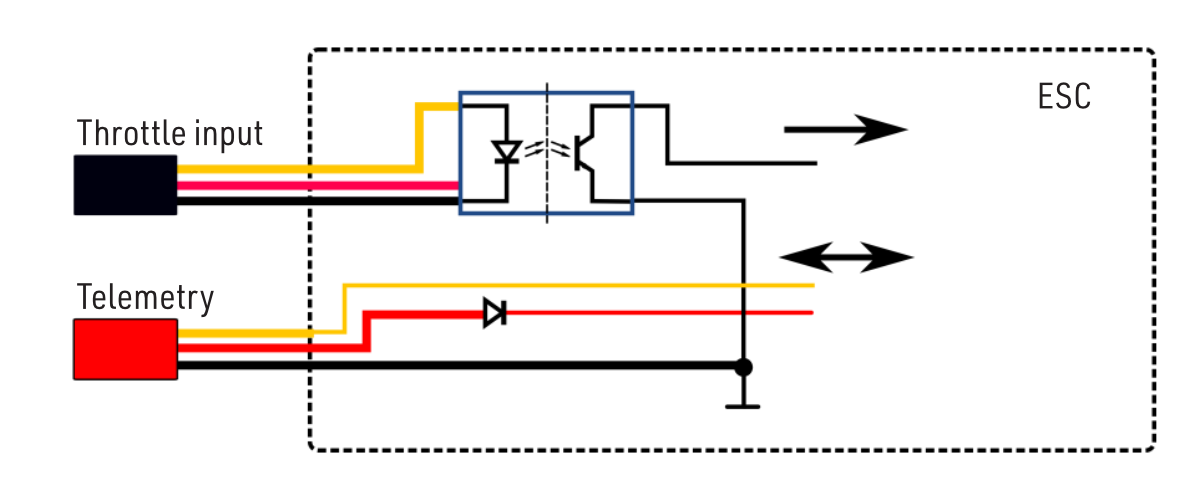
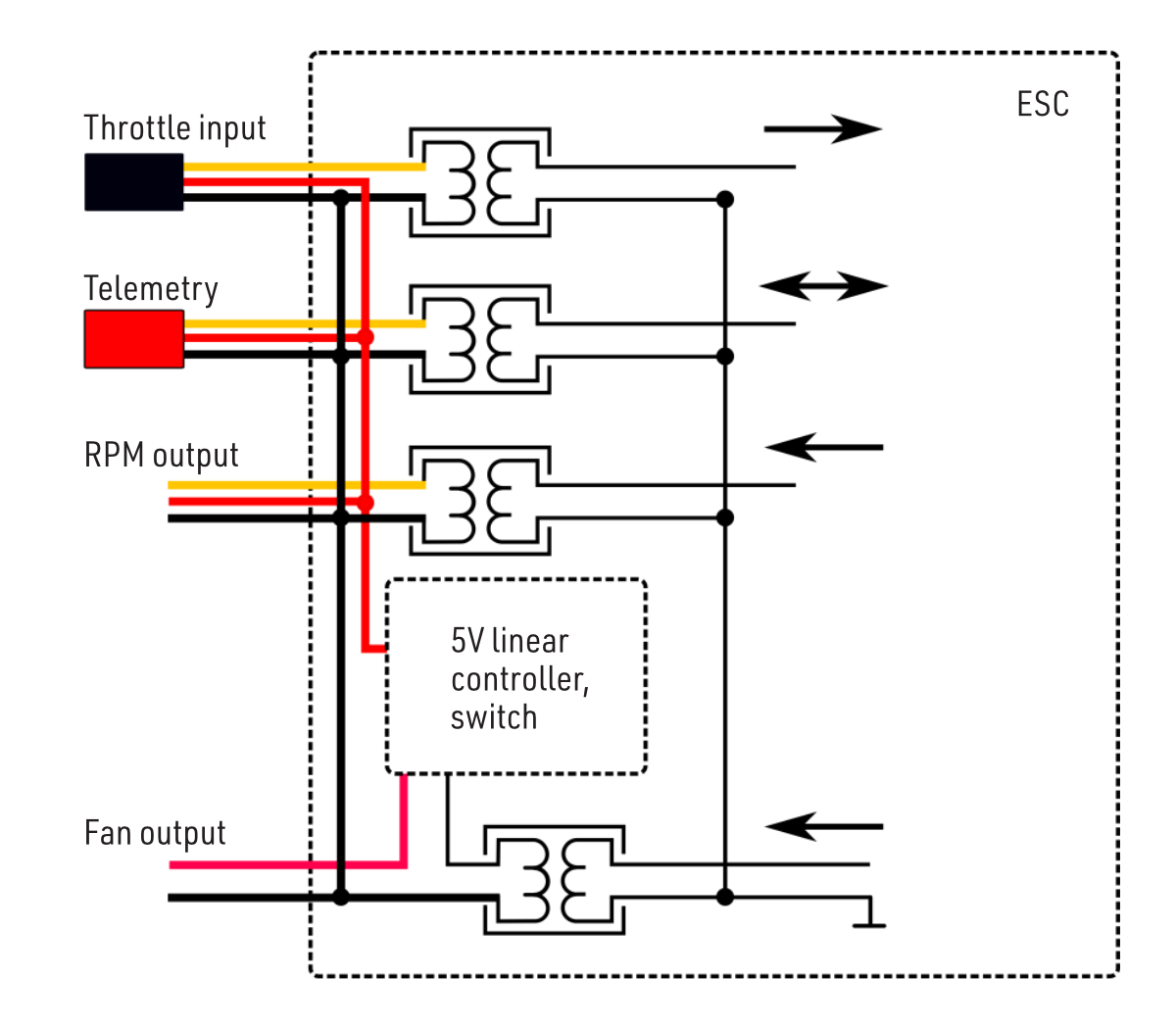
The KAVAN Smart PRO 80 and KAVAN Smart PRO 120/130 controllers have an optically isolated throttle input. Smart PRO-200/220 also include galvanic isolation for all signal wires.
KAVAN Smart PRO 80, 120/130
KAVAN Smart PRO 200/220
Fan control
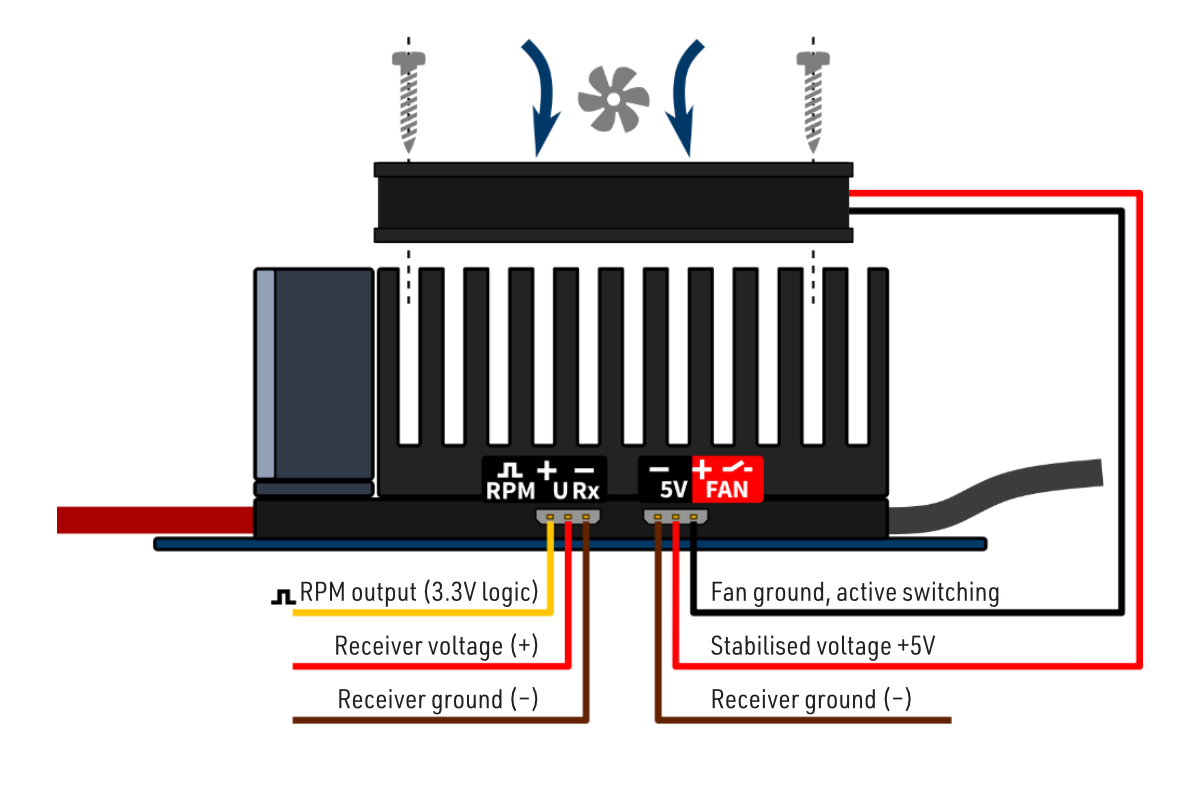
KAVAN Smart PRO 200/220 include a controlled output for an external fan (5 V, up to 300 mA). It is activated when the controller temperature reaches 55 °C.
Use only a suitable fan, which is sold as an accessory to the controller. Attach the fan to the heat sink using the screws provided. Connect the fan to the controller output marked „FAN“. The fan is powered by the receiver battery with the voltage stabilised at 5 V.
Telemetry and settings
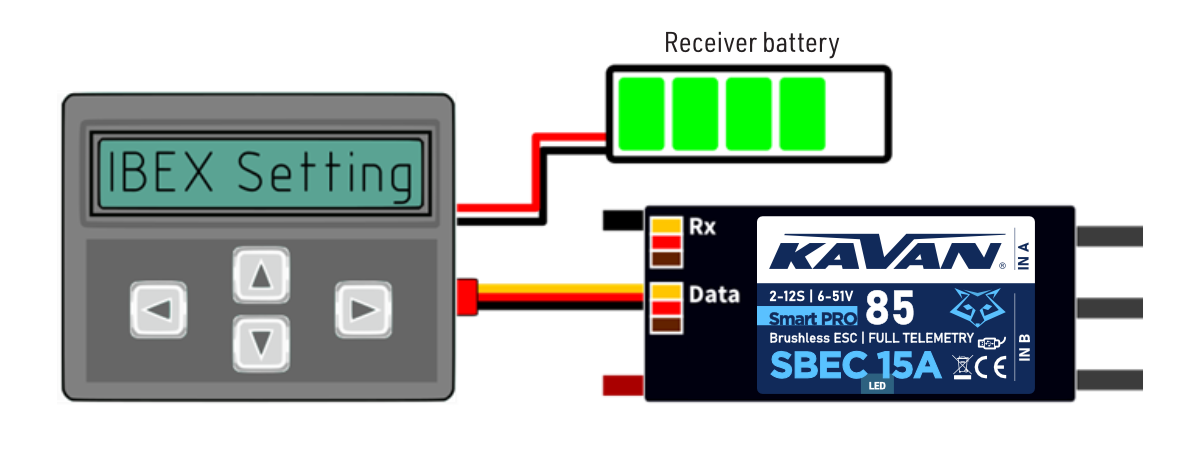
Plug the red data cable into the sensor slot of the JETIBOX / SMART-BOX (or corresponding receiver). Power it up with a battery (4.5–8.4 V). Now you can safely configure the controller using the arrows on the terminal.
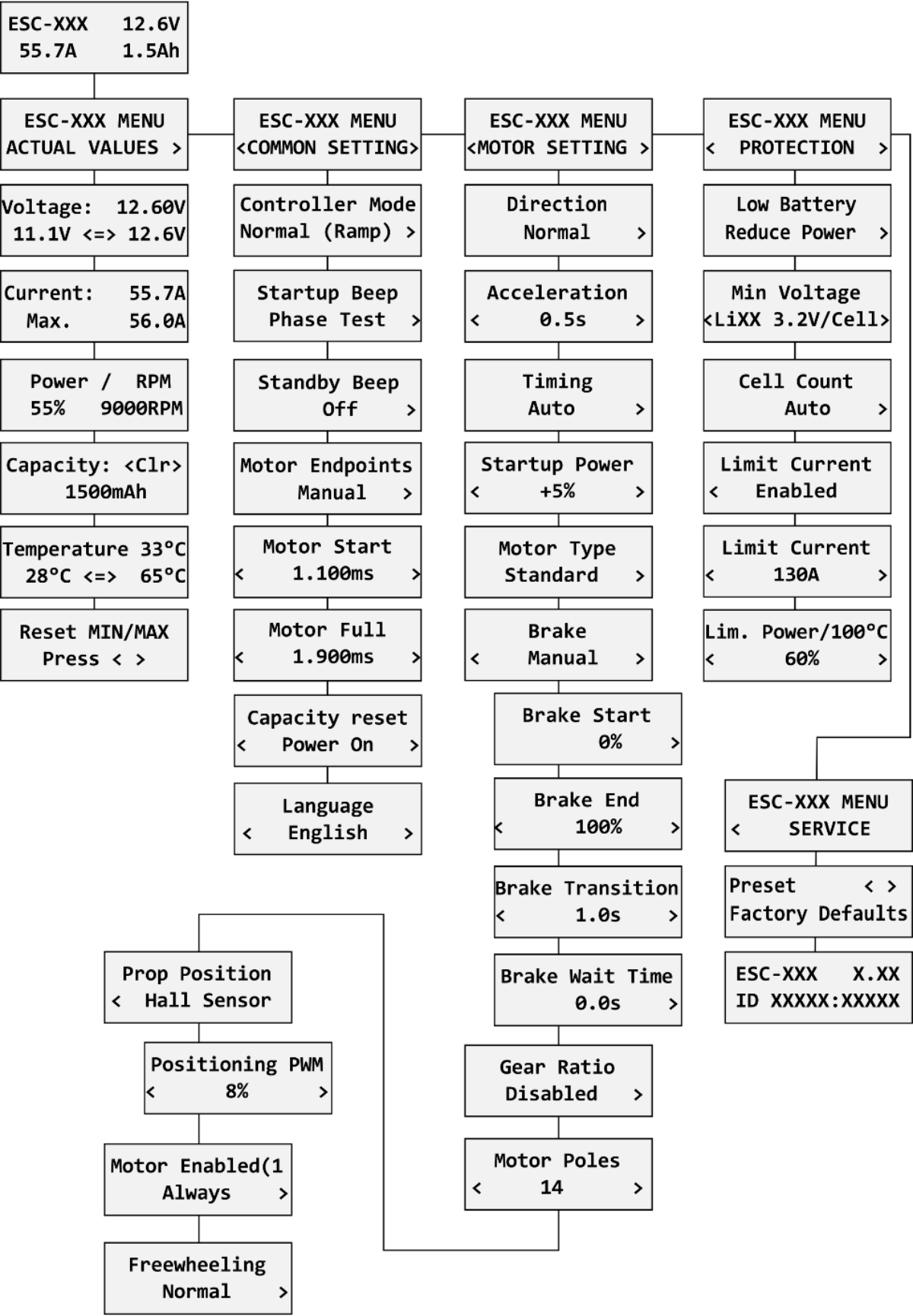
KAVAN Smart PRO controllers are compatible with JETIBOX programming. The JETIBOX menu is divided into five sections:
Actual values
Displays the latest telemetry values together with minimums and maximums.
- Available telemetry: Voltage, current, capacity, RPM, power (per cent), temperature.
- If the motor chip ID is connected, also motor identification and temperature are shown.
- Reset Min/Max - press ← and → together to reset all minimums and maximums.
Common settings
Basic controller settings
- Controller mode - basic controller mode (normal or fast).
- Startup beep - choose a melody played after the controller initialization.
- Standby beep - you can activate short repeated beeps as an indication of a powered motor drive.
- Motor endpoints, motor start, motor full - settings related to throttle input signal decoding.
- Capacity reset - you can choose at which moment the capacity and consumed energy are reset:
- Power on - the capacity is reset after the controller initialization. However, the capacity from the previous run will be displayed initially until you start the motor.
- Voltage change - the capacity is cleared after you connect a battery with a similar (or greater) voltage compared to the maximum battery voltage from the previous run. This means that each time you connect a fully charged battery of the same chemistry and number of cells, the capacity will be cleared.
- Manual - the capacity/energy is never cleared and you must perform the reset manually.
- Language - you can choose the language of the JETIBOX screen.
Motor settings
Settings related to motor parameters.
- Direction, acceleration, timing, startup power, motor type, gear ratio, motor poles - see Motor settings.
- Brake related settings - see Brake configuration.
- Prop position, positioning PWM, position hold time - see Propeller positioning.
- Motor Enabled (0/1) - motor operation can be enabled or disabled based on the logical state of the specific input „IN B.2“ (connector pin numbers: 1 = Hall sensor input, 2 = Motor enable input, 3 = 3.3 V, 4 = Ground; check orientation against the manufacturer’s connector drawing for the fitted hardware). If you choose an „InputPin Log0/1“ option, you must pull the throttle low before starting the motor. On the other hand, after choosing the „Autostart Log0/1“ option, the controller will start spinning as soon as the input pin state allows it and the throttle position is above the idle position.
- Freewheeling - enables freewheeling/active braking motor operation.
Protection
ESC and battery protection settings.
- Low battery - behavior when the battery is discharged. Either set to slowly reduce the motor power, or shut down the motor immediately. The minimum safe voltage is based on number of cells (cell count) and voltage per cell.
- Limit current - enable this feature to prevent high current peaks and system overload.
- Limit power at 100 °C - you can edit the maximum allowed PWM after the controller temperature exceeds 100 °C. The model must be operable, but the temperature must not increase anymore.
Service
In this menu, you can view the device version and reset it to the default factory configuration.
JETIBOX menu structure
Available EX, P²Bus and FPort telemetry (depending on firmware):
- Battery voltage (V)
- Motor current (A)
- Capacity (mAh)
- Speed (RPM)
- PWM (%)
- Power (W)
- Motor run time (s)
- Energy (Wmin) - a useful feature for competitions where the total energy is limited (F5B, F5D…).
- Temperature (°C)
- External temperature (°C) - if the motor identification chip is connected, the ESC forwards motor temperature in its own telemetry.
Motor status:
- 0 = initial state
- 1 = motor running
- 2 = braking
- 3 = positioning started
- 4 = position found.
- 5 = position error (prop out).
The KAVAN Smart PRO controller is recognised by default as an „Air-ESC“ sensor.
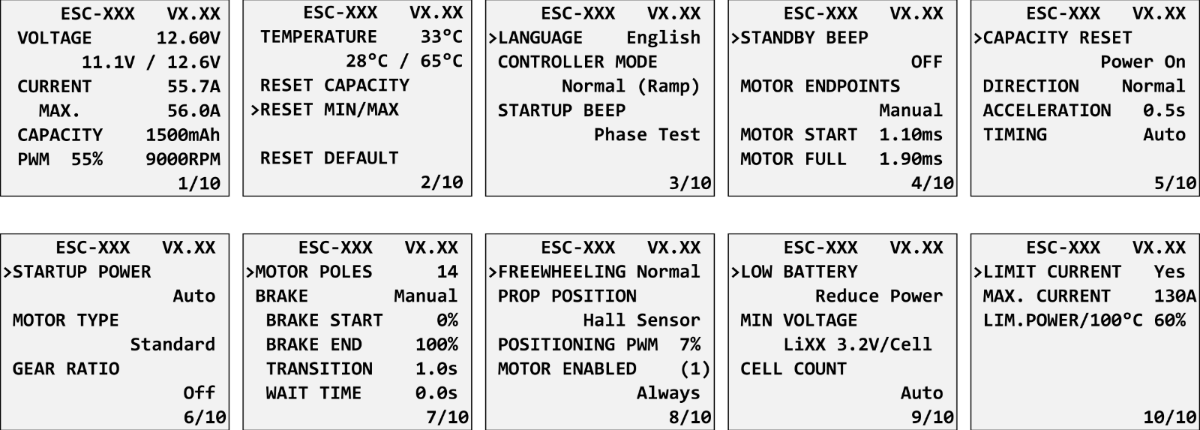
Graupner HOTT menu structure
Futaba and Multiplex connection
Futaba and Multiplex systems do not offer wireless device configuration. The telemetry transmission is possible with the following fixed sensor slots:
| Futaba S.Bus2 slot | Note | Slot Multiplex MSB | |
|---|---|---|---|
| Speed | 2 | Select the RPM sensor on slot 2. | 6 |
| Current | 3 | Select the SBS01C current sensor on slot 3. | 3 |
| Voltage | 4 | 2 | |
| Capacity | 5 | 4 | |
| Temperature | 6 | Select the Temp125 sensor on slot 6. | 5 |
| PWM (0–100 %) | 7 | Select the Temp125 sensor on slot 7. | - |
| Note | Manual detection in menu Linkage - Sensor. | Automatically detected by the transmitter. | |
PowerBox Telemetry
From version 1.09, the KAVAN Smart PRO controller can recognise the PowerBox P²Bus telemetry protocol. Connect the Telemetry cable (red connector) to the P²Bus port of the receiver. The transmitter scans for attached sensors as soon as the receiver is powered up and the controller telemetry should be available within 2.5 seconds. After that, you are free to assign the telemetry to any desktop widgets and alarms. Available telemetry is similar to the Duplex EX telemetry (see above). The controller configuration through the PowerBox transmitter is not available at the moment.
Remove the propeller or rotor blades before entering transmitter programming mode. Keep the throttle low before leaving the programming menu.
Spektrum Integration
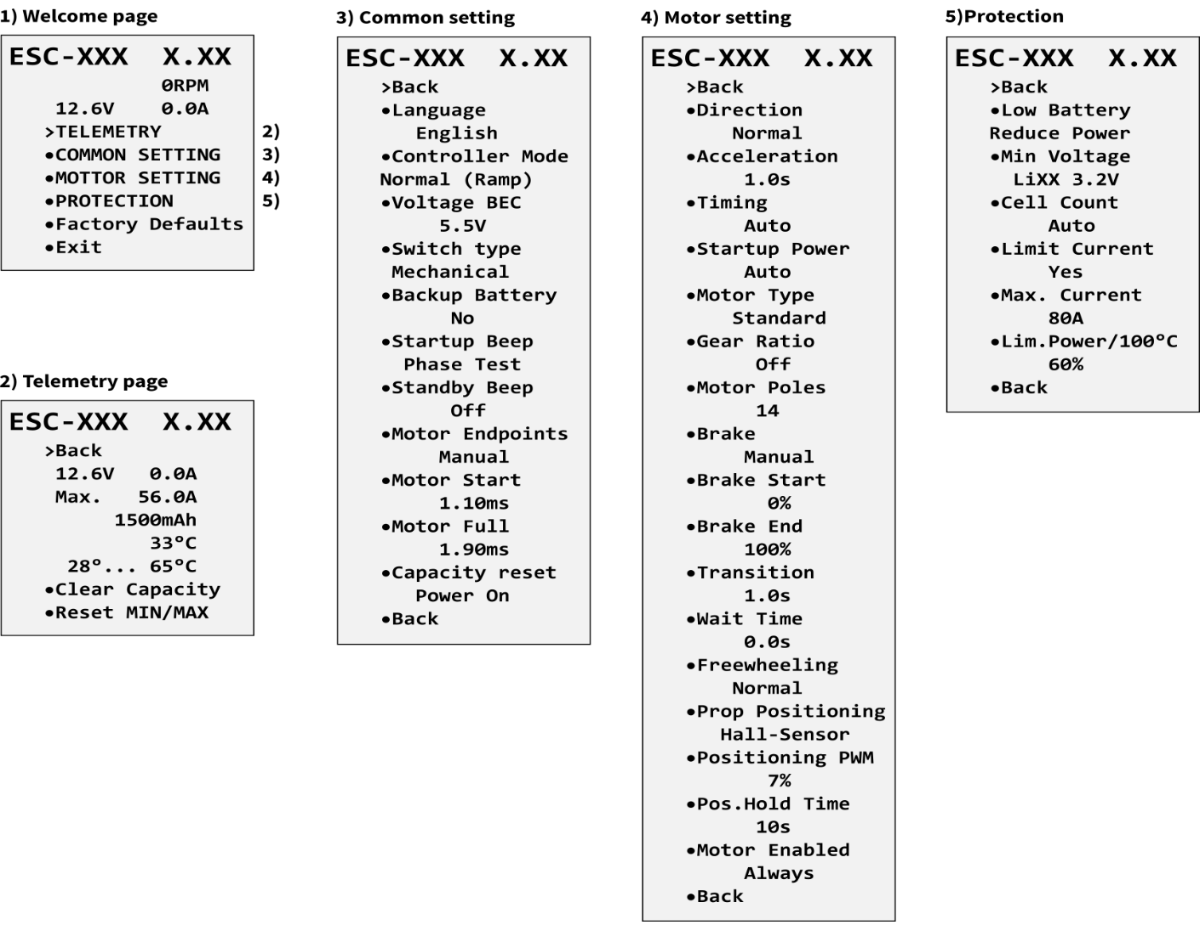
From version 1.06, the Spektrum telemetry support has been integrated into a special firmware version. This alternative firmware offers the SRXL2 telemetry and setting using the TextGen protocol. The KAVAN Smart PRO controller is represented in the transmitter by two telemetry devices:
- „ESC“ shows battery voltage, current, BEC voltage, ESC temperature, RPM and power output.
- „Flight Pack Capacity“ sensor that shows the consumed battery capacity.
Connect the Throttle cable (black connector) to the Thr (1) receiver port. For proper telemetry/setting, also connect the Telemetry cable (red connector) to the Prog/SRXL2 receiver port. The controller normally delivers only numerical telemetry. The textual menu (TextGen) is available only after a special procedure is performed during startup:
- We assume the Throttle and Telemetry cables are connected correctly and the transmitter is turned on. Now push the throttle high.
- Turn on the ESC either by connecting the flight pack or by flipping the external switch.
- The motor will beep indicating detection of the high throttle impulse. After 3 seconds, another beep announces entering the programming menu.
- Now you may pull the throttle low. On the transmitter's main screen scroll right to locate the TextGen menu. The motor will never start spinning if the textual menu is enabled. To enable normal motor operation, you have to leave the TextGen menu by choosing the „Exit“ option on the first page.
- Navigation in the menu is provided by the transmitter's sticks – the elevator stick moves the cursor up/down and the aileron stick changes the selected value.
- The configuration changes are saved immediately after any value is edited.
Use the latest firmware version in your transmitter and receiver. For Spektrum NX, at least version 3.06 has to be installed. Recommended receivers: AR8360T, AR8020T, AR6610T, AR631T, AR637T…
The KAVAN Smart PRO version 2.01 and later is compatible with Spektrum single-cable operation (Smart Throttle). To enable this function, just plug the red telemetry cable into receiver channel No.1 and keep the other (black) cable unplugged. You will be able to control throttle as well as receive telemetry. This approach is compatible with the AR10400T receiver family as well.
If you use an ESC with galvanic isolation (KAVAN Smart PRO 200/220), always turn on the ESC before the receiver. Otherwise, the telemetry functions may not work.
Firmware update
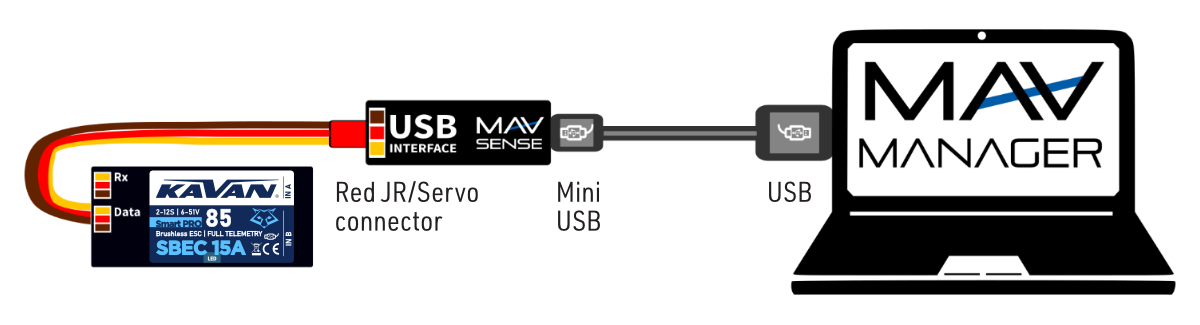
Firmware updates for KAVAN Smart PRO controllers are transferred from a PC via the USB interface. The required programs and files are available at www.mavsense.com.
Install the MAV Manager software and the USB drivers on your computer. Check the system requirements.
- Make sure that the flight pack is disconnected and the KAVAN Smart PRO ESC is unpowered.
- Connect the USB interface to your PC, run MAV Manager - Updater and select the correct COM Port.
- Connect the KAVAN Smart PRO ESC (Fig. 16) – use the red (telemetry) port. The controller will be automatically detected.
- For Smart PRO 200/220, now connect an external main battery of at least 3S LiPo, within the controller voltage limits. Start MAV Manager and connect USB before this battery to prevent sleep mode. Smart PRO 80/120/130 are powered directly from USB and do not need the flight battery for updating.
- Select the correct
*.BINfile for the controller and telemetry system, then press Update.
PC configuration
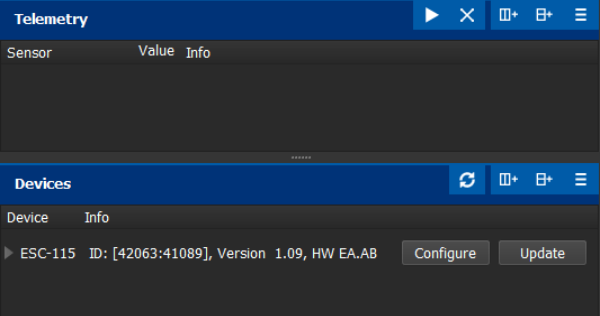
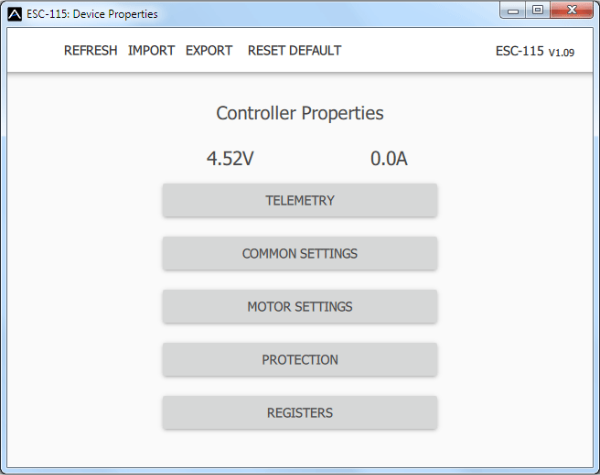
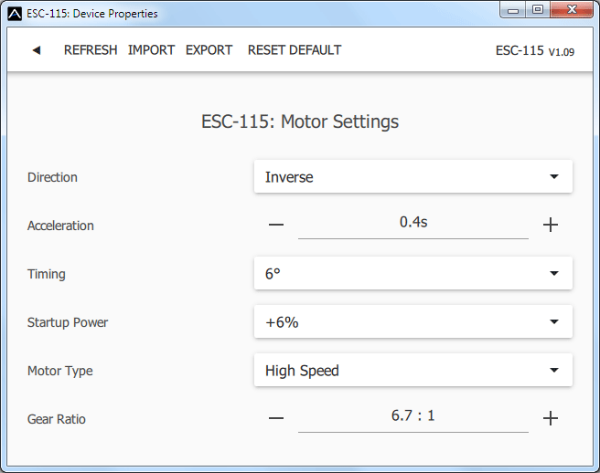
It is possible to use the MAV Manager software (1.4.0 and later) to conveniently configure all controller settings, display real-time telemetry and make a backup of the configuration. The configuration menu contains four buttons in the top toolbar:
- Refresh - forces the configuration to be reloaded from the controller.
- Import - imports the settings from a file. If you have several speed controllers and want identical settings for all of them, simply import the same settings to each controller.
- Export - exports the settings from the controller to a file. You can easily create a backup configuration stored on your PC. After creating a backup, you may easily experiment with the controller settings and later revert back to the original configuration by pressing the „Import“ button and choosing the original exported file.
- Reset default - resets the controller to factory defaults and reloads all the settings.
Connect the controller to a computer using the USB interface. It is automatically detected by the MAV Manager.
The controller properties are available by pressing the „Configure“ button.
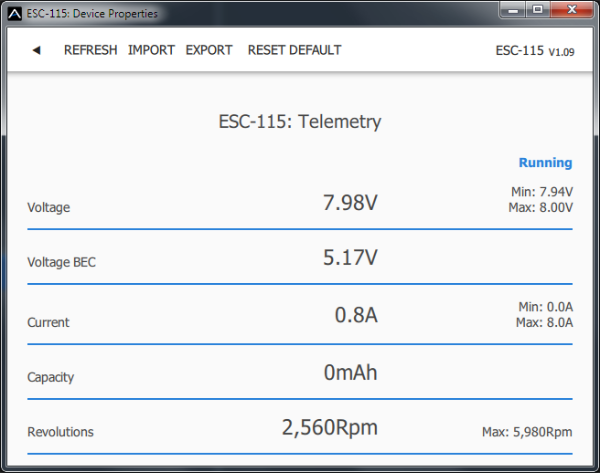
Real-time telemetry with min/max values. MAV Manager is also capable of creating a log file from real-time telemetry data that can be viewed, analyzed, imported and exported.
Motor Settings. Whenever a configuration change is made, the new value is immediately transferred to the controller and stored in memory. No additional confirmation is required. For safety reasons, some parameters are only applied after the motor has stopped.
Appendix
Manufacturer
All KAVAN Smart PRO electronic speed controllers are made in Czechia by MAV Sense s.r.o.
E-mail: info@mavsense.com | Web: www.mavsense.com
Safety precautions
- Operate the KAVAN Smart PRO controller always in a dry environment and within the device limits stated in this guide. Never expose the device to excessive heat or cold outside the working area.
- Provide sufficient airflow to prevent controller overheating.
- Never exceed the maximum allowed operating voltage of the controller/motor.
- Do not increase the cable length between the controller and the motor. If you need to extend the wires between the controller and the battery to more than 30 cm (in total), solder multiple high-capacity Low-ESR capacitors (220–470 µF) in parallel to the power wires as close to the controller as possible. For each centimetre beyond the specified cable length, add a capacitance of 1 µF for every Ampere of current passing through. For example, if you exceed the limit by 10 cm with a current of 100 A, solder a 1000 µF capacitor pack.
- Always use high-quality connectors in good condition. Replace them if any visible sign of wearing appears.
- Always remove the propeller before making any changes in the drive setup.
- Never disconnect the ESC from the battery while the motor is spinning.
- Do not remove the cover and heat sink from the device, and do not try to implement any changes or modifications. This can lead to total destruction and to the denial of any warranty claims.
- Always check the polarity of the connection. Never inverse the polarity – this could lead to total destruction.
Warranty and post-warranty service
All KAVAN Smart PRO ESCs are covered by a 2-year warranty covering all manufacturing defects and faults. When making a claim within the warranty period, please always present a copy of the proof of purchase with the product and provide the service personnel with as detailed and complete information as possible about the defect found, your usage and other information that will facilitate the assessment of the claim and speed up its settlement. Please make your claim at the shop where you purchased the product. If this is not possible, you can directly contact KAVAN Europe s.r.o.:
KAVAN Europe s.r.o. | Doubravice 110, 533 53 Pardubice | Czechia | +420 466 260 133 | info@kavanrc.com
Warranty and limitation of liability
As the manufacturer of this product, we have no control over your compliance with these instructions when wiring and installing the ESC into your model. Likewise, we have no control over the way you build, operate and maintain the RC set parts. For this reason, KAVAN must disclaim all liability for any loss, damage or financial cost that is caused by the improper use or operation of products imported by us, or that is in any way connected with such activity.
Except as otherwise provided by law, KAVAN‘s obligation to pay compensation shall (regardless of the legal arguments asserted) be limited to the purchase price for those KAVAN products that were directly involved in the event that caused the damage. This does not apply if the manufacturer has been judicially obliged to make unlimited compensation on the basis of proven wilful or gross negligence. We warrant that our products are in compliance with current legal provisions. The warranty does not cover failures and defects caused by:
- Misuse or improper use.
- Delayed, improper or no maintenance, or maintenance performed by an unauthorised service.
- Incorrect wiring.
- Use of accessories not approved or recommended by KAVAN Europe s.r.o.
- Modifications or repairs not carried out by an authorised KAVAN Europe s.r.o.
- Inadvertent or deliberate damage.
- Normal wear and tear.
- Operation of the equipment outside the operating limits specified in the specification
KAVAN Europe s.r.o. warrants that this product is free from defects in both material and workmanship at the time of sale. KAVAN Europe s.r.o. also reserves the right to change or modify this warranty without notice. The equipment is subject to continuous improvement and refinement - the manufacturer reserves the right to change the design without notice.
This warranty certificate entitles you to a free warranty repair of the product supplied by KAVAN Europe s.r.o. within a period of 24 months. The warranty does not cover natural wear and tear due to normal use, as this is a product for modelling use, where the individual parts operate under much higher loads than normal toys are subjected to.
The warranty also does not cover any part of the equipment that has been improperly installed, roughly or improperly handled, or damaged in an accident, or any part of the equipment that has been repaired or altered by an unauthorised person (this includes the application of any waterproof sprays/coatings by the user). Like other fine electronics products, do not expose this equipment to high temperatures, low temperatures, moisture, dusty environments, violent mechanical shocks and impacts. Do not leave it in direct sunlight for extended periods of time.
Please claim warranty repairs from the shop where you purchased the product.
Recycling (European Union)
Electrical equipment bearing the crossed-out bin symbol must not be disposed of in normal household waste. Instead, it must be taken to a specialised collection and recycling facility. In EU (European Union) countries, electrical equipment must not be disposed of in normal household waste (WEEE - Waste of Electrical and Electronic Equipment, Directive 2012/19/EU). You can take unwanted equipment to your nearest collection or recycling centre. The equipment will then be disposed of or recycled safely, free of charge. By handing in your unwanted equipment, you can make an important contribution to protecting the environment.
EU Declaration of Conformity
KAVAN Europe s.r.o. hereby declares that the KAVAN Smart PRO-line brushless electronic speed controllers are in compliance with the essential requirements as laid down in the EU directive(s) concerning electromagnetic compatibility. The full text of the EU Declaration of Conformity is available at the following website: EU Declaration of Conformity.