KAVAN Programming Card PRO/Plus - Instruction manual
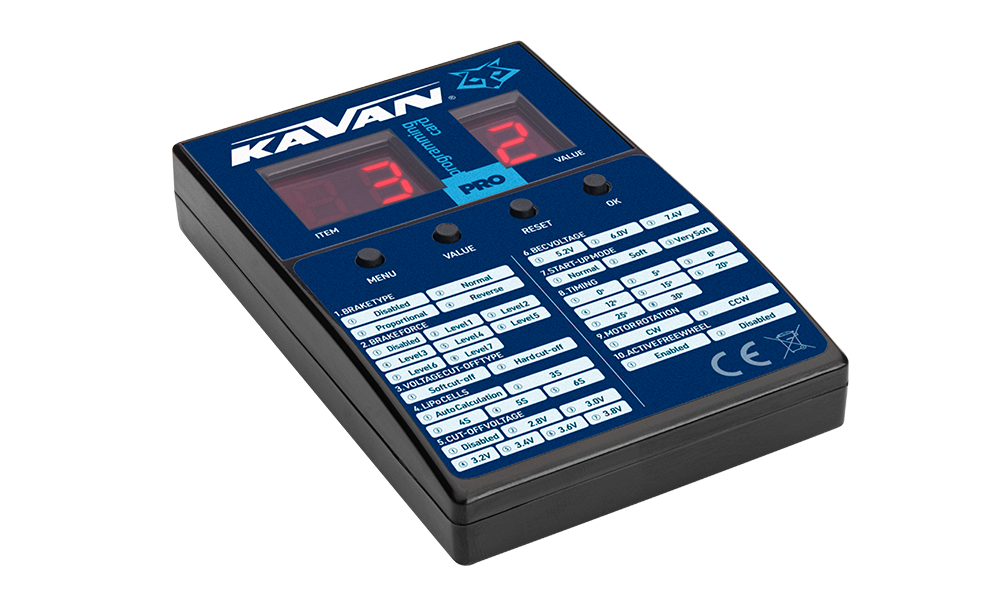
KAVAN PRO/Plus Programming card
Introduction
KAVAN PRO/Plus Programming card is easy to use and convenient to carry. All of the programmable functions are listed on the programming card.
Specification
| Parameter | Value |
|---|---|
| Input voltage | 4.8–8.4 V DC |
| Dimensions | 88×58×14 mm |
| Weight | 40 g |
Recommended power supply: ESC BEC/SBEC, a receiver battery with 4–5 NiCd/NiMH cells, or a 2S LiPo/Li-ion/LiFe battery
Description
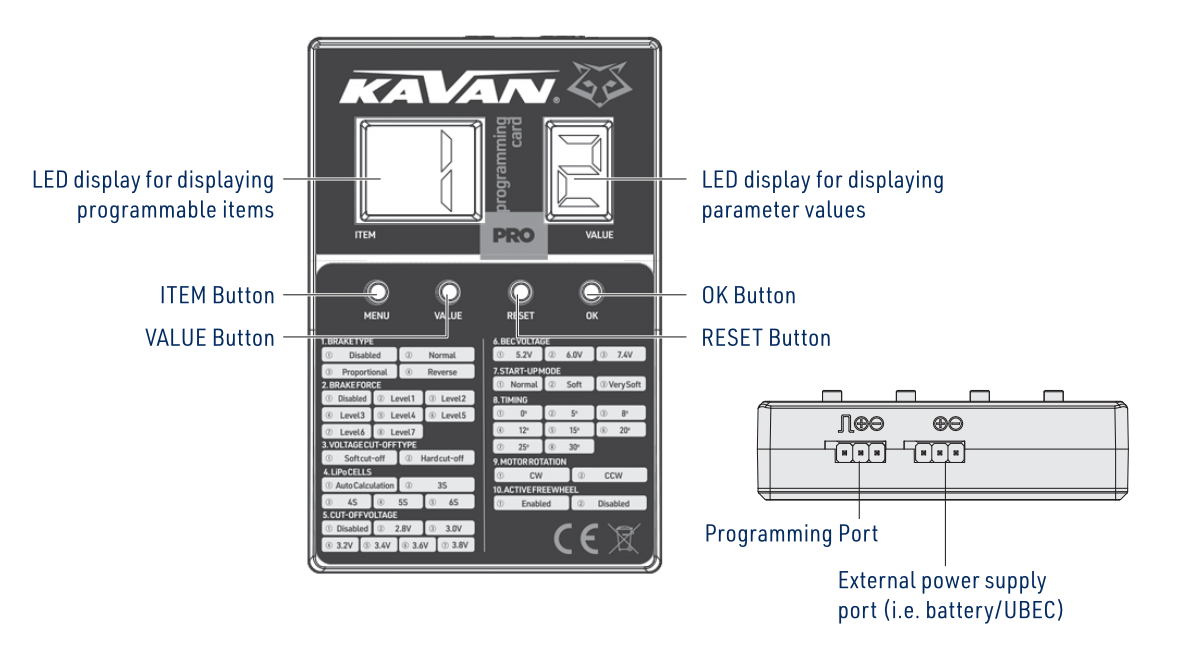
See the controls and ports in (Fig. 1).
Main section
Connecting the programming card to your ESC
The battery must be disconnected from your ESC before connecting it to this programming card. Otherwise, your ESC cannot be connected to the program box.
For the KAVAN PRO ESC (with the programming cable, which has an output voltage of 5.2–7.4 V): plug the programming cable in the port marked with „(−)(+)(⎍)“ on your LED programming card.
The programming cable is the shorter cable with a JR connector on your KAVAN PRO ESC.
For KAVAN PRO R-20SB/R-30SB and KAVAN Plus ESCs, connect the throttle signal cable to the card’s power port and the separate programming cable (yellow wire) to its programming port.
Making the programming card work
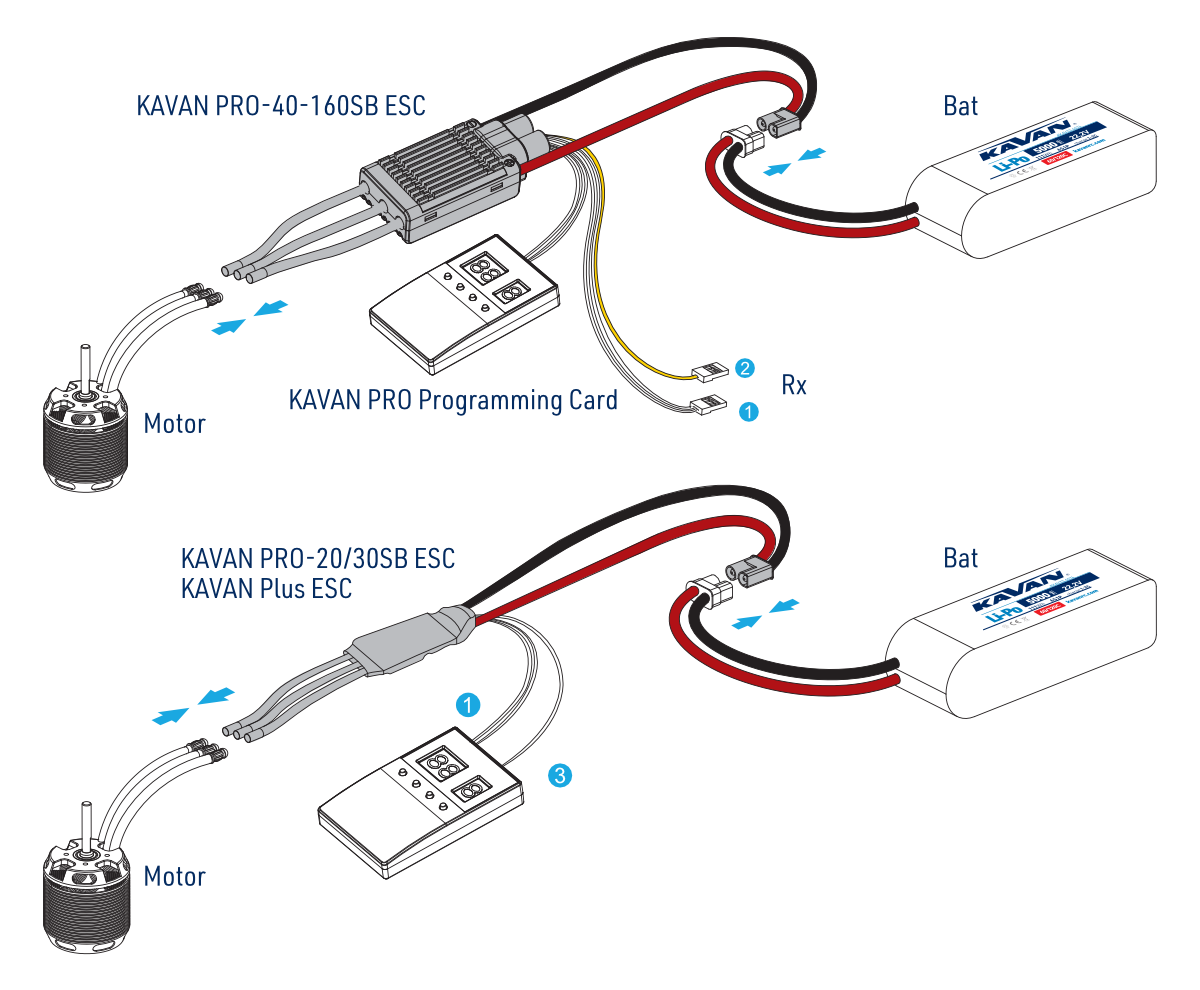
See the connection diagrams in (Fig. 2).
After connecting everything, please connect a battery to your ESC and turn it on. A few seconds later, the KAVAN PRO Programming Card will display the current settings in your ESC. If the programming card doesn’t display anything, then please check if the programming cable and the wire (on UBEC/the extra battery) for powering the KAVAN PRO Programming Card have been reversely plugged in. After confirming all the connections (are correct), disconnect the battery, and 2 seconds later re-connect it to your ESC to see if any information is displayed on the KAVAN PRO Programming Card.
It often takes a few seconds before the KAVAN PRO Programming Card displays digits or information.
Programming your KAVAN PRO ESC
ITEM Button: pressing the ITEM button selects the programmable item(s) you want to adjust/check; the corresponding (item) number of each item will be displayed on the left LED display.
The item-selection button is labelled MENU on the illustrated card.
VALUE Button: after selecting a programmable item, the corresponding parameter stored in your ESC will be displayed on the right LED display. Pressing the VALUE button adjusts the parameter values.
OK Button: press the OK button after you adjust all the parameters (you want to adjust). A Red „——“ will show up on the right LED display for about 1 or 2 seconds to indicate it’s transferring the new parameter values to your ESC. The red „——“ will disappear when the ESC saves all the parameter values.
RESET Button: pressing the RESET button resets your ESC to the factory settings.
You need to power your ESC off and then on after adjusting the parameters, otherwise the new parameters won’t take effect.
Find the detailed description of all programmable functions in the KAVAN PRO ESC manual or KAVAN Plus ESC manual.
Appendix
Safety precautions
- Do not install the propeller (fixed wing) or drive pinion (helicopter) on the motor when you test the ESC and motor for the first time to verify the correct settings on your radio. Only install your propeller (plane) or pinion (heli) after you have confirmed that the settings on your radio are correct.
- Never use ruptured or punctured battery cells.
- Never short circuit battery or motor terminals.
- Always use proper insulation material for cable insulation.
- Always use reliable, polarised cable connectors.
- Wrong battery polarity will damage the Card and ESC and void the warranty.
- Use only batteries supported by the card and ESC. Do not exceed either device’s specified supply voltage, and ensure the correct polarity before connecting.
- Once the battery is connected, handle the model as if the motor could start at any time. Keep fingers, your face and loose clothing away from the propeller. Keep yourself and bystanders out of the plane of rotation and never stand directly in front of rotating parts.
- Do not immerse the Card under water, do not allow it to get wet while powered up.
Warranty and post-warranty service
All KAVAN ESC accessories are covered by a 2-year warranty covering all manufacturing defects and faults. When making a claim within the warranty period, please always present a copy of the proof of purchase with the product and provide the service personnel with as detailed and complete information as possible about the defect found, your usage and other information that will facilitate the assessment of the claim and speed up its settlement. Please make your claim at the shop where you purchased the product. If this is not possible, you can directly contact KAVAN Europe s.r.o.:
KAVAN Europe s.r.o. | Doubravice 110, 533 53 Pardubice | Czechia | +420 466 260 133 | info@kavanrc.com
Warranty and limitation of liability
As the manufacturer of this product, we have no control over your compliance with these instructions when wiring and installing the ESC into your model. Likewise, we have no control over the way you build, operate and maintain the RC set parts. For this reason, KAVAN must disclaim all liability for any loss, damage or financial cost that is caused by the improper use or operation of products imported by us, or that is in any way connected with such activity.
Except as otherwise provided by law, KAVAN’s obligation to pay compensation shall (regardless of the legal arguments asserted) be limited to the purchase price for those KAVAN products that were directly involved in the event that caused the damage. This does not apply if the manufacturer has been judicially obliged to make unlimited compensation on the basis of proven wilful or gross negligence. We warrant that our products are in compliance with current legal provisions. The warranty does not cover failures and defects caused by:
- Misuse or improper use.
- Delayed, improper or no maintenance, or maintenance performed by an unauthorised service.
- Incorrect wiring.
- Use of accessories not approved or recommended by KAVAN Europe s.r.o.
- Modifications or repairs not carried out by an authorised KAVAN Europe s.r.o.
- Inadvertent or deliberate damage.
- Normal wear and tear.
- Operation of the equipment outside the operating limits specified in the specification.
KAVAN Europe s.r.o. warrants that this product is free from defects in both material and workmanship at the time of sale. KAVAN Europe s.r.o. also reserves the right to change or modify this warranty without notice. The equipment is subject to continuous improvement and refinement – the manufacturer reserves the right to change the design without notice.
This warranty certificate entitles you to a free warranty repair of the product supplied by KAVAN Europe s.r.o. within a period of 24 months. The warranty does not cover natural wear and tear due to normal use, as this is a product for modelling use, where the individual parts operate under much higher loads than normal toys are subjected to.
The warranty also does not cover any part of the equipment that has been improperly installed, roughly or improperly handled, or damaged in an accident, or any part of the equipment that has been repaired or altered by an unauthorised person (this includes the application of any waterproof sprays/coatings by the user). Like other fine electronics products, do not expose this equipment to high temperatures, low temperatures, moisture, dusty environments, violent mechanical shocks and impacts. Do not leave it in direct sunlight for extended periods of time.
Improper installation includes inadequate mounting, mechanical strain on cables and insufficient cooling.
Please claim warranty repairs from the shop where you purchased the product.
If possible, use the original packaging when returning the product for service. Include a dated description of its use and the fault, together with your full address and telephone number.
Recycling (European Union)
Electrical equipment bearing the crossed-out bin symbol must not be disposed of in normal household waste. Instead, it must be taken to a specialised collection and recycling facility. In EU (European Union) countries, electrical equipment must not be disposed of in normal household waste (WEEE – Waste of Electrical and Electronic Equipment, Directive 2012/19/EU). You can take unwanted equipment to your nearest collection or recycling centre. The equipment will then be disposed of or recycled safely, free of charge. By handing in your unwanted equipment, you can make an important contribution to protecting the environment.
EU Declaration of Conformity
KAVAN Europe s.r.o. hereby declares that the KAVAN PRO/Plus Programming card is in compliance with the essential requirements as laid down in the EU directive(s) concerning electro-magnetic compatibility. The full text of the EU Declaration of Conformity is available at www.kavanrc.com/doc.