KAVAN GO Servo USB programmer - Instruction manual
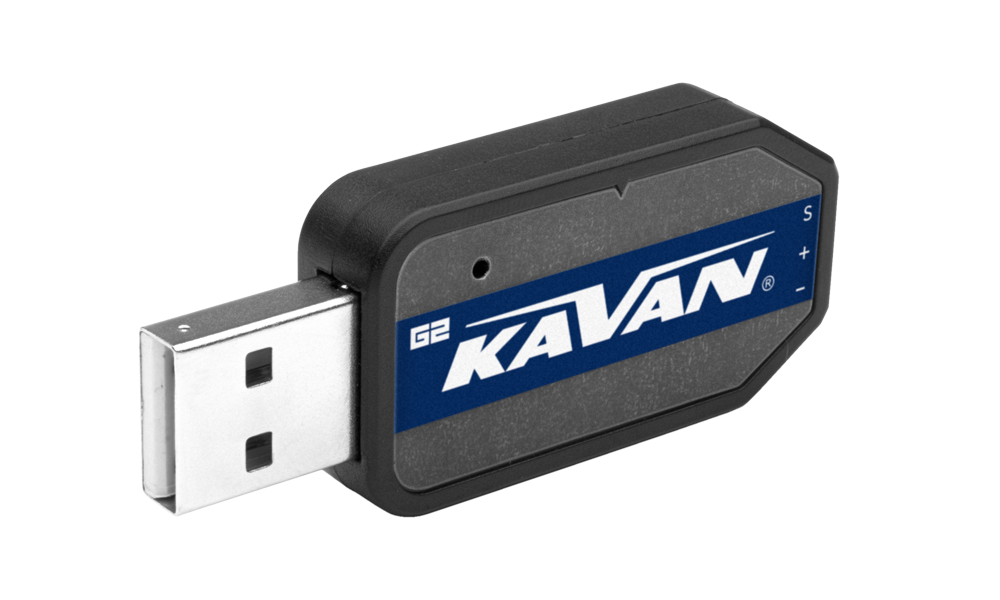
GO Servo USB programmer
Introduction
The KAVAN GO Servo USB programmer lets you configure and test compatible digital servos using a computer. During programming, the servo receives power from the computer's USB port through the programmer. Set the parameters in the software, then write them into the servo.
System requirements
| Power supply | USB (5 V / 500 mA) |
|---|---|
| Operating system | Windows® XP/Vista/7/8/10/11 |
| Connection | USB 2.0 |
| Compatible servos | KAVAN GO-10xx, GO-11xx and GO-12xx series |
Software download
Version 24.05 is only for the newer „G2“ programmer. Check your programmer version before selecting the software.
Main section
Software installation
- Extract the downloaded
.ziparchive on your computer and run the.exefile. - Connect the programmer to a free USB 2.0 port. The computer detects it and installs the driver automatically. Installation may take some time; follow the progress messages and restart the computer if requested.
- Start the programmer software. The information window should display „Adapter plug-in!“. If it does not, disconnect the programmer and reconnect it.
- Connect a compatible GO servo to the programmer. (Fig. 1) The software automatically recognises the servo and reads its data and settings. The information window displays „Servo plug-in!“, and Servo Information shows the servo type, manufacturing date and firmware version. The programmer's green LED flashes.
Wiring diagram
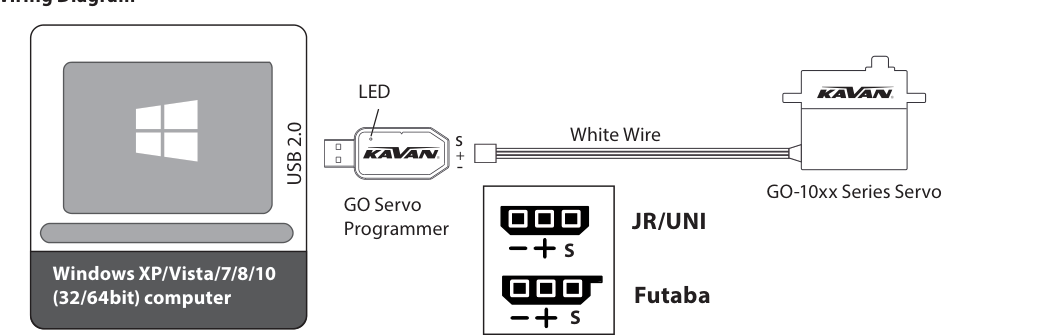
- Computer with a USB 2.0 port.
- GO Servo USB programmer; the green LED indicates servo connection by flashing.
- Compatible GO servo.
- Signal wire marked with a white stripe: connect it to S on the programmer socket. Observe the + and − markings for the power connections.
If the servo is not detected, disconnect both the servo and programmer, then reconnect them correctly. Check that the wire with the white stripe is connected to S.
Programmer software functions
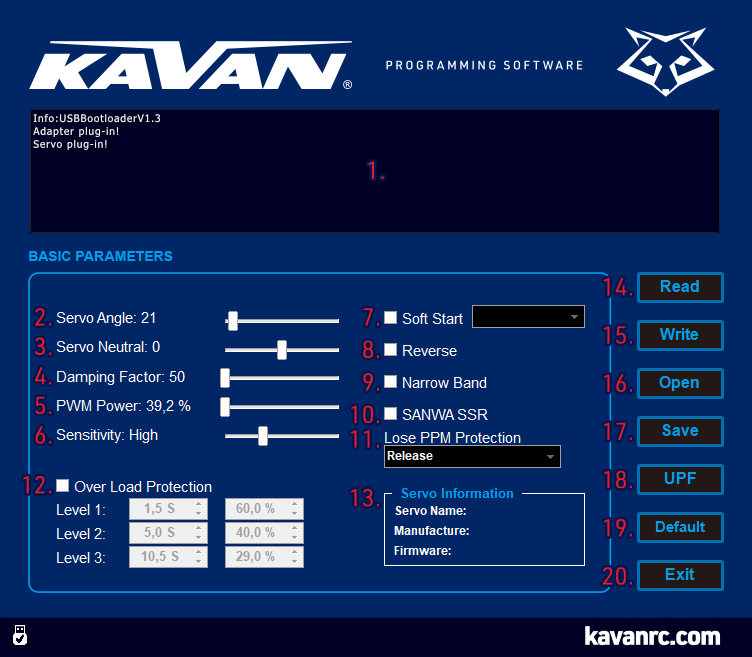
The numbers below match the illustration (Fig. 2). The displayed settings are examples; use the documented default values below for the overload-protection example. English control labels are retained so you can find them in the software.
-
Information window: Displays the connection status of the programmer and servo, and other messages.
-
Servo Angle: Adjusts the maximum servo travel. The default travel is approximately 120° for control pulses of 900–2100 µs, or approximately 180° for the maximum pulse-width range of 500–2500 µs. Adjustment range: 1–255.
-
Servo Neutral: Adjusts the neutral (centre) position. Published adjustment range: 1–255. Check the range displayed by your software.
-
Damping Factor: Adjusts the servo's behaviour when stopping. Adjustment range: 50–600.
-
PWM Power: Adjusts the output power. Increasing it raises servo speed and torque, and also increases current consumption. Adjustment range: 39.2–100 %.
-
Sensitivity: Adjusts the dead band. Higher sensitivity means a narrower dead band; the servo moves only when the change in control pulse width exceeds this width. Excessive sensitivity may cause servo jitter.
- Ultra High: approximately 1 µs.
- High: approximately 2 µs.
- Medium: approximately 3 µs.
- Low: approximately 4 µs.
-
Soft Start: Enables or disables slow movement to the initial position commanded by the control signal after power-up. This reduces abrupt movement and the risk of gear damage.
NoteSet the level to 11 to turn soft start off.
-
Reverse: Reverses the direction of servo movement.
-
Narrow Band: Enables FUTABA SR mode.
AttentionEnable this option only for FUTABA radio channels operating in SR mode. Leave it disabled for other FUTABA settings or any other radio system.
-
SANWA SSR: Enables SANWA SSR mode.
AttentionEnable this option only for SANWA radio channels operating in SSR mode. Leave it disabled for other SANWA settings or any other radio system.
-
Lost PPM Protection (fail-safe): Selects the response when the receiver signal is lost completely or cannot be decoded correctly, for example because of interference.
- Release: Disables fail-safe protection.
- Keep Position: Holds the position commanded by the last valid signal.
- Go Neutral Position: Returns to neutral, corresponding to a pulse width of 1500 µs.
-
Over Load Protection: Enables or disables three stages of overload protection. For each stage (Level 1, Level 2, Level 3), set the time for which the overload must persist and the reduced output power as a percentage of maximum power.
Stage Default activation time Default reduced power Level 1 5.1 s 62.7 % Level 2 8.2 s 50.2 % Level 3 12.2 s 25.1 % With these defaults, a continuously overloaded or stalled servo reduces its output to 62.7 % after 5.1 s, 50.2 % after 8.2 s and finally 25.1 % after 12.2 s.
-
Servo Information: Displays the servo type, manufacturing date and firmware version.
-
Read: Reads the current settings from the servo through the USB programmer.
-
Write: Writes the settings displayed on the screen into the servo.
AttentionA parameter change takes effect only after it has been written into the servo. Successful writing is confirmed by „Success write parameter!“ in the information window.
-
Open: Opens a servo parameter file previously saved on the computer.
-
Save: Saves the settings displayed on the screen to a file on the computer.
NoteSave stores settings on the computer. Use Write to store them in the servo.
-
UPF: Updates the servo firmware.
-
Default: Restores the connected servo's factory settings.
AttentionYour previous changes will be lost. Back up the servo parameters with Save first.
-
Exit: Closes the programmer software.
Programming your servos
- Connect the programmer to a free USB 2.0 port on the computer.
- Start the software and check for „Adapter plug-in!“ in the information window.
- Connect a compatible GO servo with the correct polarity. The software reads its settings automatically and displays „Servo plug-in!“. Check the type, manufacturing date and firmware version in Servo Information; the green LED flashes.
- Adjust the parameters, then click Write to store them in the servo. You can save a copy on the computer with Save, or load a previously saved file with Open and transfer it to a servo with Write.
- Disconnect the servo. Before use, reconnect it and read the parameters again to verify that the required settings were stored correctly.
Appendix
Care and service
Protect the programmer from high temperatures, moisture and dust. Do not leave it in direct sunlight for extended periods.
For service, use the original packaging where possible. Enclose a dated description of how the product was used and the fault encountered, together with your full address and telephone number. Request warranty service from the retailer where you purchased the product.
Warranty
KAVAN Europe s.r.o. products are covered by the warranty provisions applicable in the country of purchase. The supplied Czech and German warranty terms specify a period of 24 months for free warranty repairs.
The warranty excludes faults caused by crashes, natural disasters or force majeure; incorrect installation or connection; reversed polarity or excessive supply voltage; rough handling, misuse or operation outside the specifications; late, incorrect or omitted maintenance; unauthorised servicing, repairs or modifications; non-genuine accessories or operation with equipment from other manufacturers; accidental or deliberate damage; and normal wear and tear. Incorrect installation includes inadequate mounting, mechanical strain on cables, insufficient cooling and connectors that permit reversed polarity. Read the accompanying product documentation and submit warranty claims to the original retailer.
Recycling (European Union)
Electrical equipment bearing the crossed-out bin symbol must not be disposed of with household waste. Under the WEEE Directive 2012/19/EU, take unwanted equipment to a specialised collection point or recycling centre, where it can be handled safely and free of charge. Correct disposal helps protect the environment.
EU Declaration of Conformity
KAVAN Europe s.r.o. declares that the KAVAN GO Servo USB programmer complies with the applicable European directives and harmonised standards, including electromagnetic compatibility requirements. The full declaration is available at www.kavanrc.com/doc.