KAVAN R6L / Stabi - Instruction manual
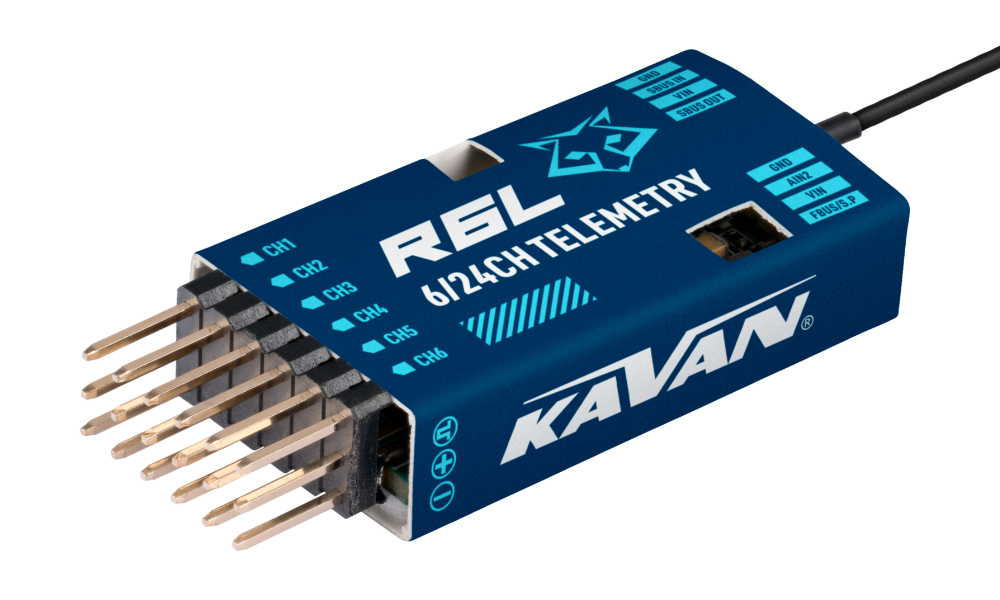
KAVAN R6L
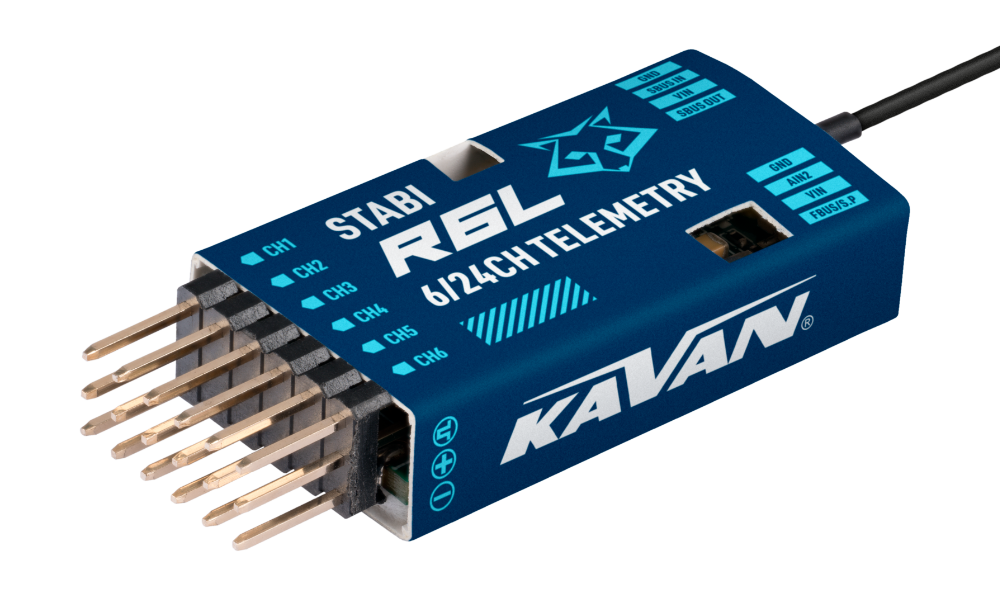
KAVAN R6L Stabi
Introduction
Congratulations on your purchase of the KAVAN R6L, a 6-channel telemetry receiver. It operates on ACCESS transmission system and has 6 high-precision PWM channels and 16 or 24-channel modes using S.BUS. Thanks to its compact size and light weight, it is especially suitable for small models and low-profile compartments, but you can use it for a variety of other models as well. With redundancy support, it can be connected as a primary receiver via S.BUS. Thanks to the F.BUS connection option, you can also connect it to compatible telemetry devices.
It features advanced interference suppression for reliable stable signal transmission across the entire range. Smart Match system speeds up pairing. The black box function stores essential flight data. Receiver operating status is indicated by an LED indicator. Smart pairing allows firmware updates wirelessly.
The R6L Stabi version adds stabilisation with a 3-axis gyroscope and a 3-axis accelerometer. It also provides more accurate and faster measurement and transmission of altitude and vertical speed data. It also allows instant audio feedback from the variometer to the ACCESS transmitters.
Firmware
Download the latest firmware '''Archer Plus R6L / SR6L''' in the ETHOS Suite or directly:
Overview
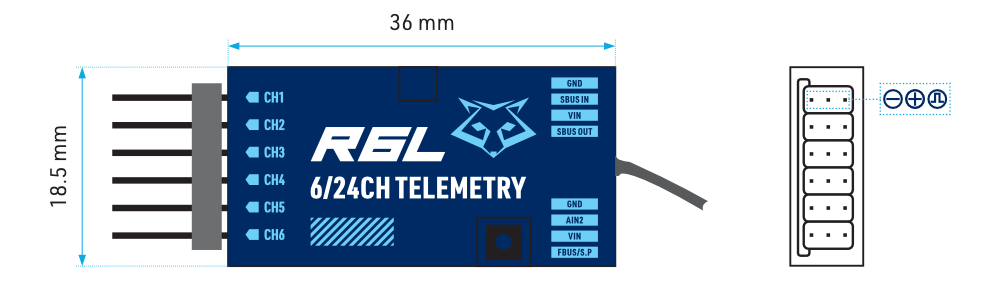
Technical specifications
| Dimensions | 45×18.5×9.7 mm (L×W×H) |
|---|---|
| Weight | 5.6 g |
| Number of channels | 6 PWM channels + 16/24 channel mode via S.BUS |
| Operating voltage range | 3.5–10 V |
| Operating current | <65 mA at 5 V |
| Operating frequency | 2.400–2.4835 GHz |
| Operating range | < 2 km; actual range depends on local conditions |
| Max. radiated power | < 20 dBm (EIRP) |
| Vario - vertical speed measurement range | ±10 m/s (R6L Stabi) |
| Vario - altimeter range and resolution | −700 m to 10 000 m, 0.1 m (R6L Stabi) |
| External voltage measurement range via AIN2 | 0–35 V (battery voltage divider ratio: 1:10) |
| Antenna connector | IPEX1 |
| Compatibility | 2.4GHz ACCESS transmitters |
Features
- Enhanced anti-RF-interference capability with more solid RF performance
- Smart pairing in the ACCESS mode
- Built-in stabilisation functions (R6L Stabi)
- Built-in high-precision telemetry sensor (R6L Stabi)
- 6 High-precision PWM Channel Ports
- SBUS Out Port (supports 16/24CH mode)
- SBUS In Port (supports signal redundancy)
- Full control range with telemetry (FBUS/F.Port/S.Port)
- Over-The-Air (OTA) firmware updates
- External battery/device voltage detection
LED indicator
| Green | Red | Status |
|---|---|---|
| On | On | Registration |
| Flashing | Flashing | Registration complete |
| On | On | Pairing |
| On | Off | Pairing complete |
| On | Off | Working properly |
| Off | On | Fail-safe mode |
| Blue | Status (calibration) |
|---|---|
| On | Limits exceeded (0.9–1.1 g) |
| Off | Normal operation |
| Blinking | Calibration complete |
Main section
Disconnect the electric motor and stop any internal combustion engine before binding, stabiliser setup or calibration. Keep the propulsion system safe during all ground checks.
Registration and pairing
Before you can start using your receiver, you must first register it:
- Turn on the internal module of your transmitter.
- Power on the receiver while holding the pairing button pressed. The red and green LED indicators are on, indicating the [Reg] status.
- Once RID, RX name and UID are shown, select [Register]. The red and green LED indicators are blinking.
- Power off the receiver.
After registration, commence the pairing:
- Select an empty receiver slot in the transmitter’s model settings and choose [Bind].
- Power on the receiver.
- Once the receiver is shown on the display, select it. The green LED indicator is on.
- The pairing process is confirmed by a [Bind successful] message in the transmitter.
Once the receiver is registered, repeating the registration is not necessary for pairing.
Stabilisation functions (R6L Stabi)
Configuration
ETHOS V1.6.1 (or later version) is required.
Stabilizer Config V3.0.10 (or later version) is required.
- Ensure stabilisation is enabled & Complete the 6-axis calibration for the gyroscope
- Servo connection & Build the stabilisation device for the model
- Set up the mixer channels and input controls
- Determine the [Wing Type] & [Mounting Type]
- Gain and Offset settings for stabilised flight modes
- Stabilised channel output checks in Auto-Level mode
- Radio stick control checks in Manual mode
- Calibration (Level, Stick Center & Range) for Stab Group 1 & 2
- Angle Mode – Roll/Pitch Degree Configuration (Optional)
Navigate to [ETHOS Suite] → [Lua library] → [StabilizerConfig] section to download the latest functional Lua scripts. Place the extracted folder with the Lua script in the root directory of the [Scripts] folder on the memory card to use.
Gyroscope calibration
[Device Config] → [Receivers] → [Stabilizer Config] → [Stabilizer Group / Configuration] → [Stabilizer / On]
Step 1
Ensure the Stabiliser is turned ON for both Stabilizer Groups 1 and 2.
[Device Config] → [Receivers] → [Stabilizer Config] → [6-axis calibration / Open]
Step 2
Complete the 6-axis calibration for the gyroscope.
The gyroscope of the device (6 surfaces) must be calibrated before mounting it into the model. Place the device on a flat surface and follow the steps to finish the calibration.
For each of the 6 orientations, follow the tool’s prompts. The corresponding accelerometer reading (AccX, AccY or AccZ) is approximately 1.000 g, with a tolerance of ±0.1 g. Check the axis in the requested orientation; do not try to make all axes read 1.000 g simultaneously.
Servo connection
The table lists logical stabiliser functions. The R6L has only 6 physical PWM outputs; connect servos only to those outputs according to their confirmed channel mapping. Higher channel numbers in the table do not indicate additional physical sockets.
For the illustrated horizontal mounting, place the receiver centrally in the fuselage with its label upwards and antenna connector towards the nose. The selected [Mounting Type] must match the actual installation. Verify compensation on every axis before flight.
| Channel | Control | Function |
|---|---|---|
| CH1 | AIL 1 | Aileron |
| CH2 | ELE 1 | Elevator |
| CH3 | THR | Throttle |
| CH4 | RUD | Rudder |
| CH5 | AIL 2 | Aileron |
| CH6 | ELE 2 | Elevator |
| CH7 | AIL 3 | Aileron |
| CH8 | ELE 3 | Elevator |
| CH9 | RUD 2 | Rudder |
| CH10 | AIL 4 | Aileron |
| CH11 | ELE 4 | Elevator |
| CH12 | User-defined | — |
| CH13 | User-defined | Gyro gain |
| CH14+CH15 | User-defined | Flight modes |
CH13 Gyro gain
When the CH13 value is in the centre, the gain is zero. The gain increases with the value, reaching the maximum when the value is ±100%.
Mixer settings
In the Mixer setting of your radio, map the correct control functions to each channel. Channels 13–15 are to be bound with the switches of your choice.
Wing types
Choose the corresponding wing configuration of your model. Select the mounting type according to the actual placement of your receiver in the fuselage.
Wing Type → [Normal / Delta / VTail]
Mounting Type → [Horizontal / Horizontal reverse / Vertical / Vertical reverse]
Gain and Offset
Set the stabiliser gain and offset for each flight mode.
Gain
Determines how aggressively the gyroscope reacts to the external forces to keep the aircraft stable.
- Stab – Fully stabilised mode
- Auto – Auto-Level mode
- Hover – Hovering Mode
- Knife – Knife's edge Mode
Angle offset
Acts as a gyro trim and is used to compensate for the level-flight angle according to the fuselage or wings' incidence.
- Auto – Auto-Level Mode
- Hover – Hover Mode
- Knife – Knife Mode
Output checks
To ensure flight safety, it is strongly recommended to check the movement directions of all stabilised channel outputs. Activating Auto-Level mode will cause significant deflection on the stabilised AIL and ELE channels, allowing you to verify the responses of the aileron and elevator. Similarly, activating Knife-Edge and Hover modes will result in the same response on the rudder.
Perform Roll Control Operations

When the model is rolled left or right, the ailerons must act to oppose the roll.
Perform Yaw Control Operations

When the nose is turned left or right, the rudder must act to oppose the yaw change.
Perform Pitch Control Operations

When the nose is raised or lowered, the elevator must act to oppose the pitch change.
Check that the stabiliser’s correction opposes the model’s movement in [Auto-Level] mode. If it acts the wrong way, reverse the corresponding stabiliser output in [Stabilizer Config] and repeat the check. Do not fly until the compensation directions are correct.
Stick control
[ETHOS] → [Model] → [Outputs] Check whether the servo movement corresponds to the stick movements in the [Manual] mode. If not, try inverting the corresponding channel output by pressing the channel bar in the [Output] tool.
Calibration
Complete the following calibration for each stabiliser group in use. Keep the motor disconnected throughout. [ETHOS] → [System] → [Device Config] → [Receivers] → [Stabilizer Config] → [Stabilizer group 1/2] → [Calibration]
Level calibration
Place the model in a level position and select [OK] to continue.
Stick centre calibration
Set both sticks to the neutral (centre) position and select [OK] to continue.
Stick range calibration
Move the sticks to their limits on each axis to calibrate.
Angle mode
Optional roll/pitch angle limits are configured in [Stabilizer Config]. Follow the instructions for the installed receiver firmware and configuration tool.
Quick mode (R6L Stabi)
[ETHOS] → [System] → [Device Config] → [Receivers] → [Stabilizer Config] → [Stabilizer group 1/2] → [Configuration] → [Quick Mode]
The stabilisation quick mode is enabled by default, and allows control of the stabilisation modes using the CH14 (a single 3-position switch). CH15 is disabled in quick mode, so the Knife's edge and Hover modes aren't included.
| Channel | Position | Flight mode |
|---|---|---|
| CH14 | Switch UP | Manual (stabilisation off) |
| Switch MIDDLE | Fully stabilised mode | |
| Switch DOWN | Auto-level mode |
Before flight, verify on the ground that every switch position selects the intended mode.
Reduced telemetry power mode
[ETHOS] → [Model] → [Internal/External Module] → [Receiver (Model)]
Reduced telemetry power mode decreases the power of telemetry transmission from 100 mW to 25 mW. Enable this mode in case your control functions are subjected to the RF interference.
Navigate to the receiver [Options] and switch ON the Reduced telemetry power (25 mW) to activate.
High PWM Speed
[ETHOS] → [Model] → [Internal/External Module] → [Receiver (Model)]
The High PWM speed mode is OFF by default. Navigate to the receiver [Options] and switch ON the High PWM speed mode to activate.
High PWM speed mode is only applied for digital servos. Turn OFF the High PWM Speed when using analogue servos; otherwise, the servos will overheat and may get permanently damaged.
Altitude / VSpeed (Vertical Speed) (R6L Stabi)
- Pair a receiver with the built-in variometer sensor with the transmitter.
- Enter [Model] menu and open the [Telemetry] menu.
- Discover new sensors, and the item [Altitude] should be flashing in the menu.
- Hold the [Altitude] item to expand the [Edit] menu.
- The telemetry data of the variometer, such as [Range] and [Unit], can be set now.
Switching the S.Port / F.Port / FBUS
Navigate to the Receiver settings. Expand the Telemetry port options and select the S.Port/F.Port/FBUS.
Switching the 16 / 24 SBUS mode
Navigate to the Receiver settings. Expand the SBUS options and select the SBUS-16 or SBUS-24 mode.
OTA firmware update
- Open [File Manager], select the receiver firmware file and press ENTER.
- Select [Flash RX by int.OTA] and switch on the receiver.
- Select the receiver and confirm with ENTER. Wait until the transmitter displays [Success].
- Wait 3 seconds, then verify normal receiver operation.
Do not start pairing or registration nearby during the update. Register the receiver before updating its firmware by OTA.
Range check
Perform a range check before every flight. Reflections from metal or concrete structures, or obstruction by buildings or trees, can cause signal loss.
- Place the model at least 60 cm above the ground on a non-metallic support such as a wooden bench. Keep the receiver antenna vertical.
- In ETHOS, open [RF system], select [RANGE] and press ENTER. In this mode, effective range is reduced to 1/30 of normal range.
Perform the test on the ground with the propulsion system made safe. Follow the transmitter manual for the required distance and pass criteria, and investigate unexpected loss of control before flying.
Fail-safe channel positions
When Fail-safe is turned on, 3 modes are available: No signal, Hold, Custom.
No signal
When the signal is lost, the receiver does not send control pulses on the channels. To use this mode, select it from the menu and wait 9 seconds for the Fail-safe setting change to take effect.
Hold
The receiver keeps the channel positions as they were before the signal was lost. To use this type, select it from the menu and wait 9 seconds for the Fail-safe setting change to take effect.
Custom
The receiver keeps the positions on all channels as you preselect them. Select the Fail-safe setting menu. Switch from Disconnect/Hold/Not Set to [Custom]. Select the channel for which you want to set fail-safe positions and confirm the selection. Then set the position on each desired channel and confirm the selection. Wait 9 seconds for the Fail-safe setting change to take effect.
If the fail-safe is not set, the model will always operate with the last functional state of the channels before the signal loss. This could potentially cause damage. If the fail-safe is disabled on the RF module side, the receiver will go to the default Hold mode. Do not set the Fail-safe mode for the S.BUS port to No Signal mode, as the signal would be continuously transmitted. Set the S.BUS port to Hold or Custom mode instead.
Before use, test the complete model’s fail-safe response on the ground with the propulsion system made safe. Verify that the connected S.BUS device and ESC actually stop the motor when the radio signal is lost.
Appendix
Warranty and post-warranty service
All KAVAN® receivers are covered by an extended 3-year warranty covering all manufacturing defects and faults. When claiming within the warranty period, please always present a copy of the proof of purchase with the product and provide the service personnel with as detailed and complete information as possible about the defect found, your usage and other information that will facilitate the assessment of the claim and speed up its settlement. Please make your claim at the shop where you purchased the product. If this is not possible, you can contact KAVAN Europe s.r.o. directly:
KAVAN Europe s.r.o. | Doubravice 110, 533 53 Pardubice | Czechia | +420 466 260 133 | info@kavanrc.com
Warranty and limitation of liability
As the manufacturer of this product, we have no control over your compliance with these instructions when wiring and installing the receiver into your model. Likewise, we have no control over how you build, operate and maintain the parts of the receiver. For this reason, KAVAN must disclaim all liability for any loss, damage or financial cost that is caused by the improper use or operation of products imported by us, or that is in any way connected with such activity.
Except as otherwise provided by law, KAVAN's obligation to pay compensation shall (regardless of the legal arguments asserted) be limited to the purchase price for those KAVAN products that were directly involved in the event that caused the damage. This does not apply if the manufacturer has been judicially obliged to make unlimited compensation on the basis of proven wilful or reckless negligence. We warrant that our products are in compliance with current legal provisions. The warranty does not cover failures and defects caused by:
- Misuse or improper use.
- Delayed, improper or no maintenance, or maintenance performed by unauthorised service.
- Incorrect wiring.
- Use of accessories not approved or recommended by KAVAN Europe s.r.o.
- Modifications or repairs not carried out by an authorised KAVAN Europe s.r.o.
- Inadvertent or deliberate damage.
- Normal wear and tear.
- Operation of the equipment outside the operating limits specified in the specification
KAVAN Europe s.r.o. warrants that this product is free from defects in both material and workmanship at the time of sale. KAVAN Europe s.r.o. also reserves the right to change or modify this warranty without notice. The equipment is subject to continuous improvement and refinement – the manufacturer reserves the right to change the design without notice.
This warranty certificate entitles you to a free warranty repair of the product supplied by KAVAN Europe s.r.o. within a period of 36 months. The warranty does not cover natural wear and tear due to normal use, as this is a product for modelling use, where the individual parts operate under much higher loads than normal toys are subjected to.
The warranty also does not cover any part of the equipment that has been improperly installed, roughly or improperly handled, or damaged in an accident, or any part of the equipment that has been repaired or altered by an unauthorised person (this includes the application of any waterproof sprays/coatings by the user). Like other fine electronics products, do not expose this equipment to high temperatures, low temperatures, moisture, dusty environments, violent mechanical shocks and impacts. Do not leave it in direct sunlight for extended periods of time.
Recycling (European Union)
Electrical equipment bearing the crossed-out bin symbol must not be disposed of in normal household waste but must instead be taken to a specialised collection and recycling facility. In EU (European Union) countries, electrical equipment must not be disposed of in normal household waste (WEEE - Waste of Electrical and Electronic Equipment, Directive 2012/19/EU). You can take unwanted equipment to your nearest collection or recycling centre. The equipment will then be disposed of or recycled safely, free of charge. By handing in your unwanted equipment, you can make an important contribution to protecting the environment.
EU declaration of conformity
KAVAN Europe s.r.o. hereby declares that the radio equipment type R6L and other equipment supplied with it comply with Directive 2014/53/EU. The full form of the EU Declaration of Conformity is available at the following website: https://kavanrc.com/doc. This 2.4 GHz radio equipment can be used without prior registration or individual approval in all countries of the European Union.