KAVAN V20 Pro - Quickstart guide
Introduction
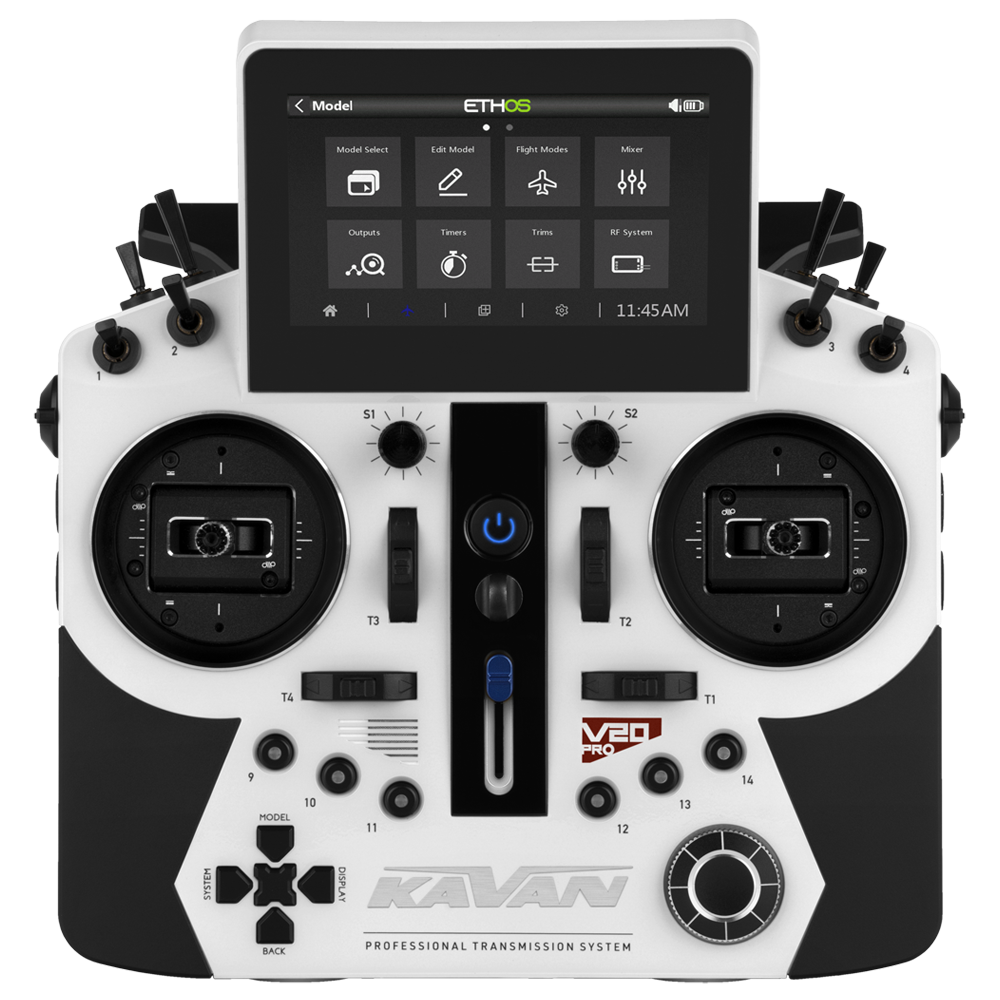
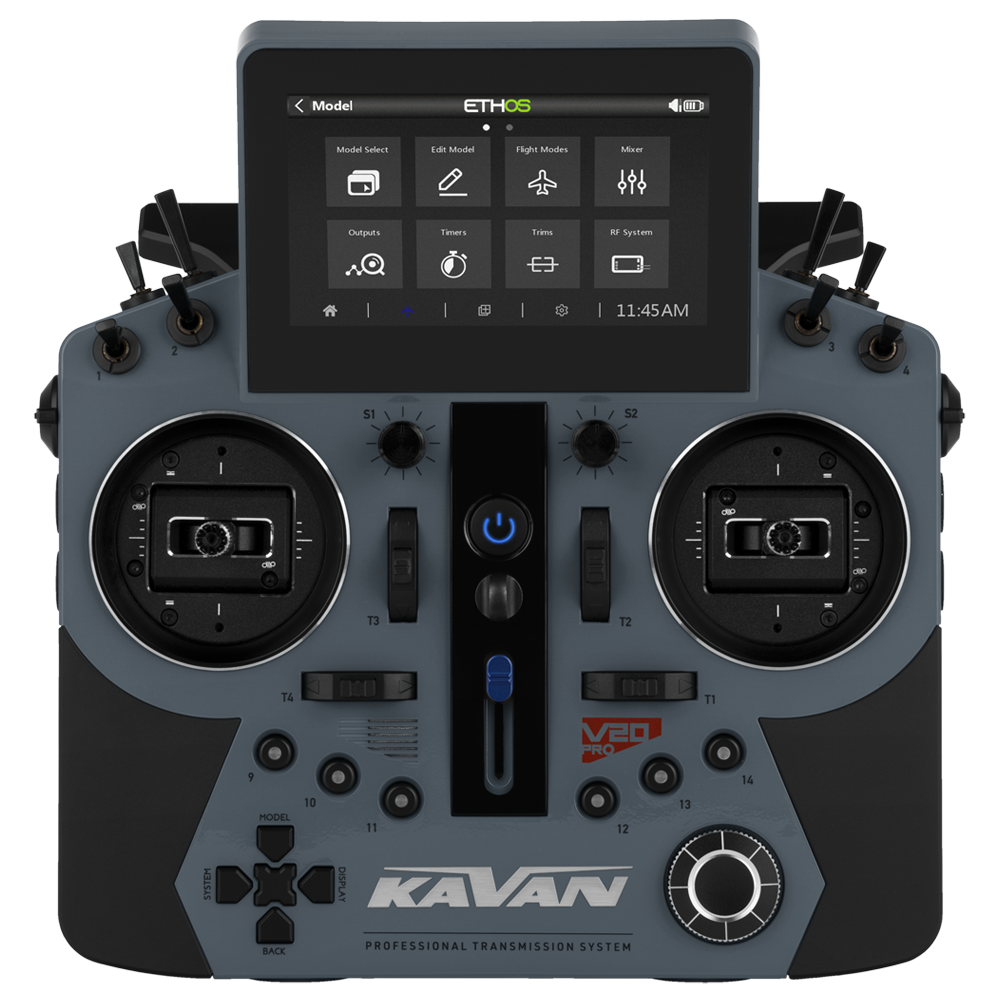
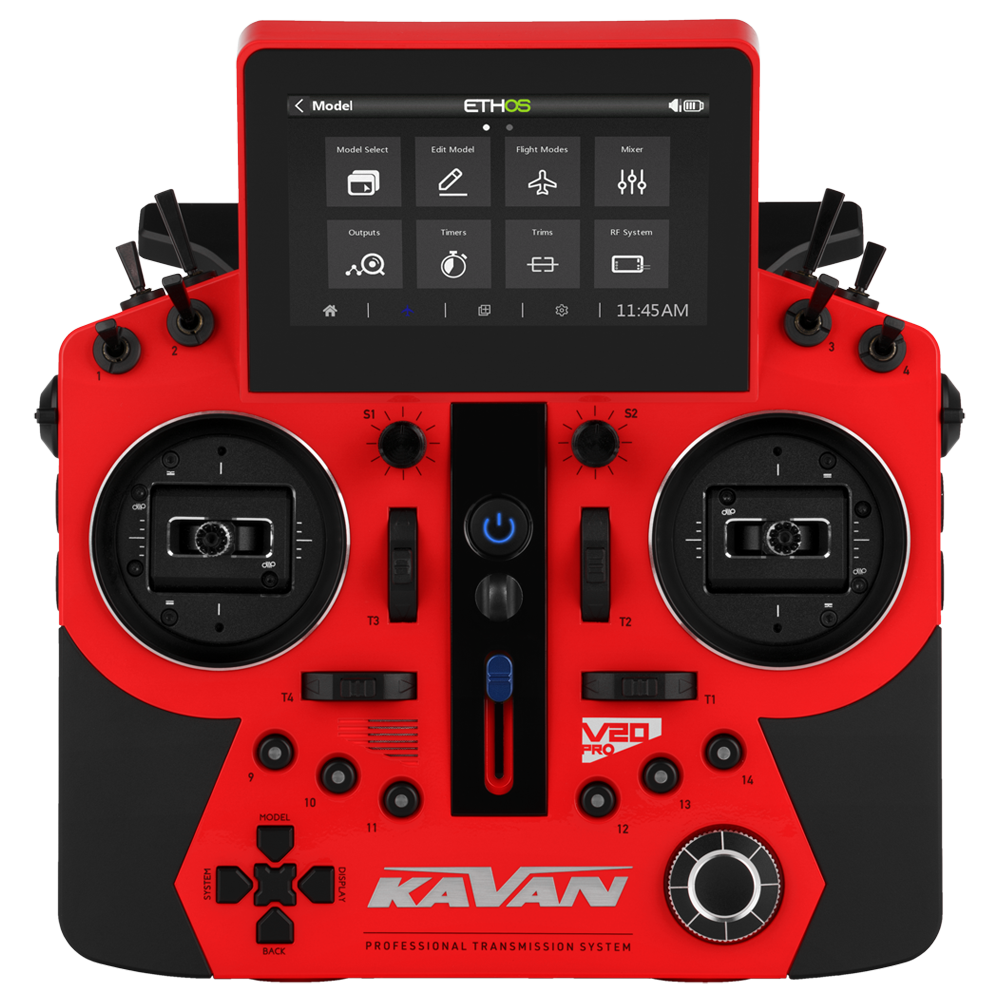
The KAVAN V20 Pro is a professional 24-channel RC set for the most demanding modellers with a TD Pro transmission system with three simultaneous radio links: 2.4 GHz FSK, 2.4 GHz LoRa and a backup 868 MHz link with full telemetry support. It boasts a peak response time of up to 4 ms, with a range of up to tens of kilometres. You can choose TW/TD/ACCESS/ACCESS R9/ACCST D16 protocols, also with telemetry. The V20 Pro can therefore be paired with a wide range of KAVAN or FrSky receivers, telemetry or not, with classic PWM and S.BUS outputs.
V20 Pro is suitable for both advanced and sport pilots. Excellent for controlling various aircraft models or heli/multicopters. You can also easily set it up for boats or land models, for example. To do this, use the wide range of functions and mixes available in the ETHOS™ operating system. You can conveniently adjust these to your preferences on the large, high-brightness touchscreen.
Technical specifications
| Transmission systems | TD Pro / TW / TD / ACCESS / ACCESS R9 / ACCST D16 |
|---|---|
| Antenna | Two 2.4 GHz and two 868 MHz built-in antennas |
| Dimensions | 221.5×214.5×94 mm (W×H×D) |
| Weight | 1075 g (including battery) |
| Operating system | ETHOS™ |
| Internal RF module | TD-ISRM Pro |
| Channels | Up to 24 |
| Operating voltage | 6.5–8.4 V (2S LiPo battery) |
| Operating temperature | −10–60 °C |
| Operating current | 240 mA at 7.4 V |
| Operating frequency | 2.400–2.4835 GHz; 868 MHz band (EU) |
| Max. radiated power | <100 mW EIRP |
| Charging current | ≤ 1 A ± 200 mA |
| USB adapter voltage | 5 ± 0.2 V |
| USB adapter current | > 2.0 A |
| Display | 4.3" 800×480 px high-brightness colour touch outdoor LCD |
Features
- 4.3" high-brightness colour backlit LCD touch screen with 800×480 px resolution
- Up to 20 flight modes for perfect control of your model in all conditions
- Full telemetry with data from a wide range of sensors and logging to a microSD card
- Memory for 64 models, expandable via microSD card
- Wireless telemetry with voice output
- Updateable software
- 6 three-position switches, 2 two-position (1 momentary) switches
- 2 rotary side dials, 2 momentary buttons on the rear
- 6 user-programmable buttons (front)
- 6-axis gyro sensor
- Precision front-adjusted gimbals mounted on 10 ball bearings
- Trainer mode via cable or wirelessly via Bluetooth®
- F.BUS port for programming servos
- Model names with 15 characters
- Subtrims
- Reversing the servo operation
- Setting end points and rate limiting
- Servo speed adjustment
- Resetting data
- Fail-safe settings
- Dual rates
- Rate progression setting along 2 exponential curves or 21-point curves
- Freely programmable mixes
- Engine shutdown
- Safe idle
- Logically linked switches
- Intuitive user interface with customizable widgets
- Servo monitor and servo tester
- 3 timers (stopwatch or timer)
- Model run time
- Transmitter run time
- Indication of preset controller positions when the transmitter is started
- Adjustable display backlight intensity
- Calibration of gimbals
- Sound and vibration warnings
- Range check
- Operation with up to 3 receivers (compatible protocols and receiver wiring required)
- Independently adjustable haptic feedback in both gimbals
- Built-in text-to-speech for voice alerts
- USB-C simulator connection
- Compatible with tuning long sticks
Set contents
- KAVAN V20 Pro transmitter
- 2S LiPo 4000mAh battery
- Transport case
- Neck strap
Transmitter description
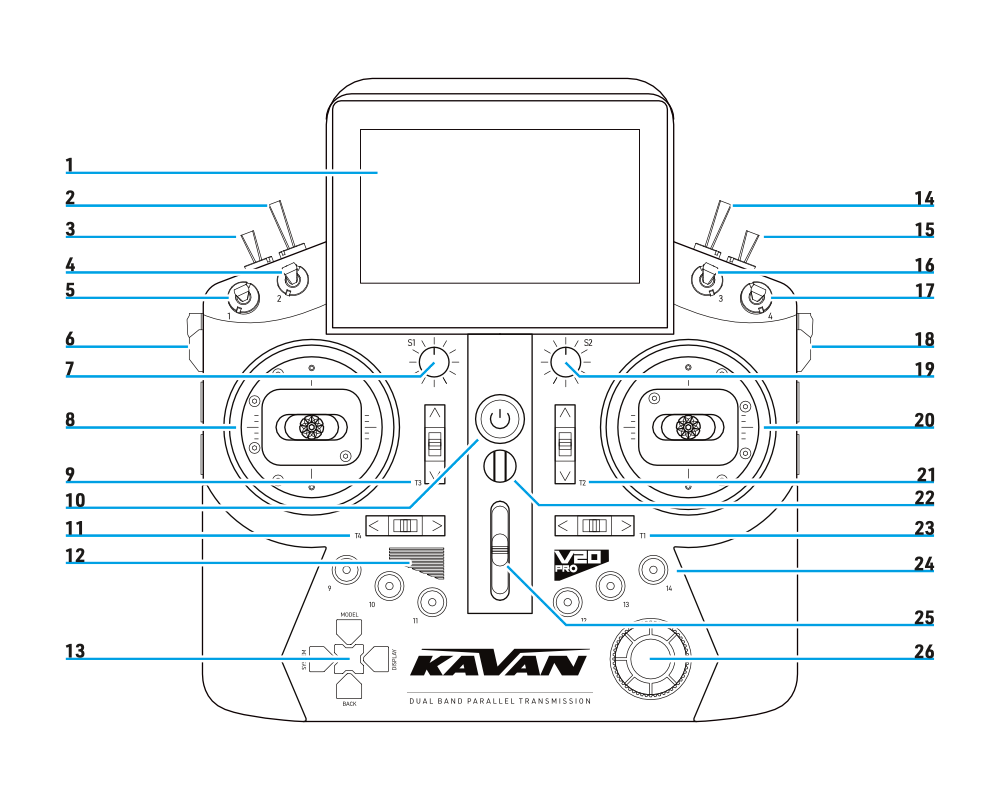
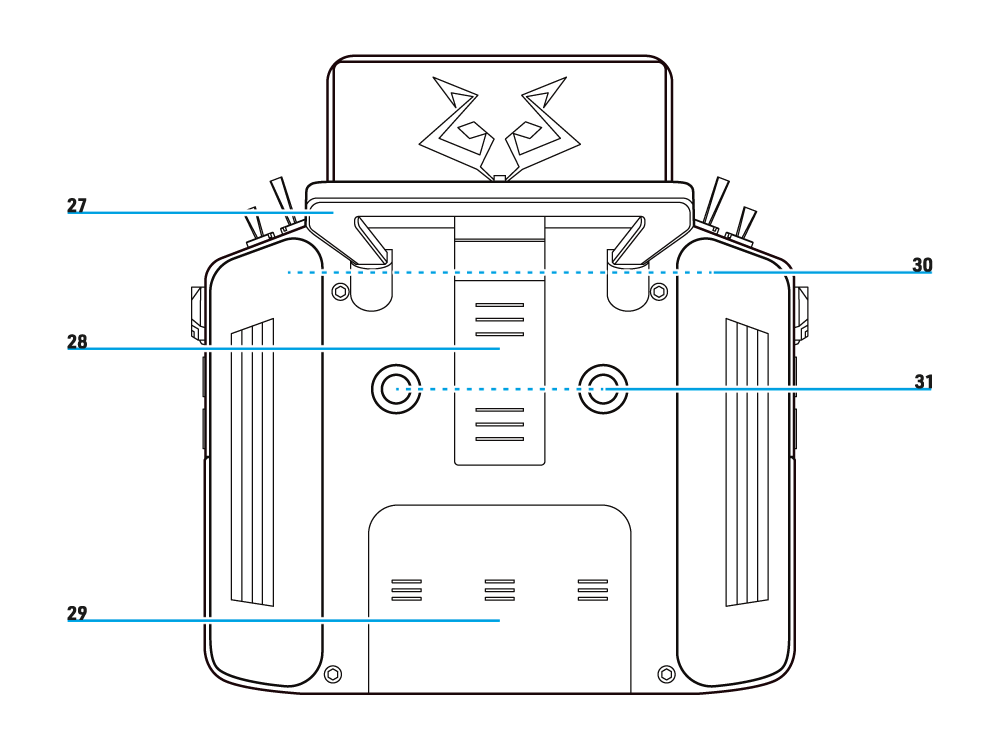
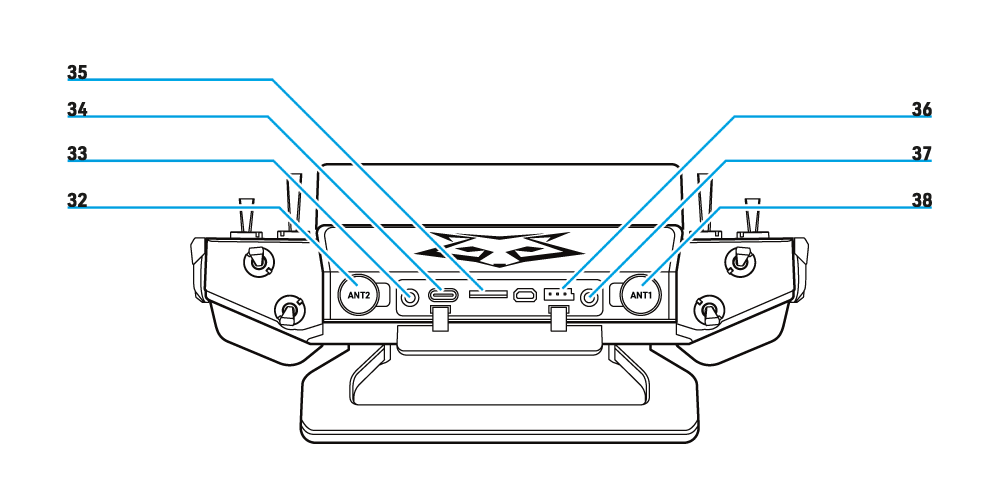
- 4.3" LCD, 800×480 px
- Two-position switch #6
- Three-position switch #5
- Three-position switch #2
- Three-position switch #1
- Side rotary dial #1
- Programmable mix knob #1
- Left gimbal
- Trim #3
- Power button
- Trim #4
- Speaker
- SYSTEM/MODEL/DISPLAY/BACK + ENTER
- 2-position momentary switch #8
- Three-position switch #7
- Three-position switch #3
- Three-position switch #4
- Side rotary dial #2
- Programmable mix knob #2
- Right gimbal
- Trim #2
- Lanyard loop
- Trim #1
- User-programmable buttons
- Programmable slider
- Multifunction knob
- Handle
- Module connection case
- Battery compartment
- Grips
- Momentary buttons
- External antenna #2
- Audio jack 3.5 mm
- USB-C
- MicroSD slot
- Smart port
- Trainer port
- External antenna #1
Main section
Gimbal adjustments
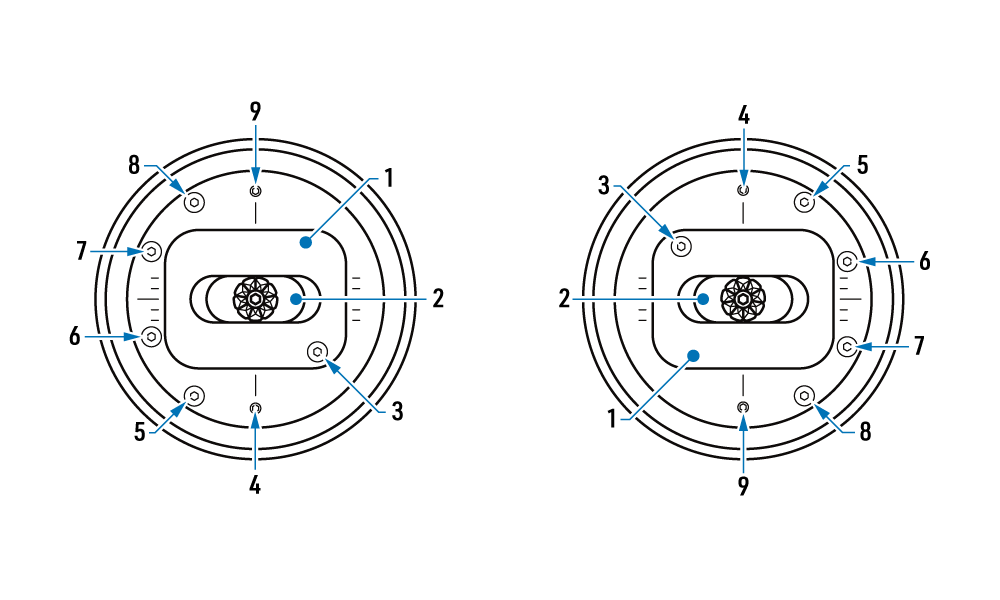
All gimbal adjustment screws are accessible from the front; the transmitter does not need to be opened. Disconnect the model's motor before changing controls.
- Vertical axis
- Horizontal axis
- Horizontal axis resistance
- Horizontal axis travel limiter
- Non-centring vertical axis stiffness
- Self-centring
- Centring vertical axis resistance
- Ratcheting
- Vertical axis travel limiter
Changing the mode
Select the required mode in Sticks (mode 2 is the factory setting). Adjust the self-centring and ratchet screws to match the new throttle stick. Tightening the self-centring screw disables vertical-axis return to centre; loosening it enables return to centre. The horizontal axis is unaffected.
Adjusting a gimbal
Adjust spring tension, non-centring friction and ratcheting as required. The travel limiters adjust the total mechanical travel from 60° to 45° (30° to 22.5° either side of centre). Recalibrate the gimbals after mechanical changes and check every control direction and neutral position.
For the function of each screw, see the MC30R gimbal setup guide.
Charging the battery
Included in the package is a 2S (7.4 V) LiPo battery with a capacity of 4000 mAh. The transmitter is equipped with a balancer for charging 2S batteries via a USB-C interface. The size of the battery compartment is 84×41.5×20 mm (W×H×D).
When using the USB charging function, charge the battery using a suitable USB adapter: voltage: 5 ± 0.2 V; current: >2.0 A.
LED
- ON: charging in progress
- OFF: charging complete
- FLASHING: charging error
Navigation controllers
The left navigation buttons provide MODEL/SYSTEM/DISPLAY/BACK. Use the right rotary control to navigate, change values and open advanced settings; press it to confirm with ENTER.
The touchscreen provides an alternative way to select and edit menu items.
ETHOS Suite
Use ETHOS Suite to update the transmitter bootloader, firmware, SD card and flash contents, and to convert image and audio formats. Current information and downloads are available from FrSky ETHOS.
Back up your models and current transmitter files before upgrading. Use the current compatible bootloader and select the correct KAVAN transmitter variant in ETHOS Suite; follow the release instructions for that model.
For detailed menus, see the ETHOS user manual. Menu wording and available options depend on the installed firmware and receiver protocol.
Creating a model
- Open Model Settings, then Model Selection. Create a new model and select its type.
- Name and configure the model. Check its channel assignments, control directions, limits and fail-safe before use.
Model setting - internal RF module
Select INT in RF System, set Status to ON and choose the protocol required by the receiver. Confirm compatible transmitter/receiver firmware and the correct regional variant.
If external antennas are selected, fit the correct antennas before enabling transmission. Antenna selection is stored separately for each model; check it whenever changing model memories. Use only the antenna options supported by this transmitter and its installed firmware.
Channel range
The internal module supports up to 24 channels with compatible protocols; ACCST D16 supports up to 16. Set the channel range required by the model and check receiver output mapping. Use a distinct model ID for each model unless intentionally sharing the same receiver and identical settings.
Registration and pairing
Disconnect the electric motor or stop the combustion engine before registration, binding, programming or fail-safe tests. Secure the model and prevent any unexpected motor start.
ACCESS and Twin 2.4 GHz
Register the receiver before binding it. Follow its manual for button and LED details.
- Select [Register]. The display shows „Waiting…“ and the transmitter may repeat a „Register“ voice prompt.
- Hold the receiver binding button while switching on its power. Wait for detection; the legacy procedure indicates red and green LEDs lit.
- Set RID, receiver name and UID as required.
- Select [Register] to finish. Confirm the „Registration OK“ dialogue with [OK].
- Turn off the receiver. Registration is complete; binding is still required.
TD Pro, TD and ACCESS R9 require a compatible receiver and the corresponding RF mode. Select that mode first, then use the registration and binding actions offered for it. Follow the receiver-specific instructions for its radio links, regional configuration and redundancy; the TW setup must not be assumed to configure the 868 MHz link automatically.
RID
This is the unique identifier of the transmitter. It can be changed to the same/own code to use the Smart share feature for sharing models (if you want to share models and own multiple transmitters, or if you share models with other modellers, you must have the same RID set on those transmitters). The RID is the transmitter data (Owner Registration ID) written into the receiver‘s memory. If two transmitters have the same RID, you can easily share models, including receivers, between them using the Smart Share function.
RX name
The naming of the receiver is done automatically when the receiver is paired for the first time. This name can be changed at any time. This is useful when using more than one receiver, e.g. to remember the settings of the receivers, e.g.:
- RX4R1 is for CH1–8
- RX4R2 is for CH9–16
- RX4R3 is for CH17–24.
UID
UID is used to distinguish multiple receivers used simultaneously in one model. A default value of 0 may be left for a single receiver. If more than one receiver is to be used in one model, the UID must be changed, usually:
- 0 for CH1–8
- 1 for CH9–16
- 2 for CH17–24.
The UID cannot be read back from the receiver, so it is a good idea to tag the receiver.
Binding
Binding a receiver allows the receiver registered in phase 1 to be paired with the transmitters. The receiver will now communicate with this transmitter only unless you bind it with another transmitter.
- Select a receiver slot and select [Bind].
- A „Waiting for receiver…“ message appears and the transmitter may repeat a binding voice prompt.
- Turn on the registered receiver without pressing its binding button.
- Its name appears in the receiver list.
- Select the receiver and wait for the automatic binding to finish.
- The receiver will only be controlled by the transmitter it is bound to. Other transmitters in its vicinity will not affect its operation.
- The name of the receiver will now be displayed in the selected slot.
- After binding, switch off the receiver, restart the transmitter if required and then switch on the receiver normally. Confirm the connected indication in its manual and check every control. Perform a range check before flight.
- If a redundant connection is required, repeat for receiver slots 2 and 3.
Protocol ACCST D16
ACCST D16 uses binding without registration. Transmitter and receiver firmware must use compatible ACCST D16 versions and the same regional variant.
- Turn off the receiver.
- Select ACCST D16, set the receiver ID and select [Bind]. Choose the required channel group and telemetry setting offered by the firmware.
- Hold the receiver binding button while switching on its power. Follow the receiver manual for the binding LED indication, then release the button.
- Exit binding mode and switch off the receiver. Switch off the transmitter if a restart is required.
- Switch on the transmitter first, then the receiver normally. Check the connected indication specified in the receiver manual and verify all controls.
The receiver responds to its bound transmitter/model ID. Repeat binding if the receiver, model ID or relevant protocol settings change. ACCESS-style receiver-name selection and three receiver slots do not apply to ACCST D16.
Fail-safe settings
The legacy quickstart describes 3 fail-safe modes: Hold, Custom and No signal (called No pulses in current firmware). Some firmware/protocol combinations also offer Receiver, which uses the receiver-side setting. Select an available mode and verify its actual behaviour.
Hold
The receiver maintains the channel outputs as they were before the signal was lost. To use this type, select it from the menu and wait 9 seconds for the Fail-safe setting change to take effect.
Custom
The receiver keeps the output values on all channels as you preselect it. Select the Fail-safe setting menu. Switch from Disconnect/Hold/Not Set to „Custom“. Select the channel for which you want to set fail-safe outputs and confirm the selection. Then set the output on each desired channel and confirm the selection. Wait 9 seconds for the Fail-safe setting change to take effect.
No pulses
When the signal is lost, the receiver does not send control pulses on its PWM outputs. To use this type, select it from the menu and wait 9 seconds for the Fail-safe setting change to take effect.
Receiver
When the signal is lost, the fail-safe mode set in your receiver is applied.
Do not rely on unspecified fail-safe behaviour. Set and test a safe response for every controlled function before flight; retained throttle output can cause injury or damage.
When the failsafe is disabled on the RF module side, the failsafe set on the receiver side will be applied.
S.BUS port does not support the failsafe setting in No Pulses mode and always outputs a signal. Always set „Hold“ or „Custom“ mode for the S.BUS port.
Test fail-safe on the ground with the motor disconnected or the combustion engine stopped. Verify that loss of the transmitter signal produces the intended safe positions and stops the motor command. Restore normal operation and check every control before flight.
Range check
Perform a range check before every flight. In RF System, select the active internal or external module, then Action and Range Check. Transmission range is reduced to approximately 1/30. Select Range Check again to return to normal transmission power before flying.
A repeated „Range Check“ voice alert confirms reduced-power operation. The display shows receiver UID, VFR % and RSSI. The legacy guide gives an approximate alarm distance of 30 m with transmitter and receiver 1 m above ground under ideal conditions. This is indicative only; follow the receiver instructions and account for antenna installation and surroundings. Do not fly if control or reception is unreliable.
Appendix
Principles of safe operation
Operating the models can be dangerous if you do not follow the appropriate safety guidelines. Here are some of the most important recommendations to help ensure safe operation.
- Before taking off, make sure the model responds properly to the gimbal movements on the transmitter. Also make sure all switches and other controls are functioning properly. If you find any problems, do not fly the model until all functions are working properly.
- Never fly in rain, strong winds or at night. Water can cause failure or improper operation and impair the control of the model, with the risk of a crash.
- Never turn off the power switch in flight when the model‘s engine is running or the battery is connected. In this case, control of the model will be impossible, and the model will crash. Even if you turn the switch back on, normal operation will not resume until the internal transmitter and receiver initialisation processes are completed.
- Do not start the internal combustion engine or electric motor while wearing the neck strap. The strap can be caught by a spinning propeller, rotor, etc. and cause serious injury.
- Never fly in range check mode. In this mode, the transmitter operates at reduced power, and a crash could occur.
- Do not fly if you are physically or mentally indisposed, as this can be dangerous to yourself and others. Also, never fly under the influence of alcohol, narcotics or drugs affecting your senses.
- Do not fly near airports, near or over people, near residential buildings, schools, hospitals, or other places where people congregate, near high voltage power lines, tall buildings and structures, or communication facilities.
- If you place the transmitter on the ground in preparation for flight, do not place it in an upright position. The transmitter may tip over, the controls may become misaligned, and the propeller or rotor may spin unexpectedly and cause injury.
- Do not touch internal combustion engines, electric motors or controllers during or immediately after operation. These devices can become very hot during operation.
- For safety reasons, always fly with the model in line of sight at all times. Getting behind buildings or other large objects will not only cause you to lose sight of the model, but the obstruction will prevent the RF signal from the transmitter from propagating and cause you to lose control of the model.
- Always set fail-safe emergency rates for safety. Set throttle fail-safe to motor stopped; use neutral only for a drive system where neutral is the verified stop position.
- Always check the charge level of the transmitter and receiver batteries before each takeoff. Low voltage will cause loss of control of the model and a crash.
- At the beginning of each flight day, check the operation of all control surfaces and perform a range check. If using the Trainer function, check that the model responds properly to both teacher and student transmitter controls. Even an incorrect setting of a single transmitter or model function can cause a crash.
- Before turning on the transmitter: 1. Set the throttle to motor stopped (the low position for a conventional aircraft throttle). 2. Turn the transmitter on first, then the receiver.
- Before turning off the transmitter after the internal combustion engine or electric motor has stopped (is in a condition where it cannot start again): 1. Turn off the receiver power switch. 2. Then turn off the transmitter power switch. If you turn the power on/off in reverse order, the propeller or rotor may spin unexpectedly and cause injury. Also, follow the above order when setting fail-safe emergency rates.
- When setting the transmitter, turn the engine off/shut down unless its operation is necessary for the setting. In the case of an electric motor, disconnect its cables. Use extra caution when setting the transmitter while the motor is running. Ensure that the model is properly secured and cannot come into contact with anyone or anything. An unexpected increase in RPM can cause serious injury.
Warranty and post-warranty service
All KAVAN transmitters are covered by an extended 3-year warranty covering all manufacturing defects and faults. When making a claim within the warranty period, please always present a copy of the proof of purchase with the product and provide the service personnel with as detailed and complete information as possible about the defect found, your usage and other information that will facilitate the assessment of the claim and speed up its settlement. Please make your claim at the shop where you purchased the product. If this is not possible, you can directly contact KAVAN Europe s.r.o.:
KAVAN Europe s.r.o. | Doubravice 110, 533 53 Pardubice | Czechia | +420 466 260 133 | info@kavanrc.com
Warranty and limitation of liability
As the manufacturer of this product, we have no control over your compliance with these instructions when wiring and installing the RC set into your model. Likewise, we have no control over the way you build, operate and maintain the RC set parts. For this reason, KAVAN must disclaim all liability for any loss, damage or financial cost that is caused by the improper use or operation of products imported by us, or that is in any way connected with such activity.
Except as otherwise provided by law, KAVAN‘s obligation to pay compensation shall (regardless of the legal arguments asserted) be limited to the purchase price for those KAVAN products that were directly involved in the event that caused the damage. This does not apply if the manufacturer has been judicially obliged to make unlimited compensation on the basis of proven wilful or gross negligence. We warrant that our products are in compliance with current legal provisions. The warranty does not cover failures and defects caused by:
- Misuse or improper use.
- Delayed, improper or no maintenance, or maintenance performed by an unauthorised service.
- Incorrect wiring.
- Use of accessories not approved or recommended by KAVAN Europe s.r.o.
- Modifications or repairs not carried out by an authorised KAVAN Europe s.r.o.
- Inadvertent or deliberate damage.
- Normal wear and tear.
- Operation of the equipment outside the operating limits specified in the specification
KAVAN Europe s.r.o. warrants that this product is free from defects in both material and workmanship at the time of sale. KAVAN Europe s.r.o. also reserves the right to change or modify this warranty without notice. The equipment is subject to continuous improvement and refinement - the manufacturer reserves the right to change the design without notice.
This warranty certificate entitles you to a free warranty repair of the product supplied by KAVAN Europe s.r.o. within a period of 36 months. The warranty does not cover natural wear and tear due to normal use, as this is a product for modelling use, where the individual parts operate under much higher loads than normal toys are subjected to.
The warranty also does not cover any part of the equipment that has been improperly installed, roughly or improperly handled, or damaged in an accident, or any part of the equipment that has been repaired or altered by an unauthorised person (this includes the application of any waterproof sprays/coatings by the user). Like other fine electronics products, do not expose this equipment to high temperatures, low temperatures, moisture, dusty environments, violent mechanical shocks and impacts. Do not leave it in direct sunlight for extended periods of time.
Please claim warranty repairs from the shop where you purchased the set.
Recycling (European Union)
Electrical equipment bearing the crossed-out bin symbol must not be disposed of in normal household waste. Instead, it must be taken to a specialised collection and recycling facility. In EU (European Union) countries, electrical equipment must not be disposed of in normal household waste (WEEE - Waste of Electrical and Electronic Equipment, Directive 2012/19/EU). You can take unwanted equipment to your nearest collection or recycling centre. The equipment will then be disposed of or recycled safely, free of charge. By handing in your unwanted equipment, you can make an important contribution to protecting the environment.
EU Declaration of Conformity
KAVAN Europe s.r.o. hereby declares that the radio equipment type: V20 Pro and other equipment supplied with it are in compliance with Directive 2014/53/EU. The full text of the EU Declaration of Conformity is available at the following website: https://www.kavanrc.com/doc. This 2.4 GHz radio equipment can be used without prior registration or individual approval in all countries of the European Union.