RadioLink R8FG - Instruction manual

RadioLink R8FG receiver
Introduction
The RadioLink R8FG is an 8-channel, dual-antenna 2.4GHz receiver with an adjustable steering gyro, PWM/SBUS outputs and telemetry for signal strength, receiver voltage and model-battery voltage. Its gyro uses a software filter and PID control to correct unwanted steering movement. It supports compatible high-voltage servos within the voltage limits of every connected component.
For operation with the pocket transmitter supplied in RC8P sets, see the RadioLink RC8P instruction manual. The display illustrations below show RC8X menus. RC8P menu names and links are given separately; available functions depend on transmitter firmware and receiver revision.
Safety notes and warnings
This product is not a toy and is not suitable for children under 14. Keep it out of young children's reach. Incorrect installation or operation can cause loss of control and injury. Read the instructions for the transmitter, model, servos, speed controller and batteries before use. Disable the drive during installation, binding and adjustment; keep wheels, propellers and mechanisms clear.
- Operate with a clear view of the model, away from crowds and roads, and observe local restrictions. Do not operate in adverse weather or poor visibility.
- Charge the batteries, set the trims to 0 for initial setup and check every servo and connection before each run.
- Switch on the transmitter first, then the receiver/model. After stopping the motor, switch off the receiver/model before the transmitter.
- Keep the receiver still during power-on gyro self-check. Check steering direction, gyro correction, range and failsafe before enabling the drive.
- Protect the transmitter from water entering through antenna or control openings. A protective cover does not make unsafe weather suitable for operation. The receiver's IPX4 rating means splash resistance, not immersion protection or waterproofing of the whole model.
Specifications
| Channels / radio system | 8 / 2.4 GHz FHSS |
|---|---|
| Dimensions (L×W×H) | 35×24×13.5 mm (1.38×0.94×0.53″) |
| Weight | 10.5 g |
| Antenna length | 205 mm |
| Receiver supply | 3–12 V |
| Receiver current | 35 mA at 5 V |
| Outputs | PWM on CH1–CH7; PWM or SBUS on CH8 |
| Resolution | FHSS V1: 2048; FHSS V2: 4096 |
| Servo signal period | 14 ms by default; 4 ms / 3 ms with compatible hardware |
| Telemetry | RSSI, receiver supply voltage, external model-battery voltage |
| External voltage sensing | 2–8S batteries, maximum 33.6 V; sensing input only |
| Gyro | Integrated steering gyro with adjustable gain |
| Protection | IPX4, resistant to splashing water |
| Ground range* | Up to 600 m (1968.5 ft), tested without obstacles or interference |
* Actual range depends on installation and surroundings. The servo signal period is not a guaranteed end-to-end response time.
Transmitter compatibility
- RC8X
- RC8P
- RC6GS V3
- RC4GS V3
- RC6GS V2
- RC4GS V2
- RC6GS with a three-position switch
- RC4GS produced after 2018-01-01 (marking P.D AFTER 180101)
- T8FB/T8S in BT or OTG versions
- T16D
- T12D
Main section
Installation and connections
- Disconnect the model battery and disable the drive. Mount the receiver securely, using suitable RC foam or rubber vibration isolation. Avoid strong vibration and high temperatures.
- Keep the antennas straight, with their active ends at 90° to each other. Keep them at least 12.7 mm (0.5″) from metal and carbon fibre; do not bend them sharply. In large models with conductive parts, position the antennas on opposite sides. Keep them away from the motor, ESC and other interference sources. (Fig. 2)
- Connect the steering servo to CH1, the throttle/ESC signal to CH2, and auxiliary equipment as shown below. Observe the receiver's signal, positive and negative markings. (Fig. 1)
- Supply the receiver through the normal channel power pins from a suitable BEC, regulator or receiver battery. Stay within 3–12 V and the limits of every connected servo and accessory. Protect the receiver against dust and moisture; the manufacturer recommends a well-sealed plastic bag where additional protection is needed. This does not permit immersion.
| CH1 | Steering, PWM |
|---|---|
| CH2 | Throttle, PWM |
| CH3–CH7 | Auxiliary PWM outputs |
| CH8 / SBUS | Auxiliary PWM or SBUS, according to output mode |
| TELEMETRY (+/−) | External model-battery voltage sensing only |


Never use the TELEMETRY port to power the receiver. Its maximum sensing voltage of 33.6 V is separate from the receiver's 3–12 V supply limit. The manufacturer specifies reverse-polarity protection for the eight channel connections; nevertheless, check all wiring. Do not reverse the telemetry JST connection: it produces incorrect readings and must not be treated as a protected power input.
Select the receiver protocol
- Identify the receiver revision and production date.
- On RC8X, open Basic Menu → Receiver setting. Select the correct protocol and use Receivers List to check compatibility. On RC8P, use RF SETTING → PROTOCOL; see RF Setting.
- Select any required Subsidiary ID before binding, then bind the receiver.
| Receiver revision | Protocol support |
|---|---|
| V1.0; produced before 2023-02-06 | FHSS V1 only, resolution 2048 |
| V2.0 and later; produced on/after 2023-02-06 | FHSS V1 and FHSS V2, resolution up to 4096 |
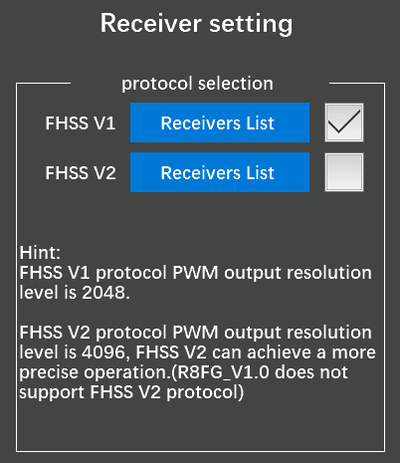
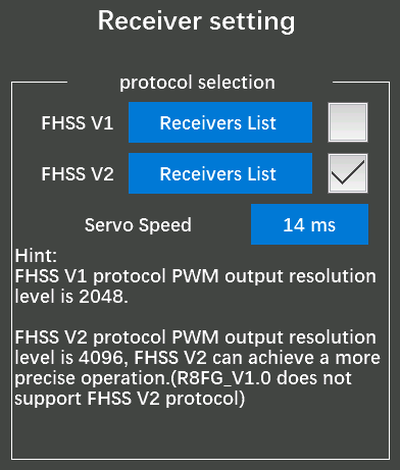
The RC8P transmitter is compatible for FHSS V2 with R8FG V2.1 or later versions.
Set the servo signal period
The Servo Speed setting changes the output signal period, not the servo's mechanical speed. On RC8X it requires firmware V1.1.5 or later and FHSS V2.
- Leave 14 ms selected for analogue servos or when compatibility is unknown.
- Select 4 ms or 3 ms only if every affected servo supports that period and the receiver is R8FG V2.1, or has a factory date of 2023-04-26 or later. A digital servo label alone does not establish compatibility.
- Check the receiver's green LED: two flashes acknowledge a successful change. No flashes mean that the change was not accepted or the receiver does not support it. Older receivers continue at 14 ms, even if a faster period is selected.
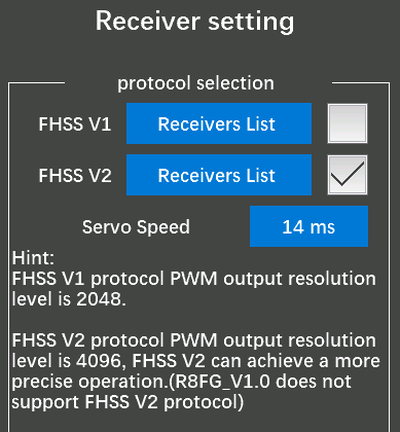
On RC8P, use the receiver period setting under RF Setting. CH SPEED is a different function for slowing commanded movement.
An unsuitable fast signal period can overheat or damage a servo. Keep 14 ms unless both receiver and servos are confirmed compatible with the selected period. An older receiver can still use digital servos that accept its 14ms signal.
Bind the receiver
Each receiver has an individual ID. Bind a new receiver before use; the pairing is retained, so routine power cycling does not require rebinding.
- Select the correct protocol and, if used, Subsidiary ID. Keep the drive disabled and place the transmitter and receiver approximately 60 cm apart.
- Switch on the transmitter, then the receiver. An unbound receiver's LED flashes slowly.
- Hold the receiver's black ID SET button for more than 1 s, then release it. The LED flashes rapidly while binding.
- A steady LED and the transmitter's signal indicator confirm binding. If the LED continues flashing slowly, repeat the procedure and check the protocol.
- Check control directions, travel, telemetry and failsafe before enabling the drive.
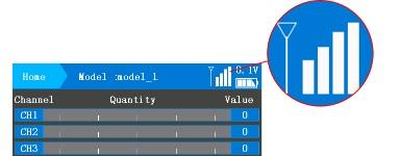
A very short distance can overload the receiver and cause failed binding or loss of signal, including at distances within about 60 cm. Move the transmitter and receiver farther apart. A slowly flashing LED indicates no successful binding or a lost signal.
Select the output mode
| Mode | Steady LED colour | CH1–CH7 | CH8 |
|---|---|---|---|
| PWM | Green | PWM | PWM |
| PWM + gyro | Red | PWM | PWM |
| PWM + SBUS | Blue | PWM | SBUS |
| PWM + SBUS + gyro | Red and blue together, appearing purple | PWM | SBUS |
- Briefly press ID SET once to enable/disable SBUS on CH8.
- Briefly press ID SET three times within 2 s, with less than 1 s between presses, to enable/disable the gyro. The red LED flashes three times to acknowledge the gyro command.
- Briefly press ID SET twice within 2 s to reverse gyro correction. The red LED flashes twice.
Connect ordinary PWM servos only to PWM outputs. When SBUS is enabled, CH8 requires SBUS-compatible equipment; CH1–CH7 remain PWM.
Set up the steering gyro
The gyro is off by default. Keep the receiver still during its power-on self-check.
- With the drive disabled, check normal steering operation first, then enable the gyro if required.
- Physically turn the model's nose to the right: the gyro should steer the wheels left. Turn the nose left: the wheels should steer right.
- If correction is reversed, briefly press ID SET twice within 2 s and repeat the test. Gyro correction direction is separate from normal steering-servo reversal.
- Start with low gain and adjust gradually. Correction while the model moves is normal. If the servo oscillates while the model is stationary, check that it is on a PWM output and reduce gain. Use CH1 for the steering servo.
On RC8X, the original setup assigns gyro gain to CH8, controlled by DL1/PS3. Turn the assigned knob clockwise to increase gain and anticlockwise to reduce it. A yellow popup shows the channel value: nearer +100 means more gain; 0 means no gyro correction. The control assignment can be changed in the transmitter.
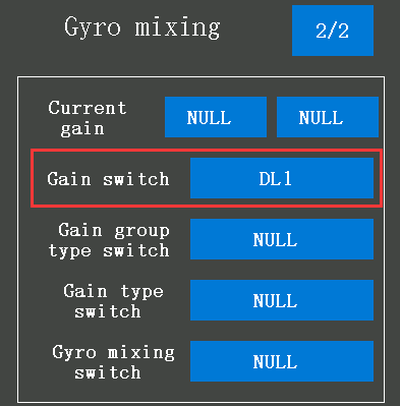
On RC8P, use GYRO, with SOURCE selecting the control and RATE setting 0–100 %. This dedicated function requires FHSS V2 and compatible gyro hardware, including R8FG V2.1 or a factory date of 2023-04-26 or later. For older FHSS V1 receivers, follow the RC8P manual's CH8 procedure instead of assuming that the RC8X assignment applies unchanged.
Reversed gyro correction can make a model uncontrollable. Verify the correction direction after installation and after changes to steering reversal, output mode or gyro settings. Gain must not cause sustained steering oscillation.
Set up telemetry
Receiver voltage and signal strength are available after binding to a compatible transmitter. External model-battery voltage additionally requires the sensing harness. RC8X, RC6GS V3/V2 and RC4GS V3/V2 support telemetry with their standard firmware. Older supported transmitters require the following manufacturer firmware:
| Transmitter | Firmware referenced in the R8FG manual |
|---|---|
| RC6GS with three-position switch | RC6GS_RadioLink_bin_1d15_V_6_1_2; RC6GS downloads |
| RC4GS produced after 2018-01-01 | RC4GS_RX_RadioLink_bin_2f50_V_6_0_1; RC4GS downloads |
Use firmware intended for the exact transmitter version and follow its update instructions. RC8P telemetry settings are described in ALARM: RX VOLT, EXT VOLT and RSSI.
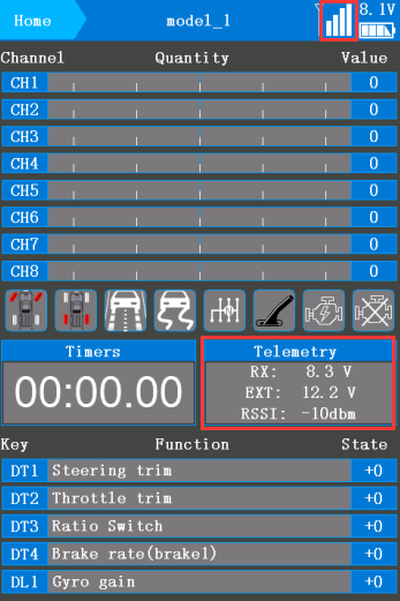
Signal strength and RSSI alarm
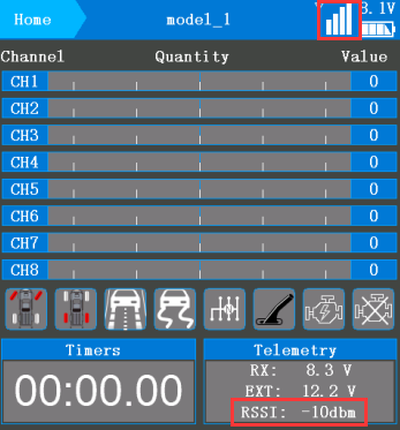
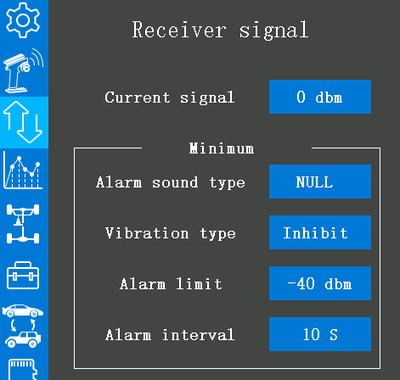
On RC8X, open Telemetry setting → Receiver signal to set the warning threshold, sound and other alarm options. RadioLink displays RSSI from −99 to 0 dBm; nearer 0 means stronger reception. For example, −90 dBm is weaker than −75 dBm.
At a transmitter-to-receiver distance of about 60 cm, the manufacturer gives −30 to 0 dBm as normal. If the link drops at very short range, increase separation. Check signal strength and warning operation as distance increases in a controlled range test; a good bench reading does not guarantee operating range.
External battery voltage and alarm
- Disconnect the model battery. Use the correct sensing harness for the battery and ESC connectors. Connect its male end to the ESC and female end to the battery connection, observing the actual connector polarity.
- Connect the harness's JST sensing plug to the receiver's TELEMETRY (+/−) port with correct polarity. No additional telemetry module is required. Monitor 2–8S batteries up to 33.6 V only. (Fig. 11)
- Power the system safely and check that the displayed external voltage is plausible. Receiver voltage and model-battery voltage are separate measurements.
- On RC8X, open Telemetry setting → Engine battery voltage to set the alarm voltage, sound and other options. On RC8P, use ALARM → EXT VOLT.

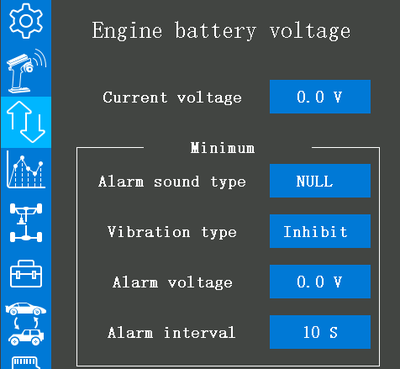
The example uses 3.7 V per cell × 3S = 11.1 V as the warning threshold for a 3S lithium battery. Choose a threshold appropriate to the battery, load and battery manufacturer's instructions. This is a telemetry warning, not an ESC low-voltage cutoff.
Use Subsidiary ID
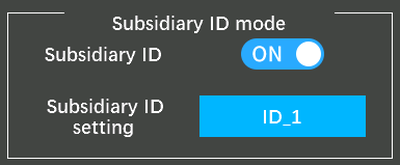
With Subsidiary ID disabled, several bound and powered receivers can respond simultaneously. When enabled, 16 IDs (0–15) allow selection of one receiver while the others remain on standby. For example, drive a car onto a truck, then select the truck's ID to transport it.
- On RC8X, change Subsidiary ID mode from OFF to ON.
- Set the required ID before binding, then bind and configure each receiver with its intended ID.
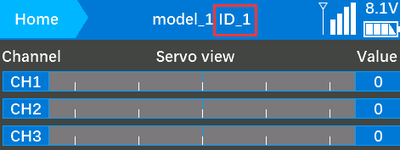
- Check the selected ID on the home screen, for example ID_1. Use the screen's − / + controls to change it; Reset returns to ID_0.
- Verify that only the intended model responds. Standby is not a physical power disconnect; switch off models before handling them.
For RC8P operation, follow Sub ID in the transmitter manual.
Failsafe and checks before operation
- Secure the model with its drive disabled. Select the correct model memory and Subsidiary ID. Check battery condition, connections, steering/throttle direction and travel, output mode and gyro correction.
- Configure failsafe using the transmitter instructions. With RC8P, see FAIL SAFE. Its manuals list default values 0 for CH1 steering and CH2 throttle, while describing steering holding its last position and throttle stopping.
- With propulsion safely disabled, simulate signal loss and observe actual steering, throttle and auxiliary outputs. Confirm safe behaviour for both signal loss and restoration. Do not assume that 0 guarantees neutral or absence of pulses, particularly with SBUS equipment.
- Perform the transmitter manufacturer's range check and verify telemetry warnings. Enable the drive only after all checks pass. Stop immediately if control or signal quality deteriorates.
Appendix
Troubleshooting
| Symptom | Check / action |
|---|---|
| Slow flashing LED or failed binding | Supply and polarity; protocol and receiver revision; selected Sub ID; repeat binding. Increase separation if the transmitter is too close. |
| Weak RSSI or intermittent control | Antenna damage, orientation and clearance; nearby motor/ESC wiring; battery supply and interference. Stop operating until corrected. |
| Steering oscillates while stationary | Servo connected to a PWM output; gyro gain too high; mounting security and vibration. |
| Gyro corrects in the wrong direction | Reverse gyro correction and repeat the physical turn test with the drive disabled. |
| 3/4ms setting not accepted | Receiver revision/date, RC8X firmware and FHSS V2; two green flashes. Retain 14 ms if unsupported. |
| External voltage missing or incorrect | Separate sensing harness, JST polarity and TELEMETRY connection; battery voltage within limits. |
| Wrong model responds or several respond | Selected model memory, Subsidiary ID enabled/disabled, ID assignment and binding of each receiver. |
Care and storage
Disconnect the model battery after use. Check the receiver, antenna insulation, plugs and wiring for damage; replace damaged components before operation. Keep the receiver clean and dry, avoid solvents and excessive heat, and store it in a dry place. Do not operate wet or damaged electronics. IPX4 does not permit immersion.
Warranty and limitation of liability
As the manufacturer of this product, we have no control over your compliance with these instructions when wiring and installing the RC set into your model. Likewise, we have no control over the way you build, operate and maintain the RC set parts. For this reason, KAVAN must disclaim all liability for any loss, damage or financial cost that is caused by the improper use or operation of products imported by us, or that is in any way connected with such activity.
Except as otherwise provided by law, KAVAN‘s obligation to pay compensation shall (regardless of the legal arguments asserted) be limited to the purchase price for those KAVAN products that were directly involved in the event that caused the damage. This does not apply if the manufacturer has been judicially obliged to make unlimited compensation on the basis of proven wilful or gross negligence. We warrant that our products are in compliance with current legal provisions. The warranty does not cover failures and defects caused by:
- Misuse or improper use.
- Delayed, improper or no maintenance, or maintenance performed by an unauthorised service.
- Incorrect wiring.
- Use of accessories not approved or recommended by KAVAN Europe s.r.o.
- Modifications or repairs not carried out by an authorised KAVAN Europe s.r.o.
- Inadvertent or deliberate damage.
- Normal wear and tear.
- Operation of the equipment outside the operating limits specified in the specification
KAVAN Europe s.r.o. warrants that this product is free from defects in both material and workmanship at the time of sale. KAVAN Europe s.r.o. also reserves the right to change or modify this warranty without notice. The equipment is subject to continuous improvement and refinement - the manufacturer reserves the right to change the design without notice.
This warranty certificate entitles you to a free warranty repair of the product supplied by KAVAN Europe s.r.o. within a period of 24 months. The warranty does not cover natural wear and tear due to normal use, as this is a product for modelling use, where the individual parts operate under much higher loads than normal toys are subjected to.
The warranty also does not cover any part of the equipment that has been improperly installed, roughly or improperly handled, or damaged in an accident, or any part of the equipment that has been repaired or altered by an unauthorised person (this includes the application of any waterproof sprays/coatings by the user). Like other fine electronics products, do not expose this equipment to high temperatures, low temperatures, moisture, dusty environments, violent mechanical shocks and impacts. Do not leave it in direct sunlight for extended periods of time.
Please claim warranty repairs from the shop where you purchased the set.
Recycling (European Union)
Electrical equipment bearing the crossed-out bin symbol must not be disposed of in normal household waste. Instead, it must be taken to a specialised collection and recycling facility. In EU (European Union) countries, electrical equipment must not be disposed of in normal household waste (WEEE - Waste of Electrical and Electronic Equipment, Directive 2012/19/EU). You can take unwanted equipment to your nearest collection or recycling centre. The equipment will then be disposed of or recycled safely, free of charge. By handing in your unwanted equipment, you can make an important contribution to protecting the environment.
EU Declaration of Conformity
RadioLink Electronic Ltd. hereby declares that the radio equipment type: R8FG and other equipment supplied with it are in compliance with Directive 2014/53/EU. The full text of the EU Declaration of Conformity is available at the following website: https://www.kavanrc.com/doc. This 2.4 GHz radio equipment can be used without prior registration or individual approval in all countries of the European Union.