KAVAN Smart PRO TW30 Power switch with telemetry - Instruction manual
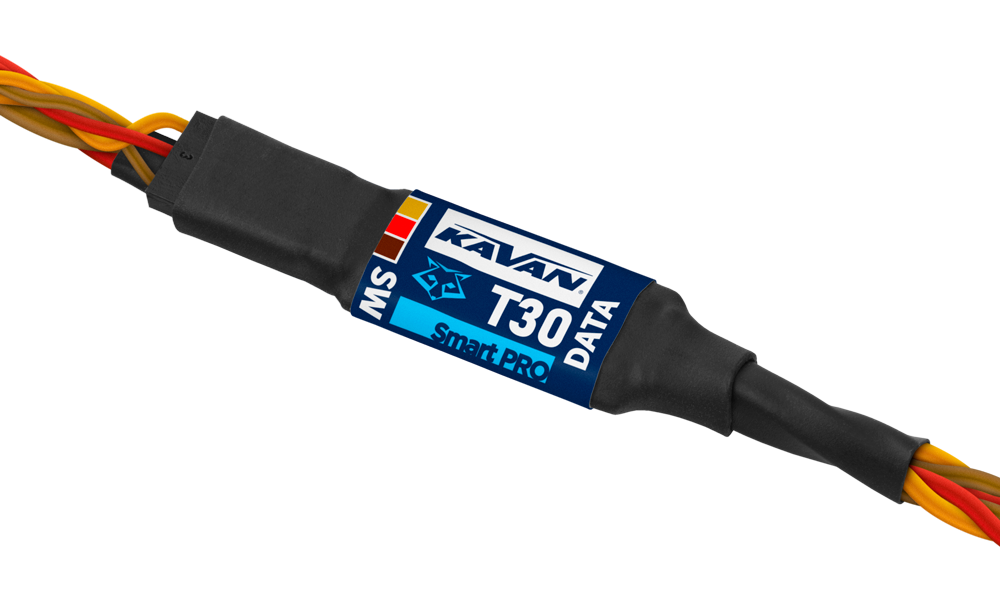
KAVAN Smart PRO TW30 Power switch with telemetry
Introduction
The KAVAN Smart PRO TW30 combines an electronic power switch with telemetry monitoring of voltage, current and consumed capacity. It switches the electronics in your model and remembers its last operating state. If the battery is accidentally disconnected while the output is on, the output switches on again when the battery is reconnected.
The TW30 has no voltage regulation. It can be controlled by the touch pad or a mechanical switch. The mechanical switch carries only the control signal; the main load current flows through the TW30. Select Touch or Standard in the configuration to match the fitted switch.
Features
- Touch or mechanical switch control.
- FPort, Duplex EX, Graupner HoTT, Multiplex MSB and Futaba S.Bus2 telemetry.
- Optional low-voltage shutdown.
- Memory for telemetry values and the operating state.
Technical specifications
| Dimensions | 25×12×5 mm |
|---|---|
| Weight | 9 g |
| Supply voltage | 5–12 V |
| Continuous current | 10 A |
| Peak current | 30 A |
| Voltage regulation | None |
Main section
Installation
Plug the device between the receiver and the battery. If you use a BEC, plug the TW30 between the battery and the BEC.
When using a BEC, remove and insulate the middle positive (red) wire of the telemetry lead between the TW30 and the receiver. Follow the BEC wiring diagram (Fig. 2).
Direct installation (without BEC)

Installation with BEC

Touch switch
Installation inside the fuselage

Installation on top of the fuselage

Touch switch behaviour

- Attach the touch pad with double-sided adhesive tape to the inside or outside of the fuselage. Use a nonconductive surface no thicker than 3 mm.
- Keep the status LED visible from outside the fuselage. For an internal installation, make a small opening for the LED if required. Mark the touch area with the supplied target sticker.
- Connect the receiver battery to the TW30 and briefly touch the button. The status LED should blink once. If not, please increase the touch sensitivity parameter in the configuration.
- To switch the output on or off, touch and hold the pad. After the initial acknowledgement flash, wait until the LED blinks repeatedly. Release your finger during this 2 s blinking window. Releasing outside the window is rejected as a false input and does not change the output state.
Telemetry and settings

The device is compatible with JETIBOX for programming. Use the connection cable supplied with the JETIBOX. (Older versions of the JETIBOX manufactured before 2015 might be unable to communicate with the TW30; once connected, the „Communication error“ message appears.)
Complete menu structure

The JETIBOX menu is divided into three sections:
Actual values – displays the latest telemetry values (current, voltage, capacity, temperature) together with minimums and maximums.
- In the Capacity screen, you can press ⮜ + ⮞ buttons together to reset the measured capacity.
- Reset Min/Max – press ⮜ + ⮞ buttons together to reset all minimums and maximums.
Setting – basic settings of the sensor
- Language – you can choose the language of the JETIBOX screen
- Switch type (Touch/Standard) – Select touch-pad or mechanical-switch control.
- Touch sensitivity – if the touch switch is used, you can increase its sensitivity by editing this value. Please note that increasing the sensitivity will allow you to install the TW30 directly inside thicker fuselages. On the other hand, this will also make the touch sensor more vulnerable to erroneous inputs.
- Capacity reset – Setting up this parameter will specify at which moment the capacity is reset to zero. Available options:
- Power-On (default) – capacity is reset every time after connecting the battery.
- Voltage-Change – capacity is reset after connecting the battery with a different voltage (by 15 % or more). This way the sensor may distinguish between charged and discharged batteries.
- Manual – capacity is never reset automatically.
- Shutdown voltage – you can specify the minimum voltage for the safe operation of the model. If the input voltage remains below the selected level for more than 30 s, the TW30 disconnects power from the receiver and servos.
Service – In this menu, you can view the device version and reset it to the default factory configuration.
Low-voltage shutdown disconnects the receiver and servos. Set the threshold with this loss of control in mind.
Graupner HoTT menu structure

TW30 offers telemetry like an „Air-ESC“ speed controller.
Safety information
- Protect the device from moisture, dust and prolonged direct sunlight.
- Always operate the TW30 in a dry environment and within the device limits stated in this guide. Never expose the device to excessive heat or cold.
- Do not remove the heat shrink tube from the device and do not try to implement any changes or modifications. This can lead to total destruction and to the denial of any warranty claims.
- Always check the polarity of the cables. Never reverse the polarity – this could lead to total destruction.
Appendix
Manufacturer
KAVAN Smart PRO TW30 Power switch with telemetry is made in Czechia by MAV Sense s.r.o.
E-mail: info@mavsense.com | Web: www.mavsense.com
Recycling and waste disposal note (European Union)
Electrical equipment marked with the crossed-out waste bin symbol must not be discarded in the domestic waste; it should be disposed of via the appropriate specialised disposal system. In the countries of the EU (European Union) electrical devices must not be discarded via the normal domestic waste system (WEEE - Waste of Electrical and Electronic Equipment, Directive 2012/19/EU). You can take your unwanted equipment to your nearest public collection point or recycling centre, where it will be disposed of in the proper manner at no charge to you. By disposing of your old equipment in a responsible manner you make an important contribution to the safeguarding of the environment.
EU declaration of conformity (European Union)
Hereby, KAVAN Europe s.r.o. declares that the KAVAN Smart PRO TW30 Power switch with telemetry is in compliance with the essential requirements as laid down in the EU directive(s) concerning electromagnetic compatibility. The full text of the EU Declaration of Conformity is available at www.kavanrc.com/doc.
Guarantee
The KAVAN Europe s.r.o. products are covered by a guarantee that fulfils the currently valid legal requirements in your country. If you wish to make a claim under guarantee, please contact the retailer from whom you first purchased the equipment. The guarantee does not cover faults which were caused in the following ways: crashes, improper use, incorrect connection, reversed polarity, maintenance work carried out late, incorrectly or not at all, or by unauthorised personnel, use of other than genuine KAVAN Europe s.r.o. accessories, modifications or repairs which were not carried out by KAVAN Europe s.r.o. or an authorised KAVAN Europe s.r.o., accidental or deliberate damage, defects caused by normal wear and tear, operation outside the Specification, or in conjunction with equipment made by other manufacturers. Please be sure to read the appropriate information sheets in the product documentation.
For service, contact the retailer from whom you purchased the product. Use the original packaging if available. Include a dated description of how the product was used and the fault, together with your full address and telephone number.
Incorrect installation, inadequate mounting or cooling, cable strain, reversed polarity and operation beyond the specified limits are not covered. Protect the device from excessive heat, moisture and dust, and do not leave it in direct sunlight for prolonged periods.