KAVAN Smart PRO USB-C interface - Instruction manual
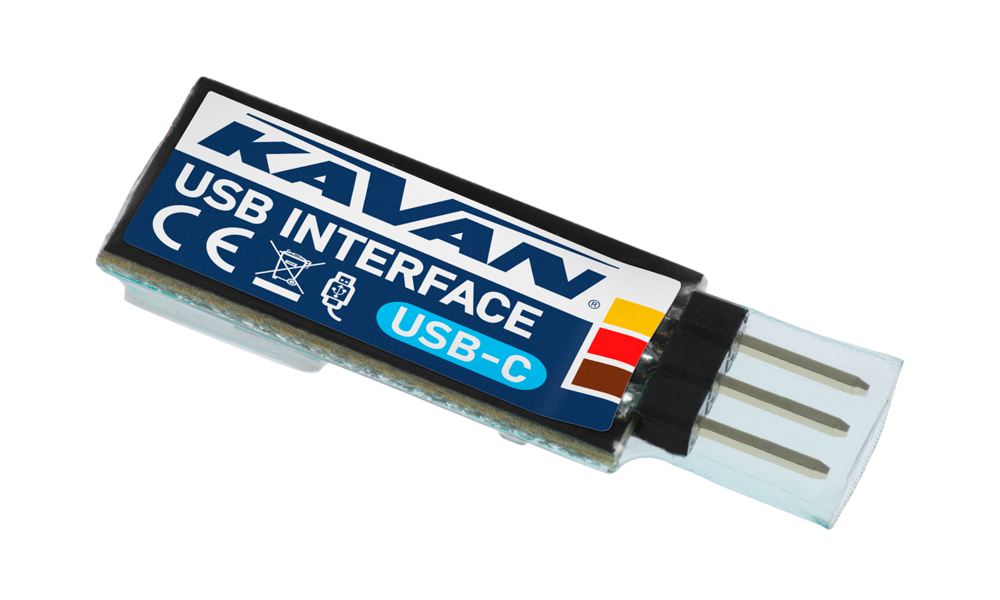
KAVAN Smart PRO USB-C interface
Introduction
The KAVAN Smart PRO USB-C interface connects compatible KAVAN Smart PRO and MAV Sense devices to a PC for configuration, firmware updates and telemetry data transfer.
Features
- Update compatible devices using MAV Manager.
- Download recorded sensor data.
- Display live telemetry on the PC.
- Configure device settings and save backups.
- USB Type-C connector (USB 2.0).
Technical specifications
| Dimensions | 33×12×6 mm |
|---|---|
| Weight | 2 g |
| USB connector | USB Type-C (USB 2.0) |
| Supply voltage | 5 V nominal from the PC; 4.5–5.5 V |
| Operating temperature | −20–85 °C |
| Operating system | Windows 7 or later; check the requirements of the installed MAV Manager and driver versions |

Main section
Installation
- Connect the interface to your PC using a USB-A to USB-C data cable. The cable is not supplied; a maximum length of 3 m is recommended.
- The operating system normally installs the driver automatically. The interface then appears in Device Manager as a virtual COM port. See (Fig. 1).
- If automatic installation fails, install the appropriate Silicon Labs USB-to-UART VCP driver.
- Install MAV Manager and check its system requirements.
Updating a connected device
- Disconnect the device from its normal installation and remove attached accessories, following its own manual.
- Connect the USB interface to the PC, start MAV Manager, open Tools → Device Updater and select the correct COM port.
- Connect the device to the USB interface using the port specified in that device’s manual. For a T70 or T75, use the Data port and apply external power through B1 or B2 as described there.
- Select the correct
*.BINfile for the connected device and press Update. See (Fig. 2). - Wait for the update to complete, then disconnect the device.

The legacy connection illustration shows Mini-USB. For the current USB-C interface, use a USB-A to USB-C data cable; follow the connected device’s manual for the correct device port and any external power supply.
Appendix
Manufacturer
KAVAN Smart PRO USB-C interface is made in Czechia by MAV Sense s.r.o.
E-mail: info@mavsense.com | Web: www.mavsense.com
Recycling and waste disposal note (European Union)
Electrical equipment marked with the crossed-out waste bin symbol must not be discarded in the domestic waste; it should be disposed of via the appropriate specialised disposal system. In the countries of the EU (European Union) electrical devices must not be discarded via the normal domestic waste system (WEEE - Waste of Electrical and Electronic Equipment, Directive 2012/19/EU). You can take your unwanted equipment to your nearest public collection point or recycling centre, where it will be disposed of in the proper manner at no charge to you. By disposing of your old equipment in a responsible manner you make an important contribution to the safeguarding of the environment.
EU declaration of conformity (European Union)
Hereby, KAVAN Europe s.r.o. declares that the KAVAN Smart PRO USB-C interface is in compliance with the essential requirements as laid down in the EU directive(s) concerning electromagnetic compatibility. The full text of the EU Declaration of Conformity is available at www.kavanrc.com/doc.
Guarantee
The KAVAN Europe s.r.o. products are covered by a guarantee that fulfils the currently valid legal requirements in your country. If you wish to make a claim under guarantee, please contact the retailer from whom you first purchased the equipment. The guarantee does not cover faults which were caused in the following ways: crashes, improper use, incorrect connection, reversed polarity, maintenance work carried out late, incorrectly or not at all, or by unauthorised personnel, use of other than genuine KAVAN Europe s.r.o. accessories, modifications or repairs which were not carried out by KAVAN Europe s.r.o. or an authorised KAVAN Europe s.r.o., accidental or deliberate damage, defects caused by normal wear and tear, operation outside the Specification, or in conjunction with equipment made by other manufacturers. Please be sure to read the appropriate information sheets in the product documentation.
For service, contact the retailer from whom you purchased the product. Use the original packaging if available. Include a dated description of how the product was used and the fault, together with your full address and telephone number.
Incorrect installation, inadequate mounting or cooling, cable strain, reversed polarity and operation beyond the specified limits are not covered. Protect the device from excessive heat, moisture and dust, and do not leave it in direct sunlight for prolonged periods.