KAVAN Smart PRO SE6 / SE6M 6ch BUS servo decoder - Instructi
on manual
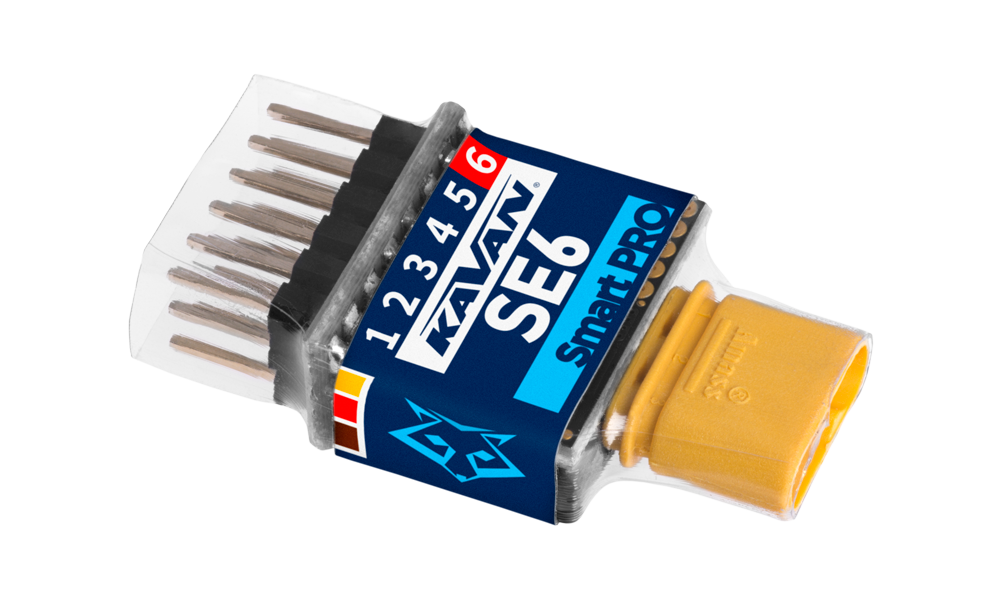
KAVAN Smart PRO SE6M 6ch BUS servo decoder
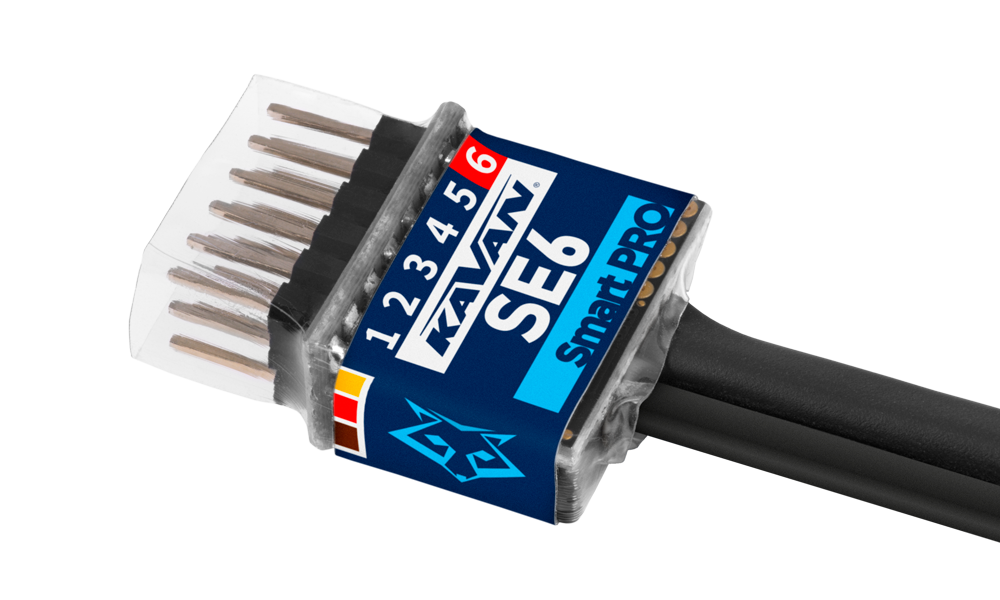
KAVAN Smart PRO SE6 6ch BUS servo decoder
Introduction
The KAVAN Smart PRO SE6 6ch BUS servo decoder is a device that converts serial bus signals to standard PWM servo outputs. It offers up to six configurable servo outputs with optional period and fail-safe settings. The SE6 connects multiple servos in a complex wing or tail to the primary receiver through a single cable. In addition, if you are running out of receiver channels simply connect the SE6 to the receiver serial line and freely assign its own output channels.
Supported protocols
- KAVAN, FrSky: FPort
- Futaba: S.Bus/S.Bus2
- Graupner: SUMD, HoTT telemetry for setting
- JETI: EX Bus
- Multiplex: MSB, SRXL 12ch, SRXL 16ch
- PowerBox: P²Bus
Hardware variants
- SE6M (KAV16.21532) has an MR30 input connector.
- SE6 (KAV16.21533) is supplied without an input connector.
The diagrams show the MR30 version. Match the wiring to your hardware variant.
Features
- Small dimensions and high current throughput via the MR30 power connector on the SE6M
- Up to 6-channel servo expander
- Automatic detection of serial data/telemetry after startup
- Configuration through the transmitter, external terminal (JETIBOX/SMART-BOX) or MAV Manager PC software
- Firmware updates via USB interface
Technical specifications
| Parameter | SE4 | SE6 |
|---|---|---|
| Dimensions (including connectors) | 34×14×9 mm | 34×19×8 mm |
| Weight (including connectors) | 4 g | 4.5 g |
| Servo output channels | 3 or 4 | 5 or 6 |
| Operating current | 15 mA | 15 mA |
| Operating temperature | −20–85 °C | −20–85 °C |
| Supply voltage | 4–14 V (recommended 5–8.4 V) | 4–14 V (recommended 5–8.4 V) |
| Continuous current | 15 A | 15 A |
| Peak current | 60 A (2 s) | 60 A (2 s) |
| Supported protocols | JETI Duplex, Multiplex, Graupner HoTT, Futaba S.Bus, PowerBox P²Bus | JETI Duplex, Multiplex, Graupner HoTT, Futaba S.Bus, PowerBox P²Bus |
| Status LED | Yes | Yes |
| Multiple EX Bus sensor expander | EX Bus: up to 4 sensors | No |
Main section
Installation
Attach the required servos to the SE6 servo expander. Connect the receiver – use its output port with the serial data option. The SE6M uses the MR30 connector for primary data input. The SE6 is supplied without this connector.
Turn on the transmitter and apply the appropriate power source to the receiver. The status LED starts blinking as soon as the SE6 detects the signal on the serial line.
For analogue servos, set the output period to 15 ms or longer. A shorter period can cause unexpected servo behaviour. Use a power supply rated for the attached servos and observe each servo’s voltage limit.
Basic installation

High power installation

Multiple installation in a complex wing

Telemetry and settings
The device is compatible with JETIBOX for programming. The JETIBOX menu is divided into three sections:
- Actual values – Displays the latest telemetry values (voltage, temperature, system status) including minimums and maximums.
- System – Shows the detected serial protocol and its average frame rate.
- Fadeouts/FS – Number of frame misses and time spent in fail-safe mode. The number of frame misses increases every time the interval between two consecutive servo frames noticeably exceeds the average period.
- Reset Min/Max – Press ⮜ + ⮞ buttons together to reset all minimums and maximums.
- Settings – Basic settings of the sensor.
- Language – You can choose the language of the JETIBOX screen.
- Period – You can specify a fixed servo output period (5–30 ms), or automatic output period synchronous to the serial input.
- Data Port (6) – Select either a servo output or a sensor/terminal connection. Using port 6 for a sensor or terminal leaves five servo outputs; SE6 does not provide the SE4’s four-sensor expander mode.
- Fail-safe delay – Set the time that must elapse before entering the fail-safe mode if there is no signal on the serial line.
- Ch.1–Ch.6 – Here you can set the properties of each output channel. You can modify the receiver channel assignment to the outputs of the SE6. By pressing both ⮜ + ⮞ buttons you can change the behaviour if there is no signal on the serial line:
- <Hold> (default) – Repeat the last known servo position.
- <FS XX> – Set the servo position to a fixed value XX %.
- Set fail-safe now – By pressing both ⮜ + ⮞ buttons the actual servo positions will be stored as fail-safe values.
- Service – In this menu you can view the device version and reset it to the default factory configuration.
JETIBOX or SMART-BOX connection
Plug the SE6 into the sensor slot of the JETIBOX/SMART-BOX. Power it up using a battery with appropriate voltage (4.5–8.4 V). Now you can configure the device using ⮝, ⮟, ⮜ and ⮞ on the JETIBOX/SMART-BOX.

Default connection of JETIBOX/SMART-BOX. For the SE6M, an adapter cable between MR30 and JR is necessary.

Optional type of connection. Output No. 6 must be configured to a „Sensor“ option.

Optional SMART-BOX or HoTT receiver connection. Output No. 6 must be configured to the „Sensor“ option and a SUMD signal must be detected at the primary input (MR30 on the SE6M).
Complete JETIBOX menu structure

Graupner HoTT menu structure

SE6 offers text telemetry as a standard EAM telemetry module.
Safety information
- Protect the device from moisture, dust and prolonged direct sunlight.
- Operate the SE6 always in a dry environment and within the device limits stated in this guide. Never expose the device to excessive heat or cold.
- Do not remove the heat shrink tube from the device and do not try to implement any changes or modifications. This can result in damage to the product and denial of any warranty claims.
- Always check the polarity of the connection. Never reverse the polarity – this could result in damage to the product.
- Always use a sufficient power source according to the consumption of the attached servos. Never exceed the maximum allowed operating voltage of the attached servos.
Firmware update

Firmware updates for the SE6 are transferred from a PC via the USB interface. The required programs and files are available at www.mavsense.com.
Install the MAV Manager software and the USB drivers on your computer. Check the system requirements.
- Disconnect all servos from SE6.
- Connect the USB interface to your PC, run MAV Manager, open Tools → Device Updater and select the correct COM port.
- Connect the SE6 as shown in (Fig. 9).
- Select the correct
*.BINfile and press Update. - Wait for the update to complete, then disconnect the device.
The legacy connection illustration shows Mini-USB. For the current USB-C interface, use a USB-A to USB-C data cable; follow the connected device’s manual for the correct device port and any external power supply.
PC configuration
It is possible to use the MAV Manager software (1.6.0 and later) to conveniently configure all device settings, display real-time telemetry and make a backup copy of your settings. The configuration menu contains four buttons in the top toolbar, shown in (Fig. 11):
- Refresh – forces the configuration to be reloaded from the device.
- Import – imports the settings from a file. If you have several devices and want all of them with identical settings, import the same settings to each device.
- Export – exports the settings from the device to a file. You can easily create a backup configuration stored on your PC. After creating a backup, you may easily experiment with the settings and later revert to the original configuration by pressing the Import button and choosing the original exported file.
- Reset default – resets the device to factory defaults and reloads all the settings.

Connect the SE6 to your PC using the USB interface. The device will be automatically detected by the MAV Manager.

The device properties are available after pressing the Configure button.

Real-time telemetry with min/max values. The MAV Manager also can create a log file from the real-time telemetry data, which can be viewed, analyzed, imported and exported.

SE6 settings. Every time you change the configuration, the new value is immediately transferred to the device and saved to memory. There is no need for additional confirmation.
Appendix
Manufacturer
KAVAN Smart PRO SE6 6ch BUS servo decoder is made in Czechia by MAV Sense s.r.o.
E-mail: info@mavsense.com | Web: www.mavsense.com
Recycling and waste disposal note (European Union)
Electrical equipment marked with the crossed-out waste bin symbol must not be discarded in the domestic waste; it should be disposed of via the appropriate specialised disposal system. In the countries of the EU (European Union) electrical devices must not be discarded via the normal domestic waste system (WEEE - Waste of Electrical and Electronic Equipment, Directive 2012/19/EU). You can take your unwanted equipment to your nearest public collection point or recycling centre, where it will be disposed of in the proper manner at no charge to you. By disposing of your old equipment in a responsible manner you make an important contribution to the safeguarding of the environment.
EU declaration of conformity (European Union)
Hereby, KAVAN Europe s.r.o. declares that the KAVAN Smart PRO SE6 6ch BUS servo decoder is in compliance with the essential requirements as laid down in the EU directive(s) concerning electromagnetic compatibility. The full text of the EU Declaration of Conformity is available at www.kavanrc.com/doc.
Guarantee
The KAVAN Europe s.r.o. products are covered by a guarantee that fulfils the currently valid legal requirements in your country. If you wish to make a claim under guarantee, please contact the retailer from whom you first purchased the equipment. The guarantee does not cover faults which were caused in the following ways: crashes, improper use, incorrect connection, reversed polarity, maintenance work carried out late, incorrectly or not at all, or by unauthorised personnel, use of other than genuine KAVAN Europe s.r.o. accessories, modifications or repairs which were not carried out by KAVAN Europe s.r.o. or an authorised KAVAN Europe s.r.o., accidental or deliberate damage, defects caused by normal wear and tear, operation outside the Specification, or in conjunction with equipment made by other manufacturers. Please be sure to read the appropriate information sheets in the product documentation.
For service, contact the retailer from whom you purchased the product. Use the original packaging if available. Include a dated description of how the product was used and the fault, together with your full address and telephone number.
Incorrect installation, inadequate mounting or cooling, cable strain, reversed polarity and operation beyond the specified limits are not covered. Protect the device from excessive heat, moisture and dust, and do not leave it in direct sunlight for prolonged periods.