KAVAN Beta 1400mm Kit - Instruction manual
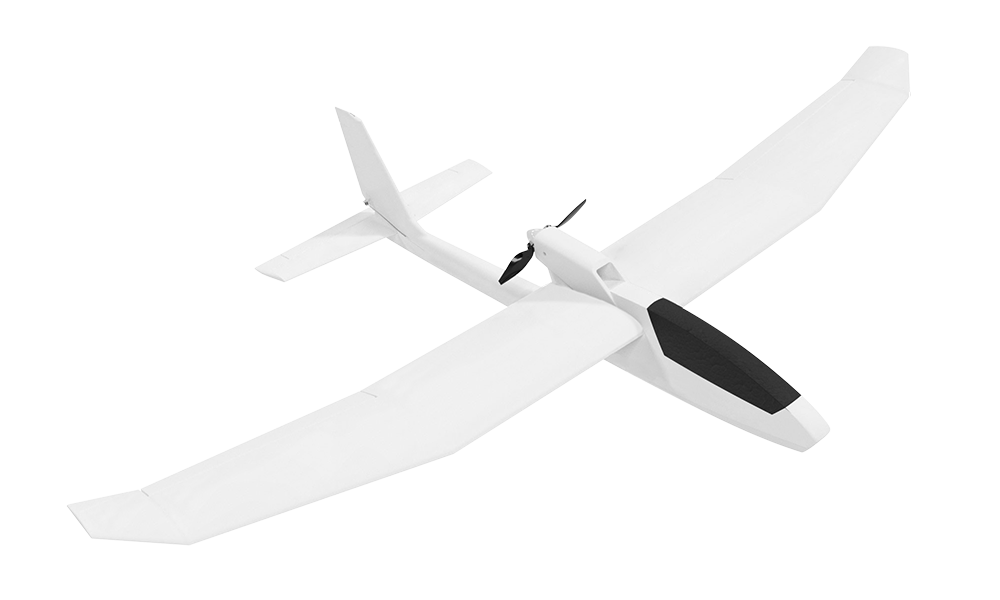
KAVAN Beta - kit
Introduction
The Beta 1400 is an EPO (expanded polyolefin) motor glider for initial flight training and recreational thermal flying. Its pusher motor is mounted on a pylon behind the wing. Ailerons, elevator, rudder and motor speed are controlled separately. This kit contains the airframe parts and folding propeller; the motor, ESC, servos, radio and flight battery are supplied separately.
Features
- Builder’s kit with EPO foam parts
- Aileron, elevator, rudder and throttle control
- Easy handling, high stability and a durable, high-performance electric motor-powered glider
- Large wing area, low weight
Technical specifications
| Wingspan | 1400 mm |
|---|---|
| Length | 966 mm |
| All-up weight | 700–770 g |
| Wing area | 24.5 dm² |
| Wing loading | 28.6–31.4 g/dm² |
| Recommended motor (not included) | C2814-1400 outrunner |
| Recommended ESC (not included) | 20 A with BEC 5 V, compatible with the motor and battery |
Safety precautions
This RC model is not a toy. Use it with care and follow these instructions.
Children under the age of 14 must operate the model under adult supervision. Check the airframe, equipment and control operation before every flight. Fly in light winds in a safe area clear of obstacles.
General warnings
An RC aeroplane is not a toy! If misused, it can cause serious bodily harm and damage to property. Fly only on a safe place following all instructions and recommendations in this manual. Beware of the propeller! Keep loose items that can get entangled in the propeller away from the spinning propeller, including loose clothing, or other objects such as pencils and screwdrivers. Ensure that yours and other people’s hands, and face are kept away from the rotating propeller.
Note on lithium polymer batteries
Lithium Polymer batteries are significantly more vulnerable than alkaline or NiCd/NiMH batteries used in RC applications. All manufacturer’s instructions and warnings must be followed closely. Mishandling of LiPo batteries can result in fire. Always follow the manufacturer’s instructions when disposing of Lithium Polymer batteries.
Additional safety precautions and warnings
As the user of this product, you are solely responsible for operating it in a manner that does not endanger yourself and others or result in damage to the product or the property of others. This model is controlled by a radio signal that is subject to interference from many sources outside your control. This interference can cause momentary loss of control so it is advisable to always keep a safe distance in all directions around your model, as this margin will help to avoid collisions or injury.
Never operate your model with low transmitter batteries.
Always operate your model in an open area away from power lines, cars, traffic, or people.
Avoid operating your model in populated areas where injury or damage can occur.
Disconnect the flight battery when you are not flying. The ESC draws current even at minimum throttle. Leaving it connected for hours or days can cause deep discharge, battery damage and a fire risk.
Carefully follow the directions and warnings for this and any optional support equipment (chargers, rechargeable batteries, etc.) which you use.
Keep all chemicals, small parts and anything electrical out of the reach of children.
Moisture causes damage to electronics. Avoid water exposure to all equipment not specifically designed and protected for this purpose.
Never lick or place any portion of your model in your mouth as it could cause serious injury or even death.
Kit contents
- EPO foam moulded parts
- Small accessories
- 7×6" prop
- Spinner set
- Sheet of red stickers
- Sheet of blue stickers
- Instruction manual
You will also need the following accessories and tools (not included in the kit)
RC set, power unit, battery
- At least a 4-channel transmitter and receiver
- LiPo flight pack 11.1 V 1600–2200 mAh, at least 20C
- KAVAN C2814-1400 brushless motor or similar
- KAVAN R-20B Plus 20A ESC or an equivalent compatible ESC
- 4× KAVAN GO-09 servos or similar
- Short Y-cable or 2× 20–30 cm extension cable
Tools
- Small Phillips and flat screwdrivers
- 1.5 mm Allen key or screwdriver
- Hot melt glue gun
- Sandpaper No. 150–200
Glue
- Medium or thick cyanoacrylate glue (e.g. KAV56.9952 or KAV56.9953)
- Low or medium strength threadlocker (blue – e.g. KAV56.9970).
- Hot melt glue or MS polymer glue (e.g. BISON Poly Max®, Soudal T-Rex®)
- Clear sticky tape
Main section
Radio and battery preparation
Install a compatible radio and power system; the kit does not include them. Use the radio manufacturer’s instructions for transmitter power, model setup, binding and fail-safe.
Charge the 3S LiPo flight battery with a compatible balance charger according to its instructions. If a KAVAN C3 is supplied, use the C3 charger manual. Never leave charging unattended.
Assembly
Keep the flight battery disconnected during assembly. Remove the propeller before radio setup, ESC calibration and motor-direction testing. Refit it only after switching off and disconnecting the battery.
Fuselage
The fuselage is supplied unassembled (with pre-installed push rods, carbon and plywood reinforcements) in the kit. You are supposed to install the servos and motor and glue the fuselage halves together. Roughen the contact areas with No. 150–200 sandpaper before applying glue.
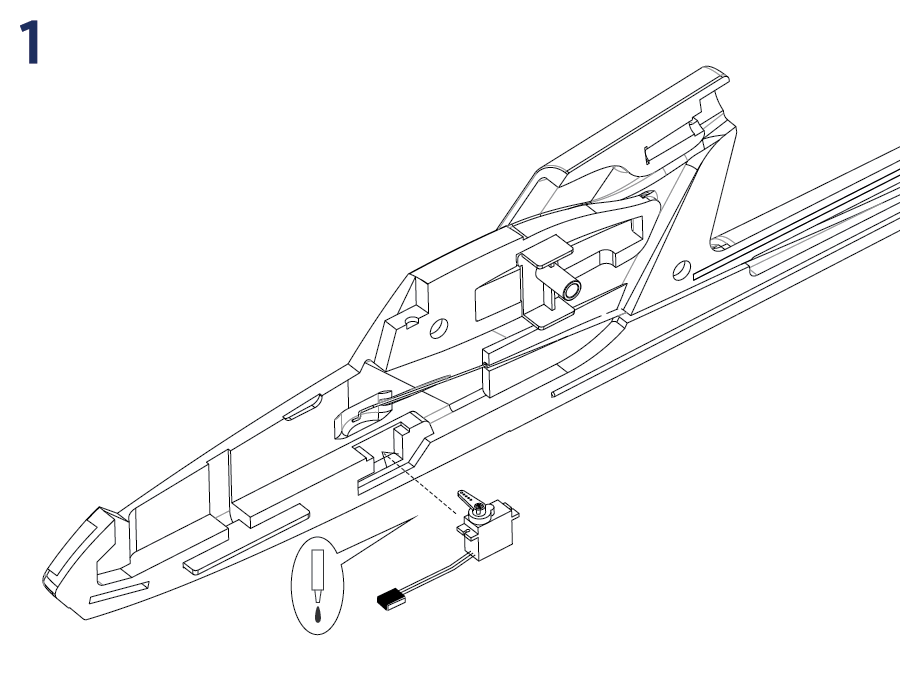
1. Rudder servo installation (Fig. 1)
- Locate the right fuselage half. You will find the KAVAN GO-09-sized bay for the rudder servo in the rear part of the cockpit compartment.
- Prepare the one-sided arm supplied with the KAVAN GO-09 (or cut a two-side arm to one-side arm). Turn on your transmitter, set the rudder stick and trim to the centre (neutral). Connect the rudder servo to the appropriate receiver output (CH4 with the T8FB), plug the ESC’s cable to the throttle channel (CH3 with the T8FB) and connect the flight pack. Insert the Z-bend on the end of the rudder pushrod into the middle hole in the servo arm (ca 10 mm from the centre of the arm). Now insert the servo into the servo bay, so the servo output shaft and cable face the nose.
- Now attach the servo arm on the output shaft of the servo - it should be square to the side of the servo case as much as possible. Secure the servo arm with the screw supplied with the servo. Glue the servo with drops of hot melt glue or MS polymer glue over the servo lugs. You can use a medium CA as well, but the hot melt glue or MS polymer glue could be easily removed without damage to your model if you ever needed to get the servo out.
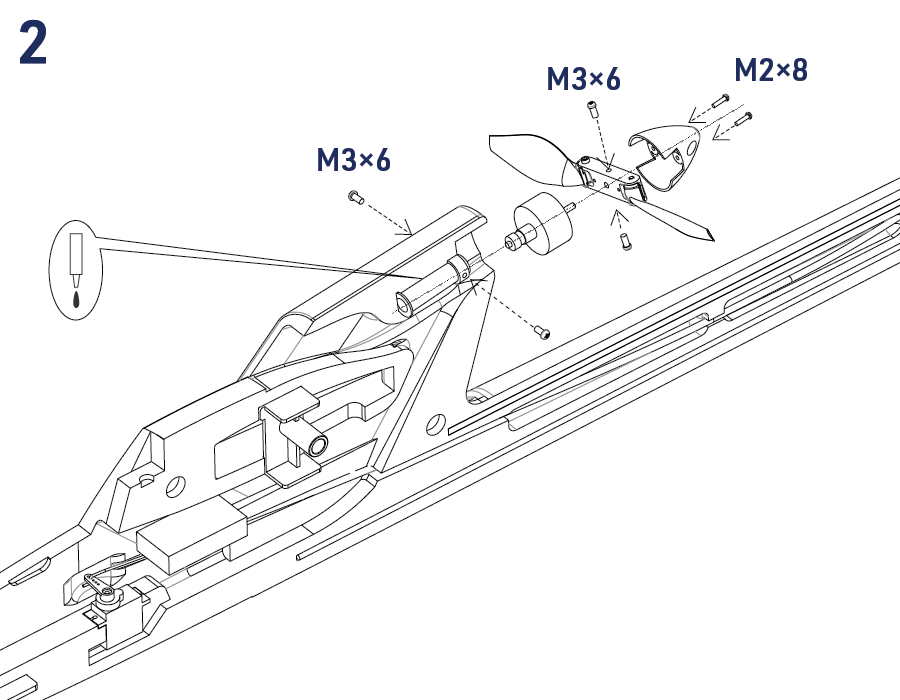
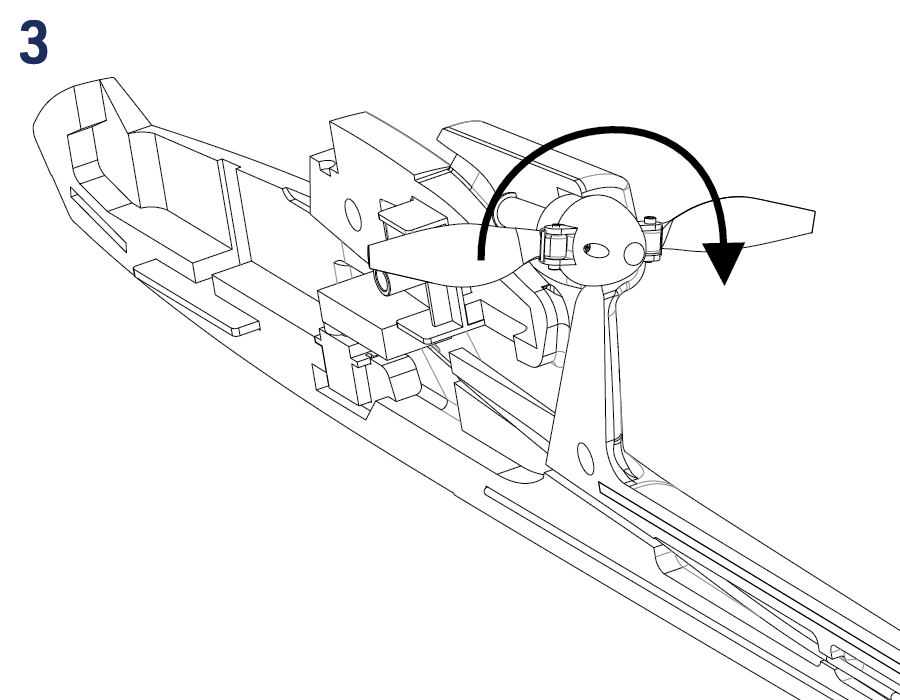
2. Motor mount (Fig. 2)+(Fig. 3)
- KAVAN C2814-1400 brushless motor is to be secured to the supplied aluminium mount by two M3×6 mm setting screws. Check the correct alignment of the motor mount - the setting screws have to point straight to the access holes in the side of the fuselage. Glue the motor mount using thick cyano or MS polymer glue into the slot in the fuselage.
- Please note the motor is offset up and right. This „up thrust“ and „side thrust“ is correct and purely intentional. It compensates for the effect of the propeller stream on the fuselage and tail. Check the correct alignment of both fuselage halves before glueing the motor mount permanently into the right fuselage shell.
- Motor direction of rotation check: With the propeller removed, connect the motor cables to your ESC and secure the motor into the motor mount with two M3×6 mm setting screws. With your radio on, check the direction of rotation of your motor as described in Testing the power system. Once set correctly, disconnect the battery and remove the motor from the motor mount. (Fig. 3)
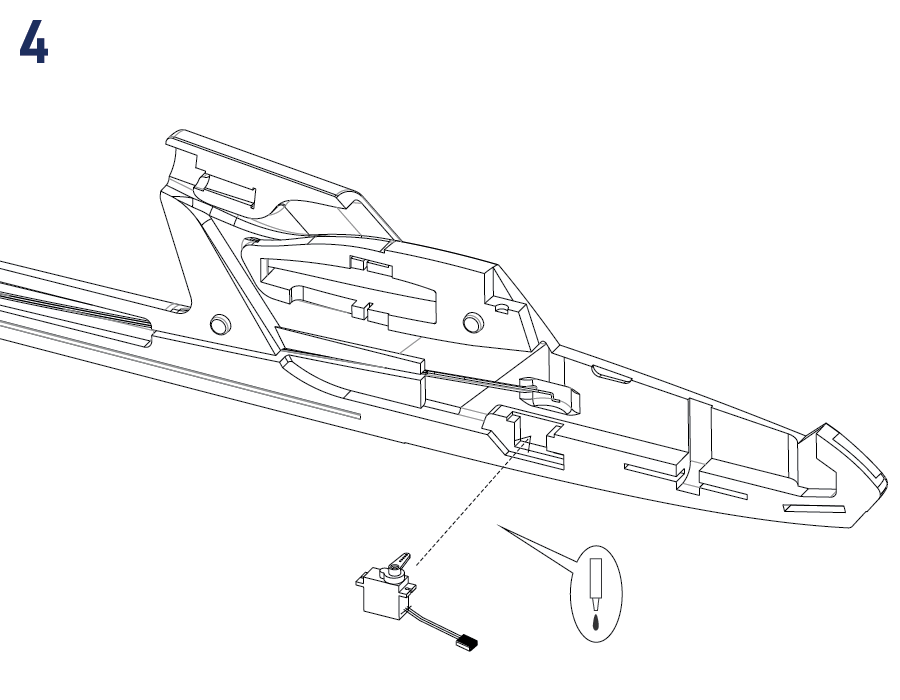
3. Elevator servo installation (Fig. 4)
- Locate the left fuselage half and install the elevator servo in the same way as you did with the rudder servo. Do not forget to set the servo (CH2 with the T8FB) into the neutral position with your radio on.
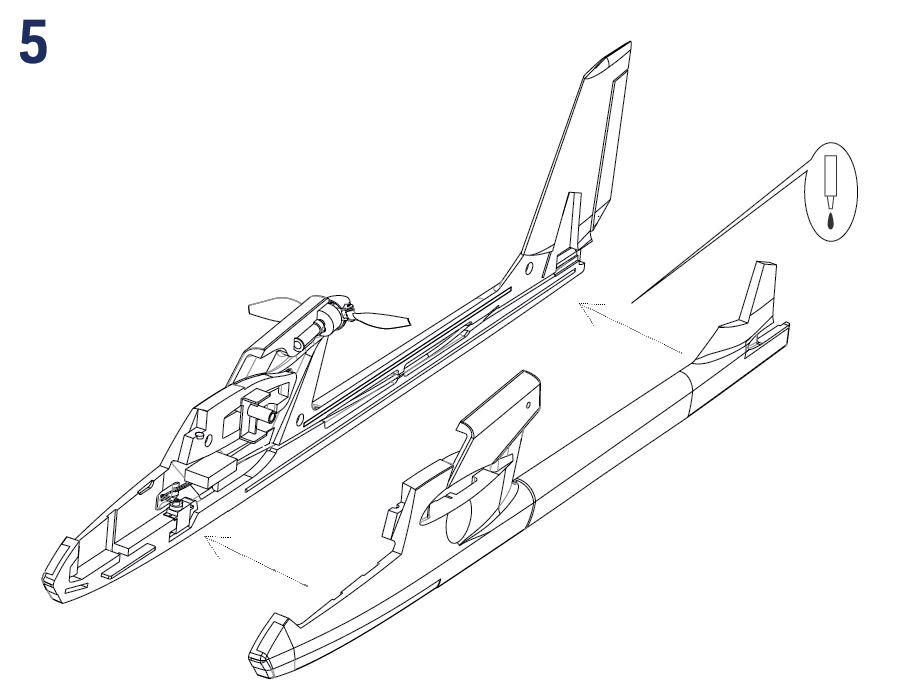
4. Joining the fuselage shells (Fig. 5)
- Attach the left and right fuselage shell together. Take care they are correctly aligned all around. If necessary, sand the contact area flush to create a neat joint. Once satisfied, apply a bead of thick cyano or MS polymer glue on the right fuselage shell. (Slow-setting glue is required here to give you some time to align the fuselage shells correctly - and double-check it). Attach the shells together, check the correct alignment and secure them with modelling pins or masking tape until the glue sets down. Double-check that the fuselage is straight and untwisted; looking along the longitudinal axis of the fuselage, the joint of the fuselage shells must be straight. Take extra care of the good alignment at the wing and tailplane area. This is the most critical step of the entire assembly - now you can make a straight and true fuselage that will give you a pleasant plane to fly - or not.
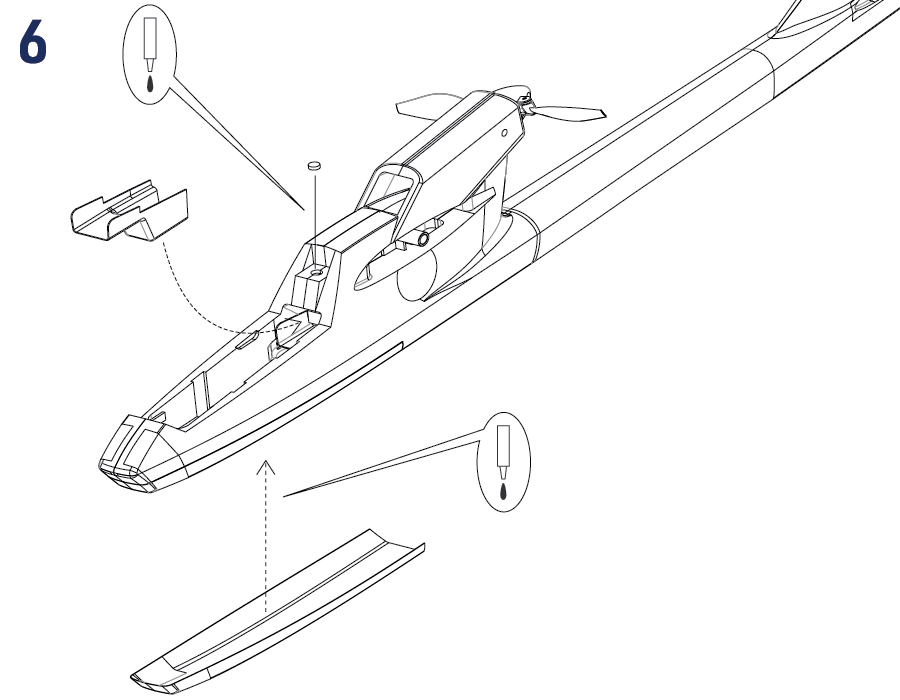
5. Finishing the fuselage (Fig. 6)
- Check the correct polarity of the canopy lock magnets and cyano them into the respective recess on the rear side of the cockpit and canopy. Cover it with a piece of clear sticky tape in the end.
- Cyano (alternatively you can use a thin double-sided sticky tape or foam-compatible contact cement) the plastic reinforcement to the bottom side of the fuselage.
- After the motor (do not forget to apply a blue thread locker to the setting screws) and ESC have been installed, secure the plastic servo cover into the fuselage using drops of hot melt glue, small pieces of hook and loop tape or small magnets (not supplied in the kit). The point is securing the cover in place - yet making it removable to access the servos if needed.
- After radio setup and motor-direction testing, disconnect the flight battery. Install the propeller yoke and secure it with two M3×6 mm setting screws (do not forget to apply a blue thread locker to the screws). Finally, install the spinner using two M2×8 mm screws. Be sure the propeller rotates freely. No matter what, the propeller blades may not graze the fuselage. (Fig. 2)
Wing
1. Releasing the Ailerons
- Deflect the ailerons 10 times up and down carefully to make them move easily.
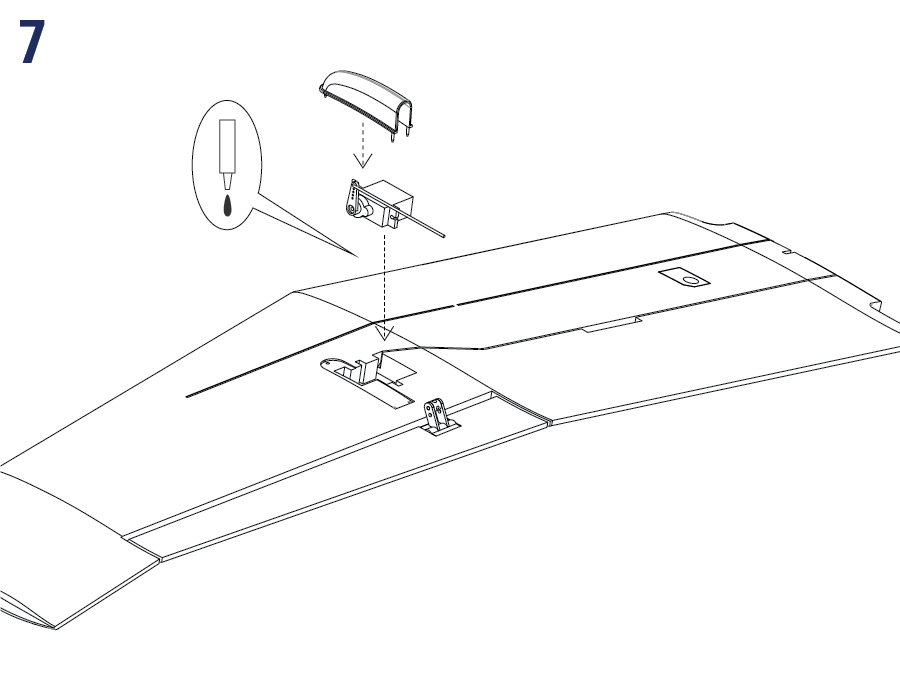
2. Aileron servos installation (Fig. 7)
- You can find moulded servo bays in both wing halves that fit KAVAN GO-09 servos or similar. Set the aileron servos to neutral with your radio on (in the same way as you did with the elevator and rudder servos). Attach the one-sided servo arms so the arms are square to the side of the servo case as much as possible. Please note you must obtain a mirror image pair - simply lay both servos down on the table, the output shaft pointing towards each other and both the servo sides with servo cables pointing in the same direction. Now attach the servo arms - square to the servo case side, same on both servos. Check the operation of aileron servos and secure the arms with screws supplied with the servos.
- For mechanical aileron differential, you can angle both servo arms forwards by about 15–20° instead of setting them square. Both sides must match, and the resulting up travel must exceed the down travel. Verify the measured throws; do not combine mechanical and electronic differential without checking the result.
- Insert the servos into the servo bays and secure them with drops of hot melt glue or MS polymer glue over the servo lugs. Connect the supplied extension cables to the aileron servos. Deploy the servo cable (with the connector put neatly into the bay in the wing) in the aileron servo cable groove. The end of the cable should stick out of the wing by 10 cm (4") to allow inserting the cable into the fuselage. Apply a strip of clear sticky tape over the aileron servo cable grooves.
3. Aileron linkage installation
- Locate the two short piano wire pushrods with pre-formed Z-bend on one end in the accessories bag. Insert the Z-bend into the outer hole in the aileron servo arm. Insert the other end of the push rod into the push rod connector in the aileron arm. Repeat for the other wing half.
- (The position of a push rod in holes of a control arm is a way how to adjust control throws with a non-computer radio. Moving the push rod closer to the control surface gives bigger throws whilst moving the push rod to outer holes reduces the throws. You can also move the position of the push rod Z-bend on the servo arm - in this case, moving the push rod closer to the centre of the servo arm reduces the throws - and vice versa.)
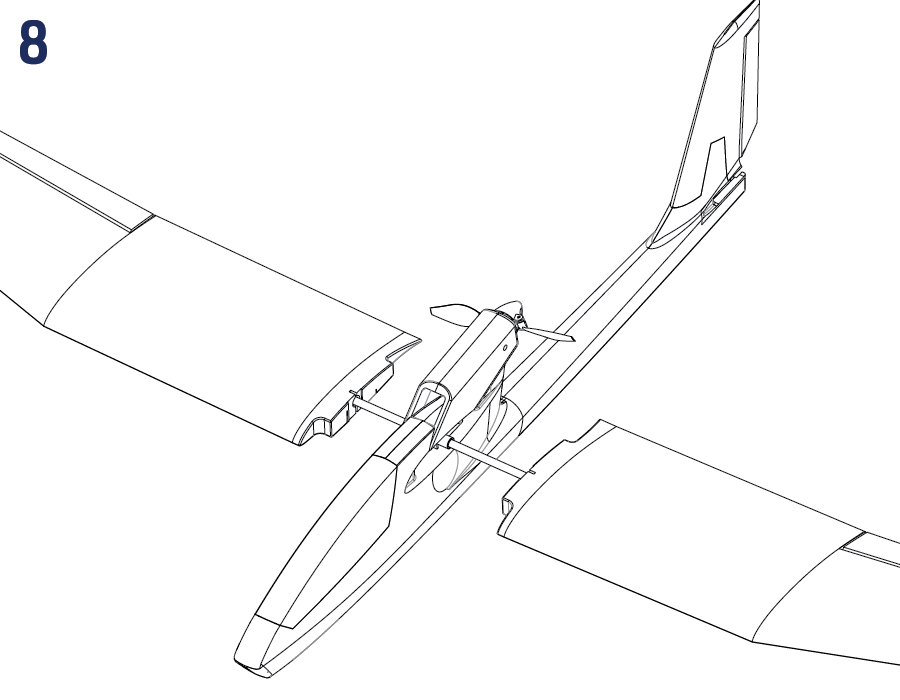
4. Wing joiner (Fig. 8)
- Locate the carbon tube wing joiner, insert it into the housing in the fuselage and slide both wing halves onto the joiner.
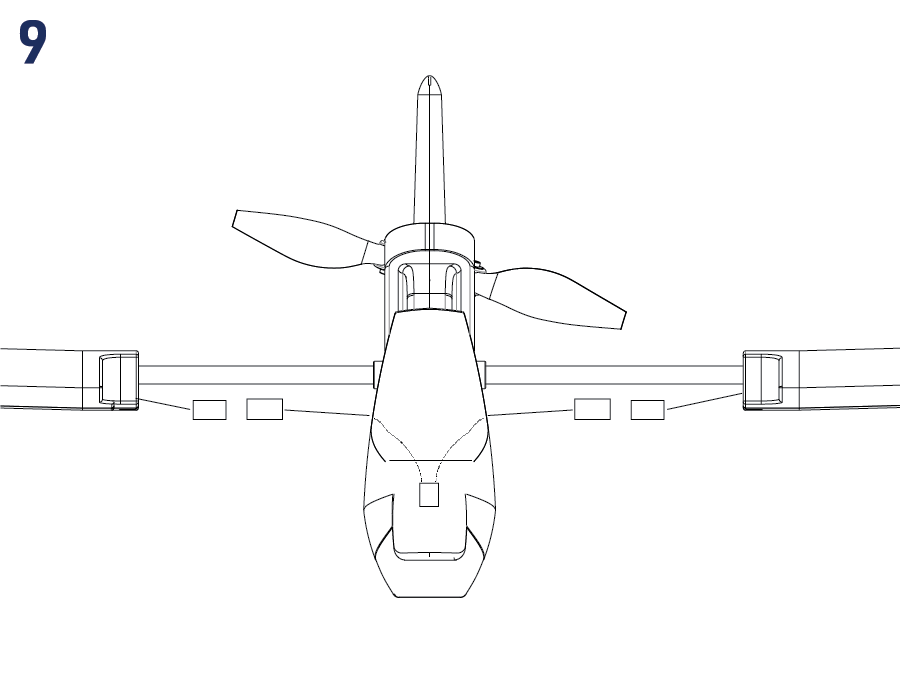
5. Connecting the aileron servos (Fig. 9)
- A radio featuring only one aileron channel:
Connect both aileron servos to a Y-cable and connect it to the receiver’s aileron channel (CH1 for the illustrated T8FB setup). - A radio featuring 2 independent aileron servo channels:
Use two 20–30 cm extension cables to connect the aileron servos to their assigned receiver channels, typically CH1 and CH5 or CH6. Follow your radio’s channel assignment. The Y-cable or receiver extension cables are not included in the kit.
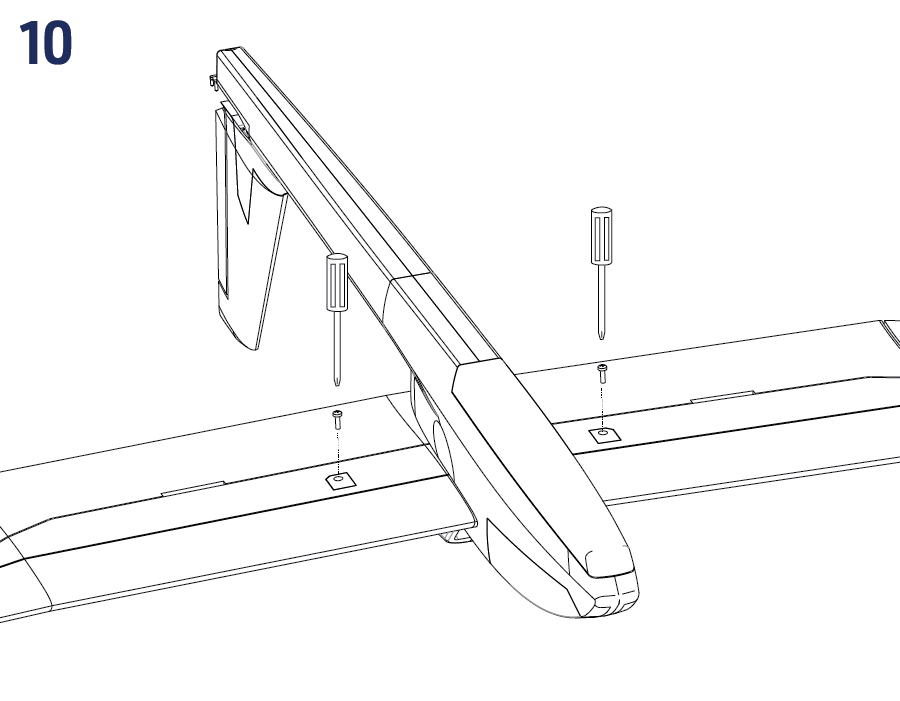
6. Securing the wing
- Secure the wing halves by carefully tightening the M5×10 mm setting screws on the bottom side of the wing. (Fig. 10)
7. Aileron Servo Covers (Fig. 7)
- Once the aileron servo operation and aileron linkage have been set and tested successfully, glue the aileron servo covers in place.
Tail feathers
1. Releasing the elevator and rudder
- Deflect the elevator and rudder 10 times up and down (left and right) carefully to make them move easily.
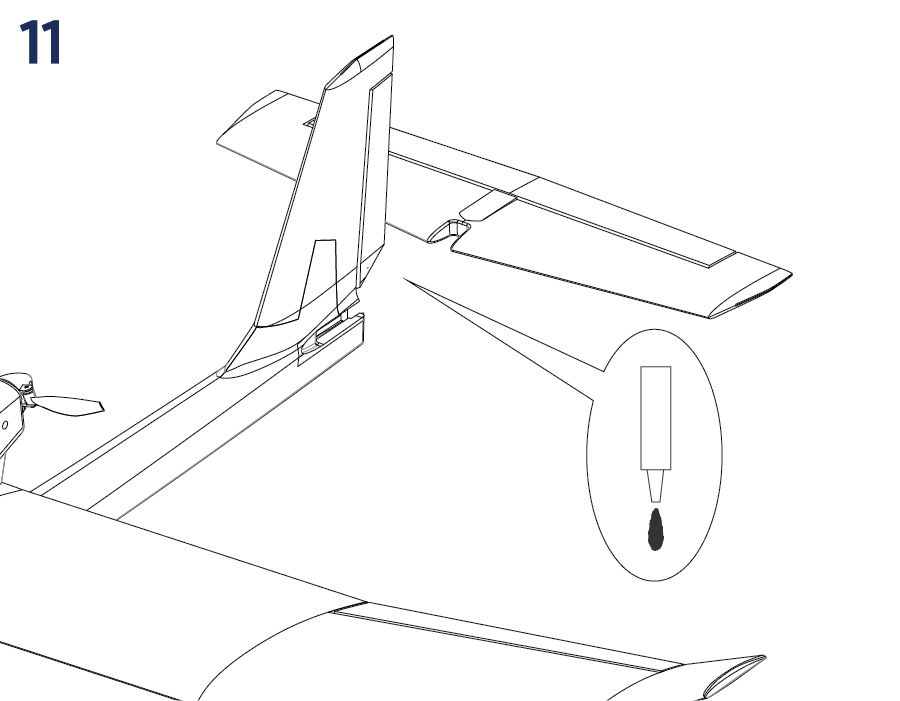
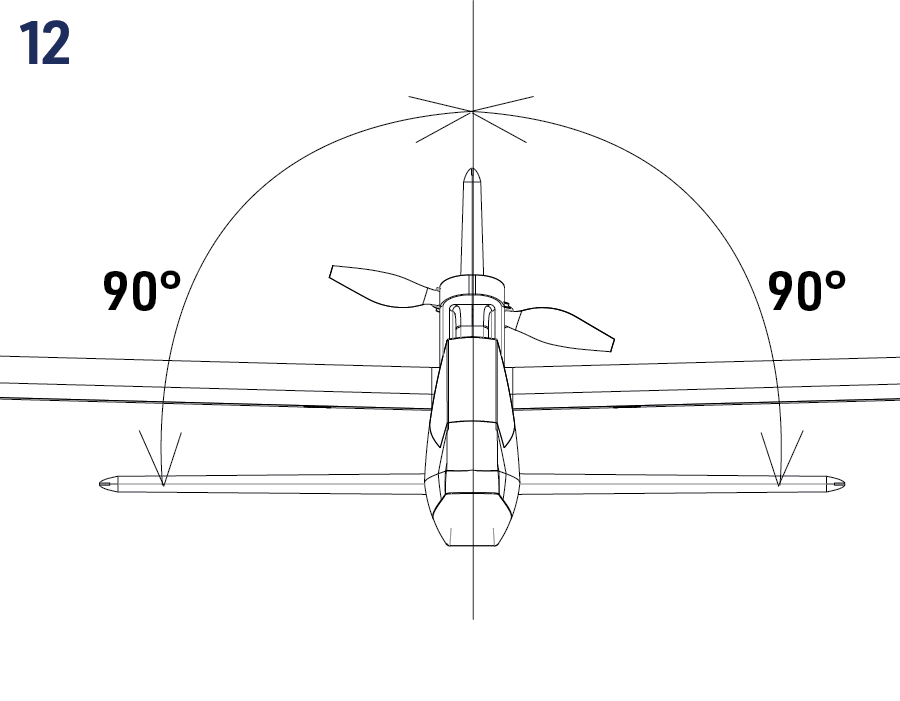
2. Horizontal tailplane installation (Fig. 11)+(Fig. 12)
- Glue the horizontal tailplane into the fuselage using medium or thick cyano. Be sure the elevator horn is on the bottom side. Before the glue sets, check the correct alignment of the horizontal tailplane - it has to be square to the fin.
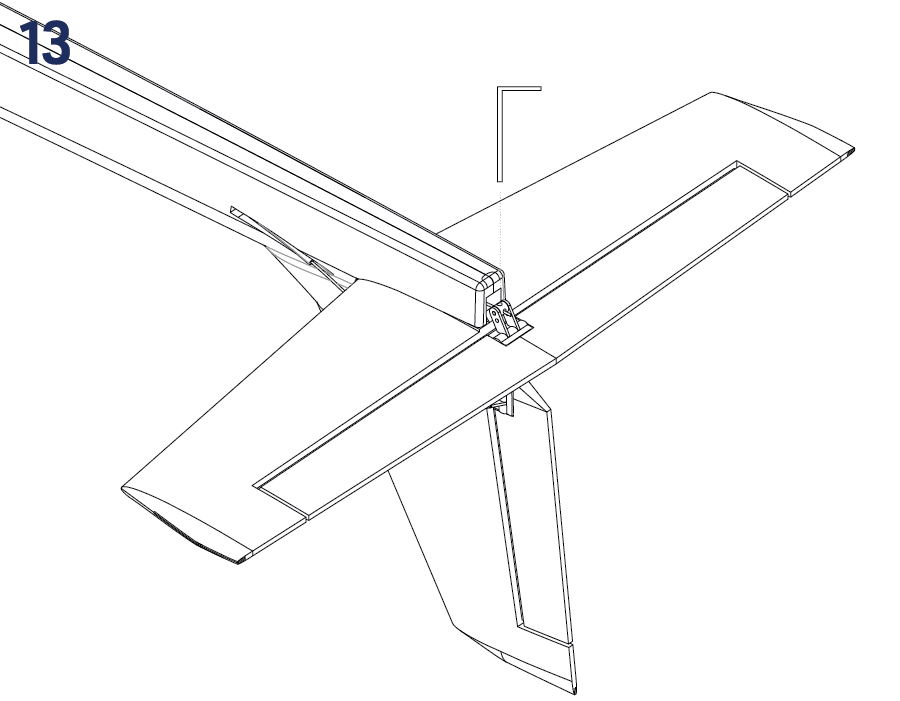
3. Elevator and rudder linkage (Fig. 13)
- Insert the elevator and rudder push rods into the push rod connector in the elevator (rudder horn).
Applying the stickers
- Cut the stickers following the printed outlines. Apply them to the surface of your model dampened by water with a few drops of mild dish detergent. It allows re-positioning of the sticker if necessary. Once satisfied with the position, carefully smooth out the sticker with a soft cloth to remove all air bubbles.
RC set installation
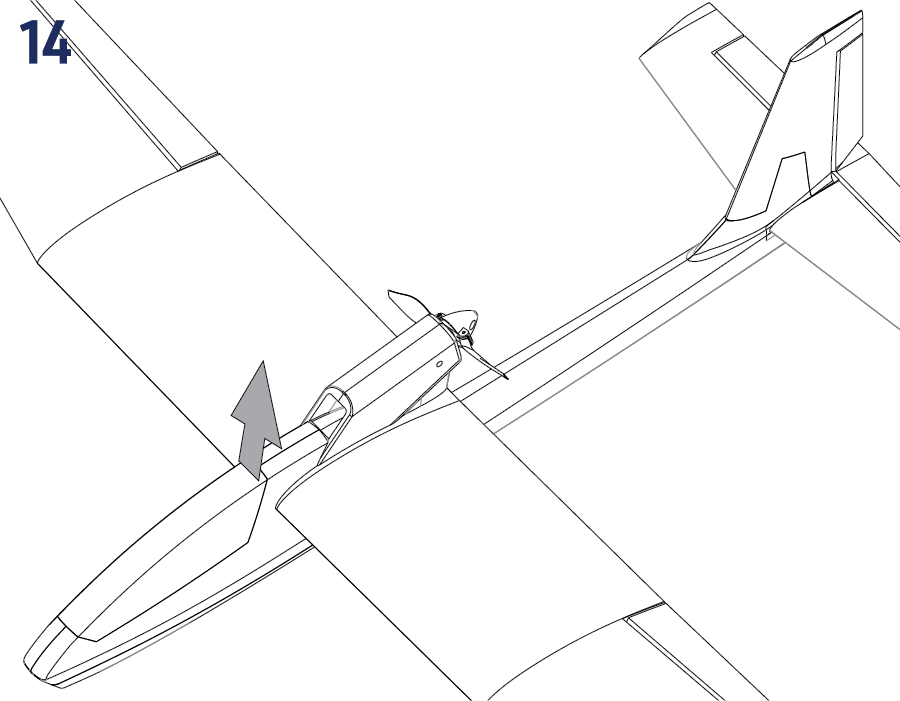
Now you have to install/connect your receiver, servos and electronic speed controller (ESC). (Fig. 14)
- Remove the canopy: lift the rear part to disengage the magnetic lock.
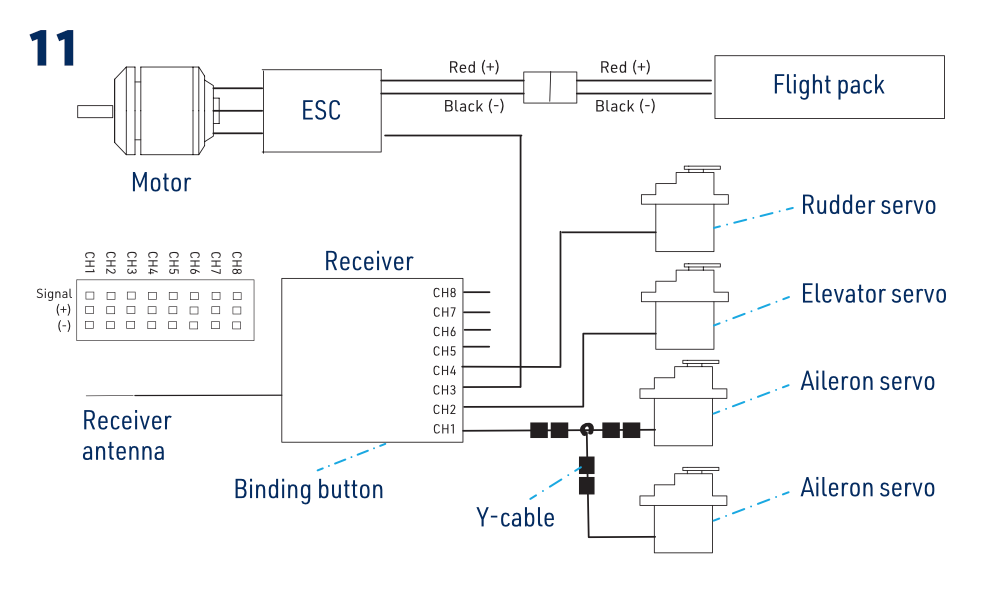
- Following your radio instruction manual, connect the servos and ESC to your receiver – the table shows the original T8FB channel assignment as an example; use the assignment of your own radio.
- Put your receiver into the fuselage (into the rear part of the cockpit). You can secure it using a strip of hook-and-loop tape to the fuselage.
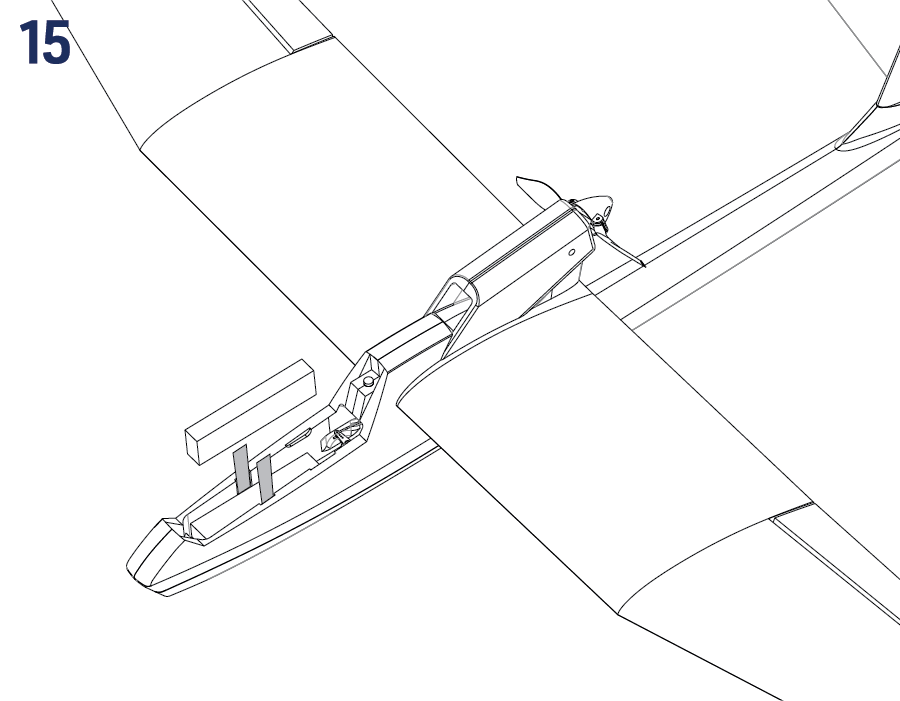
- The flight battery pack is to be inserted into the nose of your Beta 1400 and secured by the hook-and-loop strap threaded under the plywood reinforcement plate - the exact position of the battery pack will be determined later during the centre of gravity (CG) position check.
| Connector label | Function | Receiver channel (T8FB example) |
|---|---|---|
| AILE | Ailerons | CH1 |
| ELEV | Elevator | CH2 |
| ESC | Throttle | CH3 |
| RUDD | Rudder | CH4 |
Always turn on your transmitter first, and only then connect the flight pack to the ESC. From now on, always handle your model as if the motor might burst into life and the propeller started to spin anytime.
Receiver
Receiver aerial
Follow the instructions for the actual receiver. For the original external aerial shown, keep the active end (the last 30 mm with translucent insulation) straight and as far as possible from conductive parts, wiring and the flight battery. The dark coaxial section is the feeder: route it in gentle curves without sharp bends. Do not pull, pinch or mechanically strain either section. Secure the aerial with tape, for example to the fuselage side. Do not cut it or strip its insulation.
Pre-flight preparation
Checking the current setup
Turn on the transmitter, select the correct model, centre the control trims and lower the throttle fully. With the propeller removed, connect the flight battery and check the link according to your receiver’s instructions. Set and test throttle-off fail-safe before refitting the propeller.
Checking the control surface neutrals
With the sticks and trims centred, the elevator must align with the stabilizer, the rudder with the fin and both ailerons with the wing trailing edge. If adjustment is needed, disconnect power, loosen the corresponding pushrod connector’s clamp screw and adjust the pushrod. Apply a small drop of suitable threadlocker to the metal screw and retighten it. Keep adhesive away from plastic and moving joints. Check security, neutral, direction and full travel again.
A loose pushrod clamp can cause loss of control. Check every linkage regularly, especially after adjustment.
Testing the ailerons
- Move the aileron stick to the left (looking from the tail to the nose). The left aileron must move up and the right aileron must drop down simultaneously.
- Move the aileron stick to the right. The left aileron must drop down and the right aileron go up simultaneously.
- Return the aileron stick to the centre (neutral) - both ailerons will return to the neutral position.
If the ailerons move in the wrong direction, reverse the corresponding output in the transmitter’s model settings and repeat the direction and travel checks.
Testing the rudder
- Move the rudder stick to the left (looking from the tail to the nose). The rudder must move to the left.
- Move the rudder stick to the right. The rudder must move to the right.
- Return the rudder stick to the centre (neutral) - the rudder will return to the neutral position.
If the rudder moves in the wrong direction, reverse the corresponding output in the transmitter’s model settings and repeat the direction and travel checks.
Testing the elevator
- The elevator stick is located on the left side of the Mode 1 transmitter or on the right side of the Mode 2 transmitter. Pull the elevator stick down. The elevator must move up.
- Push the elevator stick up. The elevator must move down.
- Return the elevator stick to the centre (neutral) - the elevator will return to the neutral position.
If the elevator moves in the wrong direction, reverse the corresponding output in the transmitter’s model settings and repeat the direction and travel checks.
Control surface throws
If you carefully followed the instructions in the previous sections of this manual, the correct default control surface throws have been set automatically. The control throws are set by the ratio between the effective lengths of the servo arm and control horn - the actual throws set this way are listed in the column „Normal rate“ in the table below. (The throws are always measured at the widest point of the particular control surface.) It is always better to try reaching requested throws mechanically, adjusting the arm/horn length ratio - even if you have got a fancy computer radio. If you have such a transmitter you can use the function „Dual rate“ (D/R) to get an even more forgiving setup - please refer to the „Low rate“ column. You can also do it mechanically - simply move the push rod Z-bends on the servo arms closer to the centre.
A. Radio featuring only one aileron channel
| Control | Low rate | Normal rate | Expo* |
|---|---|---|---|
| Aileron | 7 mm up and down | 10 mm up and down | 10–20 % |
| Rudder | 10 mm left and right | 12 mm left and right | 0–10 % |
| Elevator | 6 mm up and down | 8 mm up and down | 20–30 % |
B. Radio featuring 2 independent aileron servo channels
| Control | Low rate | Normal rate | Expo* |
|---|---|---|---|
| Aileron | 8 mm up/4 mm down | 10 mm up/5 mm down | 10–20 % |
| Aileron (airbrake) | 13 mm up | 13 mm up | — |
| Rudder | 10 mm left and right | 12 mm left and right | 0–10 % |
| Elevator | 6 mm up and down | 8 mm up and down | 20–30 % |
| Elevator (airbrake) | 2 mm up | 2 mm up | — |
*Expo – choose the sign that reduces sensitivity around neutral. The legacy examples are Futaba, Hitec, Radiolink and Multiplex: −10/−20; Graupner: +10/+20. For V5 or another transmitter, check its own convention and verify the response in the output monitor.
With separate aileron channels, both ailerons may be raised as airbrakes. Retain enough additional upward aileron travel for roll control even at full brake. Check the elevator compensation direction and response at a safe height before using the brakes on approach.
Testing the power system
Identify the installed ESC before programming it. Use the matching ESC manual for throttle calibration. For the folding propeller, enable the normal motor brake for flight; do not select reverse thrust.
- Remove the propeller. Turn on the transmitter and put the throttle stick fully down. For T8FB, the throttle reverse switch must be in N (up). For V5 or another radio, follow the ESC instructions for output direction and throttle endpoints.
- Connect the flight battery and perform the installed ESC’s throttle-range calibration. The motor must remain stopped at minimum throttle. If it does not, disconnect the battery and correct the setup before continuing.
- Briefly advance the throttle and check rotation: clockwise when viewed from behind the motor, as specified in the model manual. Return to minimum and disconnect the battery. If rotation is wrong, swap any two motor-to-ESC phase leads and retest. Do not swap the battery leads.
- Confirm the brake and throttle-off fail-safe settings, disconnect the battery and refit the undamaged, correctly oriented propeller. For the final powered check, restrain the model securely and keep everyone clear of the propeller.
If the motor does not respond, disconnect the battery and check the power connections and battery charge before trying again.
A connected battery can start the motor unexpectedly. Keep hands, clothing and loose objects away from the propeller. Never try to stop it by hand or with an object.
The centre of gravity
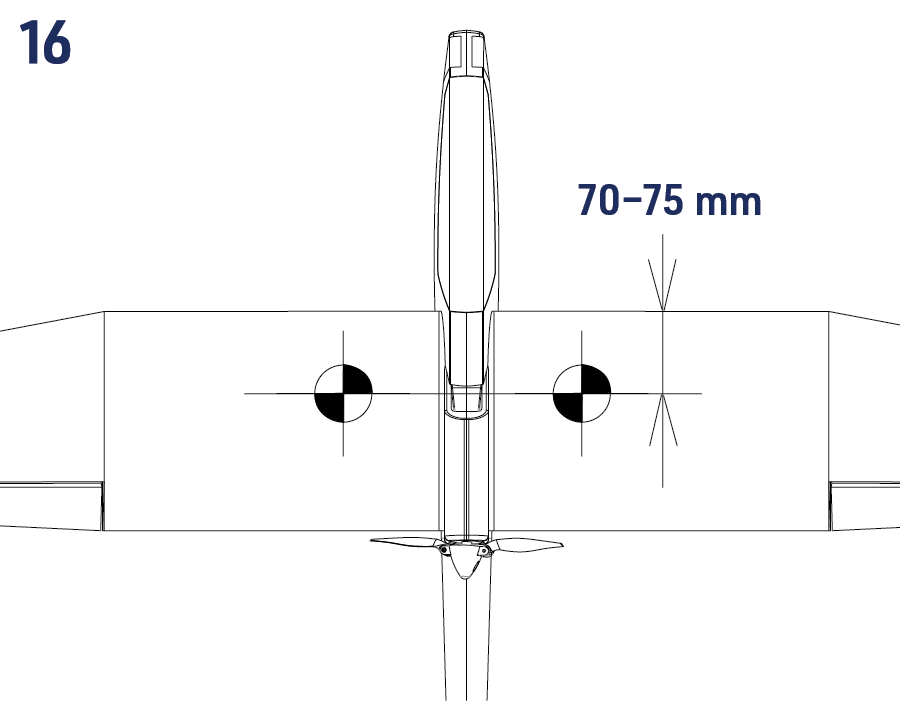
- The CG has to be located 70–75 mm behind the leading edge of the wing. Balance your Beta 1400 supporting the wing with your fingertips 70 mm behind the leading edge for the first flight.
- You can fine-tune the CG position later to suit your requirements. Moving the CG forwards increases stability; moving it backwards increases sensitivity. Stay within 70–75 mm and never move it behind 75 mm. Recheck balance with each different battery, secured in its flight position and with the canopy fitted. Use a pack of suitable size and weight; a different capacity alone does not establish suitability.
Moving back the CG too much could cause your model to be hard to control or even so unstable that you wouldn't be able to control it at all.
Complete the range check and the remaining pre-flight checks before launching.
Flying
Choosing the flying field/weather
Flying field
The flying field should be a flat grassy area. There should be no cars, persons, animals, buildings, power lines, trees, or large stones or any other obstacles that Beta 1400 might collide with within the range of ca 150 m. We highly recommend you join a local model flying club – you will get access to their flying field along with advice and help to make your first steps into model flying much easier and safer.
Weather
Calm summer evenings are perfect for the maiden flight. Your Beta 1400 is a light thermal glider that is the happiest with wind under 5 m/s. DO NOT fly when it is raining or snowing, on foggy days. Thunderstorms are clearly not the right time to fly either.
Range check
Perform the range check as described in the instruction manual of your radio. Ask a friend to hold the transmitter, and secure the model on a suitable stand in its normal flight attitude. Keep everyone clear of the propeller during any powered part of the radio manufacturer’s test; do not carry the model at shoulder height with the motor running. The servos have to respond to control inputs (control stick movements) without any glitching or jitter, with the motor off and at full throttle within the range stated by the radio manufacturer. Only prepare to fly if the range check is 100 % successful.
Never try to fly with your transmitter in the range check (reduced output power) mode!
First flight
Now the most important advice in this entire manual:
During the first flight, we recommend that you have the support of an experienced RC pilot.
There is no shame in asking for help. Full-size aircraft are also first flown by experienced test pilots. RC control skills and reflexes develop through training, with the time required depending on your aptitude. As with full-size aircraft, begin under instruction at a safe height, then learn take-off and landing before flying solo. Do not expect to control the model safely without previous RC flying experience.
The rapid button presses and abrupt stick movements used in computer games are unsuitable for controlling an RC model.
Control the model with small, gentle stick movements. The Beta 1400 flies best when you let it „fly by itself“ most of the time, guiding its direction with gentle corrections. Observe the effect of each input. Use larger movements only once you can anticipate their effect; they can be dangerous during the early stages of learning.
Step 1: Hand launch and initial trimming
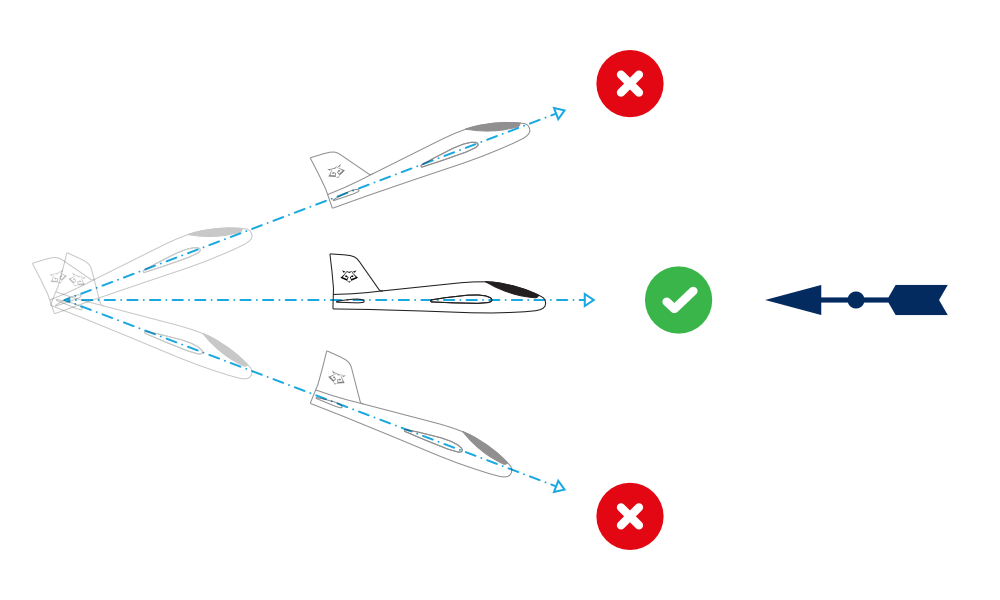
The model must be launched into the wind every time. Throw grass into the air to observe the wind direction.
Turn on your transmitter.
Lower the throttle fully. Place and secure the flight battery in its compartment, connect it and secure the canopy.
Hold your model with the wings and fuselage level (refer to the drawing) – it is better to ask a friend to launch your model than to do everything by yourself – you can then concentrate on the controls. Keep the launching hand and all clothing clear of the pusher propeller and its swept area throughout release.
Launch the model against the wind.
Give the model full throttle and launch your model with a gentle push straight and level. You will feel the point at which the model is trying to fly naturally. Don't give a push too strong. Do not throw your model with the nose up, or greater than 10 degrees down. The model must have a certain minimum speed from the very start to stay airborne. It is not enough to just „put“ your model in the air.
With correct setup and sufficient airspeed, the Beta 1400 will climb gently. If it loses height at a safe airspeed, apply only a very small amount of up-elevator. Do not pull harder to force a climb below a safe flying speed.
Step 2: Flying
Keep your BETA 1400 climbing until it reaches at least 50 m in height, then throttle back the motor enough to maintain the flight level. The real flying fun begins now.
Do not let the Beta 1400 fly too far away, especially downwind. You can control it safely only while you can clearly identify its attitude in the air. Radio range is generally much greater than the distance at which you can see the model clearly.
At a safe airspeed and height, reduce throttle gradually to enter the glide. Use gentle elevator corrections to prevent the nose rising as power decreases, then ease the elevator towards the trimmed gliding position as the model slows. Avoid abrupt control inputs or slowing below a safe flying speed.
How to control the model
An aircraft moves in three dimensions. Unlike steering a car or boat, controlling its direction also requires managing bank, pitch and airspeed. Use the controls together as described below.
The control is fully proportional – the more you move the stick, the more movement of the control surface. The actual stick movement required is mostly quite small, and almost never from one end stop to the other!
Elevator controls pitch. Pulling the stick back raises the elevator and the nose; pushing forward lowers them. A climb also needs sufficient airspeed and power. Excessive up-elevator can stall the wing. If a stall develops, reduce the angle of attack with appropriate forward elevator and regain flying speed before gently recovering.
Ailerons control bank. Move the stick towards the desired bank, then centre it as that bank is reached. Use opposite aileron to level the wings; returning the stick to centre alone does not necessarily level the model.
Rudder controls yaw and helps coordinate turns with the ailerons. Begin with gentle turns of 20–30° bank. During initial flights do not exceed 45°; normally keep below 30°. Avoid using large rudder inputs to force a tight, slow turn.
Turn using the ailerons and elevator
Practise at a safe height and speed. Bank gently towards the turn with aileron, then reduce the aileron input and add only enough up-elevator to maintain the desired flight path. The tilted lift force turns the model; its vertical component is reduced at a given total lift. Excessive elevator increases the risk of a stall. At a given airspeed, a steeper bank gives a smaller turn radius.
Begin rolling out before reaching the desired heading; as an initial exercise, start after roughly 3/4 of the turn. Use opposite aileron to level the wings while relaxing the additional elevator. Adjust the timing to the actual turn rate. If the model descends, avoid a sudden large pull: maintain airspeed and recover smoothly.
Coordinated turn using the ailerons, elevator, and rudder
Add appropriate rudder in the turn direction as you roll in, to coordinate yaw with bank. Use elevator to control the flight path. Larger gliders and high-wing aircraft particularly benefit from coordinated rudder use. Do not assume that rudder replaces the elevator or that it must always make the model descend.
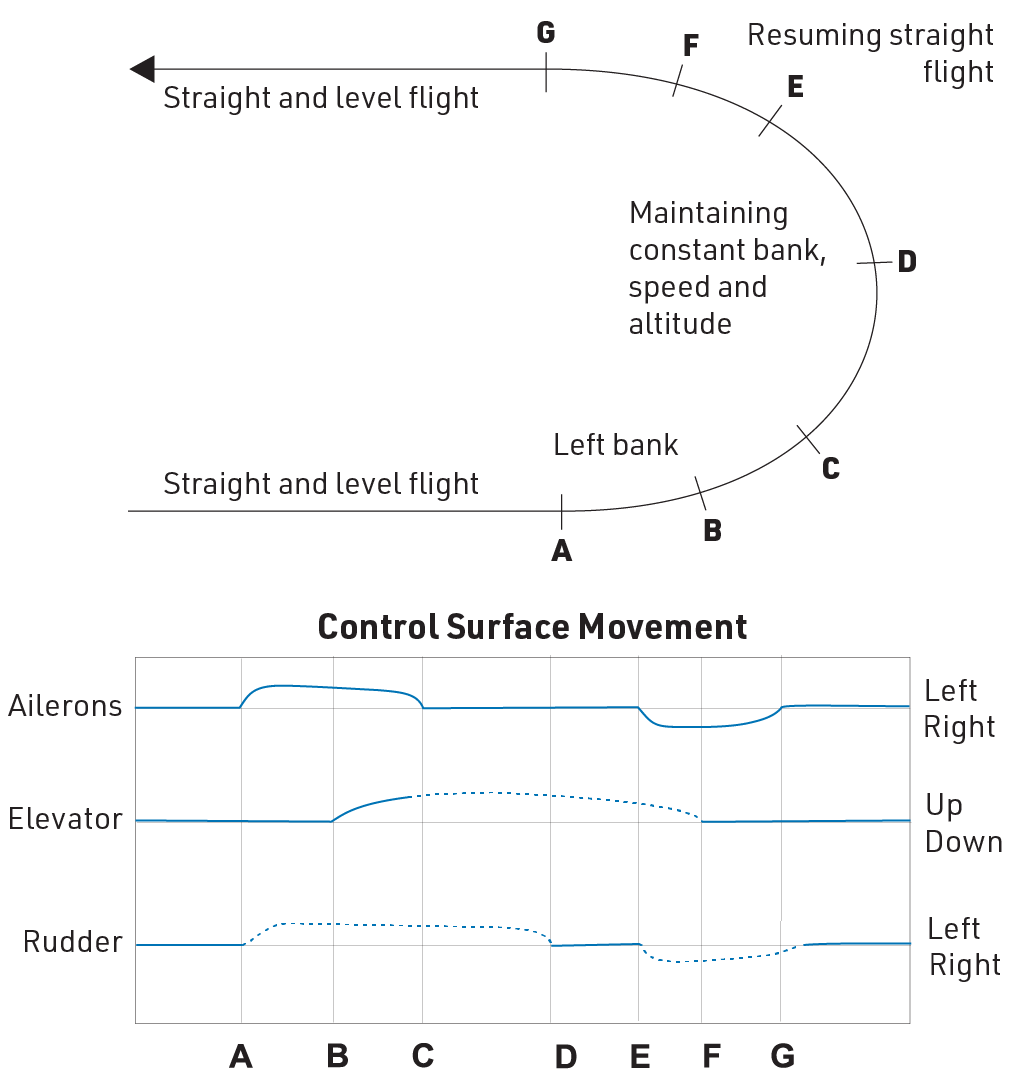
As the required heading approaches, coordinate the rollout with opposite aileron and appropriate rudder, then centre the rudder and relax the extra elevator as the wings level. Begin early enough for the model to finish the turn on the intended heading. Ailerons level the wings; they do not directly control pitch.
Flying speed is relative to the air, not the ground. In steady wind the model travels faster over the ground downwind than upwind at the same airspeed. Do not slow it by pulling excessive elevator just because it looks fast downwind, particularly on approach. A low-speed turn near the ground can lead to a stall with insufficient height to recover. Take off and land into wind where practicable.
In-flight trimming
Trim the model in a steady, straight glide with the motor off. Correct a persistent yaw or turn with rudder trim, a bank with aileron trim, and an unstable gliding attitude or speed with elevator trim. Distinguish yaw from roll: the model should fly straight with level wings and its fuselage aligned with the airflow, not sideways with opposing rudder and aileron trims. Make small corrections and observe the result. Have an experienced pilot perform the first flight and initial trimming.
What to do if the required trim adjustment is large?
If a trim exceeds approximately 1/4 of its travel from centre, adjust the pushrod mechanically after landing. Note the trimmed surface position, disconnect the flight battery and remove the propeller before powering the servos to centre the trim. Disconnect power again, loosen the pushrod clamp and restore the noted surface position. Reapply suitable threadlocker, secure the clamp, and check neutral, direction and full travel before the next flight.
Powered and unpowered flight
Trim for a stable glide first. After applying power, allow the model to gain speed and use gentle elevator corrections to maintain a reasonable climb. The Beta’s pylon gives the motor an intentional upward and sideways offset. If the model pitches excessively or will not climb despite correct trim and adequate power, have an experienced modeller check the installation against the Beta drawing. Do not apply a nose-mounted aircraft’s downthrust adjustment to this pusher installation. Disconnect the battery and remove the propeller before working on the motor; do not weaken its mounting or obstruct cooling.
Flying a motorised glider and the wind direction
Take off and land into wind where practicable. Keep the model predominantly upwind of your position so it can return if the motor stops; this describes its location, not a constant heading. Use a conservative timer and land with enough battery reserve for a go-around. Do not routinely fly until the ESC reduces or cuts motor power: the receiver may remain powered through the BEC, but little flight-energy reserve remains and deep discharge shortens battery life. If motor power fades, land promptly.
Landing
Approach into wind with level wings and the throttle fully down. Maintain a shallow glide and safe airspeed. Use small elevator corrections; excessive up-elevator can cause a stall. At about 5 m, check that the wings remain level and continue the controlled descent. Just before touchdown, gently raise the nose to level the fuselage and settle onto the landing area. Avoid steep turns near the ground. A controlled downwind landing is preferable to stalling in a sharp turn at 2–3 m. Choose a clear area safely separated from people, and accept a longer walk rather than forcing a landing at your feet. After landing, leave the transmitter on, disconnect the flight battery and only then switch off the transmitter.
Practise coordinated control with an experienced pilot. When the model approaches you, left and right appear reversed from your viewpoint; the model’s control directions have not changed. For aileron corrections, imagine moving the stick under the approaching model’s wing that you want to raise. Learn this at a safe height before attempting an approach.
Appendix
ESC instructions
The original PDF specifies the KAVAN R-20B. Use the standard ESC manual for that version. If a R-20B Plus or another ESC is fitted, use its own instructions; the Plus ESC manual covers the Plus version.
Caution
- Do not install the propeller on the motor when you test the ESC and motor for the first time to verify the correct settings on your radio. Only install your propeller after you have confirmed that the settings on your radio is correct.
- Never use ruptured or punctured battery cells.
- Never use battery packs that are known to overheat.
- Never short circuit battery or motor terminals.
- Always use proper insulation material for cable insulation.
- Always use proper cable connectors.
- Do not exceed the number of cells or servos specified for the ESC.
- Wrong battery polarity will damage the ESC and void the warranty.
- Install the ESC in a suitable location with adequate ventilation for cooling.
- Use only batteries that are supported by the ESC and ensure the correct polarity before connecting.
- Switch your transmitter ON first and ensure the throttle stick is in the minimum position before connecting the battery pack.
- Never switch your transmitter OFF while the battery is connected to your ESC.
- Only connect your battery pack just before flying and do not leave your battery pack connected after flying.
- Handle your model with extreme care once the battery pack is connected and keep away from the propeller at all times. Never stand in-line or directly in front of any rotating parts.
- Do not immerse the ESC under water, do not allow it to get wet while powered up.
- Always fly at a designated flying site and follow the rules and guidelines set by your modeller’s club.
Repairs and maintenance
- Please perform the range check in the beginning of each flying session.
- Before every take off please check the correct control surface movement.
- After every landing check the plane for any damage, loose clevises or push rods, bent undercarriage, damaged propeller etc. Do not fly again until the damage is repaired.
EPO foam can still be damaged. Repair minor damage with suitable cyanoacrylate (CA) adhesive or clear repair tape. Replace seriously damaged structural parts rather than relying on a temporary repair. Genuine spare parts are available through KAVAN dealers.
In the unfortunate event of a crash or heavy landing, no matter how minor or major, you must lower the throttle stick to its lowest positions as quickly as possible to prevent damage to the electronic speed controller in the control unit.
Failure to lower the throttle stick and trim to the lowest possible positions in the event of a crash could result in damage to the ESC, which may require replacement of the ESC.
Crash damage is not covered under warranty.
Guarantee
KAVAN Europe s.r.o. guarantees that this model kit is free from defects in both materials and workmanship at the time of sale. This warranty does not cover any parts damaged through use or as a result of modification; under no circumstances shall the liability of the manufacturer and importer exceed the original purchase price of the model kit. KAVAN Europe s.r.o. also reserves the right to change or modify this warranty without prior notice. The model kit is subject to ongoing improvement and refinement, and the manufacturer reserves the right to change the design without prior notice.
Since KAVAN Europe s.r.o. has no control over potential damage during shipping, the method of assembly, or the materials used by the modeller to complete the model, no liability can be assumed or accepted for damages associated with the use of the model assembled by the user. The moment the user decides to use the model they have assembled, they assume full responsibility. If the purchaser is not prepared to accept this responsibility, they should immediately return the kit in its complete and unused condition to the place of purchase.
If your RC model requires service, please follow the guidelines below. Failure to comply with these guidelines may result in the warranty being voided.
- If possible, use the original packaging to pack the model. Do not use the original cardboard box as the final packaging.
- Include a detailed description of how you have used the model and RC kit, as well as the problem you have encountered. Attach a numbered list of the included accessories and provide any additional information that may assist the service department. Date the note and double-check that it includes your full address and phone number.
- Provide your name, address, and phone number where you can be reached during business hours. Include a copy of the model’s proof of purchase.
This warranty card entitles you to a free warranty repair of a product supplied by KAVAN Europe s.r.o. within 24 months. The warranty does not cover normal wear and tear resulting from regular use, as this is a product intended for sports and model-making use, in which individual parts operate under much higher loads than those to which ordinary toys are subjected. The model’s moving parts (motor, servos, and their gears, etc.) are subject to natural wear and tear, and replacement may be necessary over time.
The warranty also does not cover any part of the model or RC kit that was improperly installed, handled roughly or incorrectly, or damaged in a crash, nor does it cover any part of the model or RC kit that was repaired or modified by an unauthorised person. As with other delicate electronic products, do not expose your RC system to high temperatures, low temperatures, humidity, or dusty environments. Do not leave it in direct sunlight for extended periods.
Recycling and waste disposal note (European Union)
Electrical equipment marked with the crossed-out waste bin symbol must not be discarded in the domestic waste; it should be disposed of via the appropriate specialised disposal system. In the countries of the EU (European Union) electrical devices must not be discarded via the normal domestic waste system (WEEE - Waste of Electrical and Electronic Equipment, Directive 2012/19/EU). You can take your unwanted equipment to your nearest public collection point or recycling centre, where it will be disposed of in the proper manner at no charge to you. By disposing of your old equipment in a responsible manner you make an important contribution to the safeguarding of the environment!
EU declaration of conformity
Hereby, KAVAN Europe s.r.o. declares that the model Beta 1400 kit and the included electronic and electric devices comply with the relevant European directives and harmonized standards. The full declaration is available at kavanrc.com/doc.