KAVAN C100 Duo / Air - Instruction manual
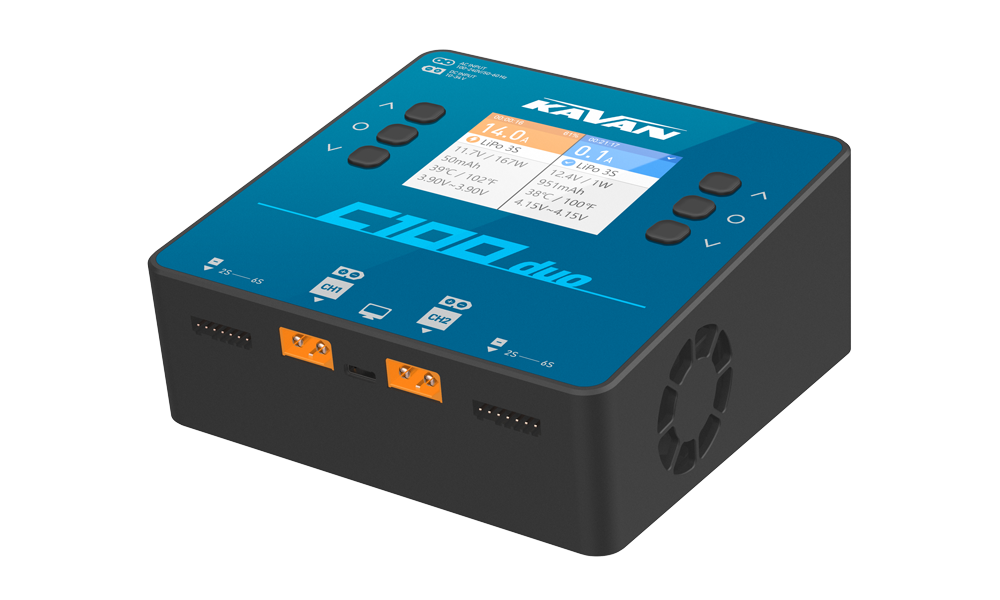
C100 Duo
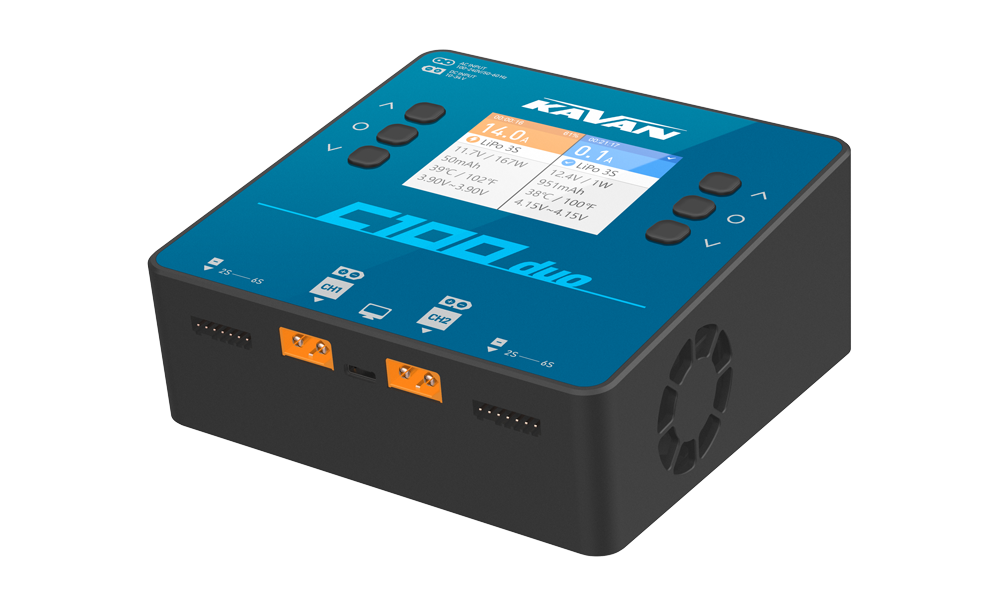
C100 Duo Air
Introduction
The KAVAN C100 Duo and C100 Duo Air are two-channel AC/DC balance chargers and dischargers. They support independent tasks, synchronised tasks for two matching packs and combined output for a single pack. The Air version also supports iSDT BattAir smart modules. Read the entire manual and Warnings and safety notes before connecting a battery.
Charger set contents
- KAVAN C100 Duo (Air) charger
- Instruction manual
Warnings and safety notes
Wrong battery chemistry, cell count, polarity or charge current can cause fire or explosion. Never leave a charging battery unattended.
- For your safety and a better user experience, please read this manual and follow the instruction before using the new charger.
- This is not a toy. This appliance is not intended for use by young children under 15 years of age or uninformed persons unless they were adequately supervised by a responsible adult person to ensure that they can use the appliance safely.
- Never use the charger without supervision, please stop using the charger and refer to the manual if you encounter any functional abnormality.
- Keep the charger away from dust, humidity, rain, low and high temperature, as well as avoid direct exposure to the sunlight and intense vibration.
- Place the charger on a heat-resisting, non-flammable and insulating surface. Do not use it on the car's seats, carpet or other similar places. Keep inflammable and explosive objects away from operation areas of the charger.
- Only operate this device in a cool ventilated area.
- Read the instruction manual carefully to be familiar with the features of the charger, and set proper charging parameters before operating. Setting the parameters incorrectly and or failure to observe safety procedures may and will result in damage to the product, personal property and cause serious injury as well.
- Never attempt to charge primary (non-rechargeable) batteries.
- Batteries pose a severe risk of fire if not properly handled.
- This unit may emit heat during use.
Technical specifications
| DC input | 10–30 V, maximum 35 A |
|---|---|
| AC input | 100–240 V / 50–60 Hz |
| Lithium batteries | 1–6S LiPo/LiHV/LiFe/LiIon/ULiHV |
| Nickel batteries | 1–16-cell NiMH/NiCd |
| Lead-acid batteries | 1–12 cells (2–24 V nominal) |
| Normal charging current | 0.2–20.0 A per channel |
| AC charging power | Up to 100 W per channel |
| DC charging power | Up to 500 W per channel |
| Parallel-output charging | One battery, up to 30 A; 800 W |
| Normal discharging | 0.2–1.5 A and up to 15 W per channel |
| Parallel-output discharging | 0.2–3.0 A and up to 30 W combined |
| Balancing current | Up to 1.5 A per cell |
| Operating temperature | 0–40 °C |
| USB-C | Firmware update / Output 5 V/2 A |
| Dimensions | 142×135×64 mm |
| Weight | Approximately 700 g |
Follow the limits and chemistry choices of your battery. Do not select LiHV or LiPo as a substitute for ULiHV. Full DC power requires a sufficiently powerful supply above 24 V.
Charger layout
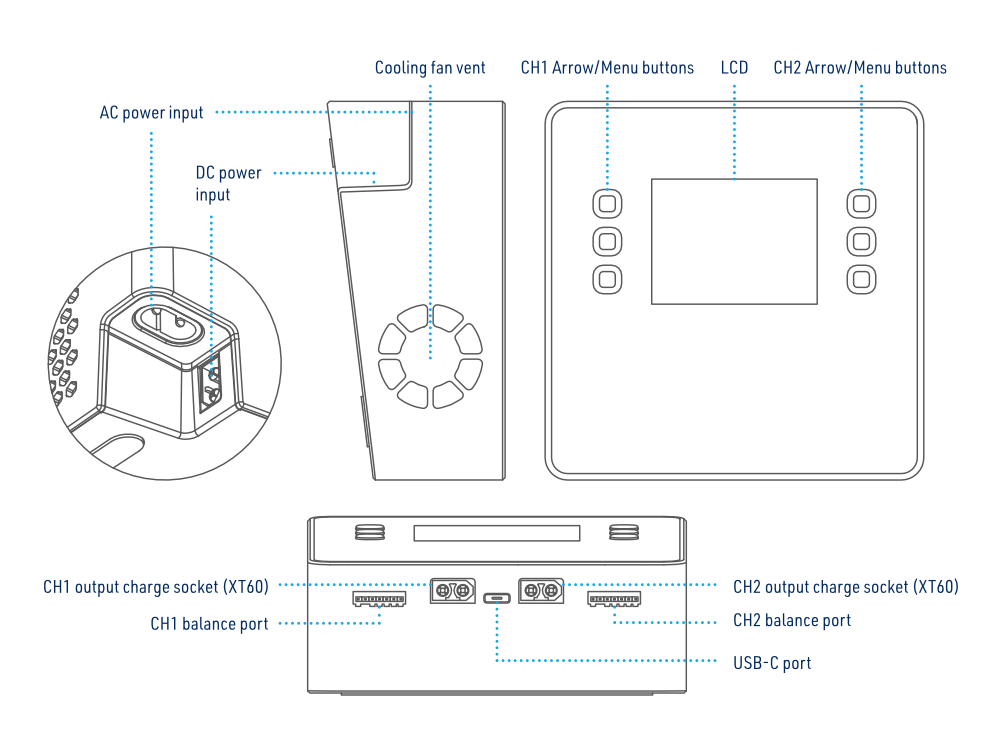
Main section
Select the menu language
To follow the English menu labels used in this manual, select English:
- With both channels idle, hold CH1 and CH2 for approximately 2 seconds.
- Select System. nastaveni (system settings) if the display is in Czech.
- Scroll to Jazyk, marked with a globe, and select English. Confirm with a channel menu button (CH1 or CH2).
Button operation in standby
CH1 menu button: Short press to enter the CH1 detailed parameter interface, long press to enter the CH1 task setting menu.
CH2 menu button: Short press to enter the CH2 detailed parameter interface, long press to enter the CH2 task setting menu.
Long press the CH1 and CH2 menu buttons at the same time: Enter the advanced settings menu.
Preset battery type of charger and task parameters
| Parameter | Rated voltage | Full charge voltage | Storage voltage | Discharge voltage | Balance charge | Unbalanced charge | Supported cell count | Max. charging current |
|---|---|---|---|---|---|---|---|---|
| NiCd/MH | 1.20 V | 1.40 V | No | 0.90 V | No | Yes | 1–16S | 20.0 A |
| Pb | 2.00 V | 2.40 V | No | 1.90 V | No | Yes | 1–12S | 20.0 A |
| LiFe | 3.20 V | 3.65 V | 3.30 V | 2.90 V | Yes | Yes | 1–6S | 20.0 A |
| LiIon | 3.60 V | 4.10 V | 3.70 V | 3.20 V | Yes | Yes | 1–6S | 20.0 A |
| LiPo | 3.70 V | 4.20 V | 3.80 V | 3.30 V | Yes | Yes | 1–6S | 20.0 A |
| LiHV | 3.80 V | 4.35 V | 3.85 V | 3.40 V | Yes | Yes | 1–6S | 20.0 A |
Confirming the charging current
Make sure to know the maximum charging current of the battery before charging. Never use excessive current to charge to avoid damaging your battery, which will result in overheating or even explosion during the charging process. The charging and discharging rate of a battery is usually marked with a C value. Multiplying the charging C value and battery capacity equals the maximum charging current supported by the battery. For example, for a 1000 mAh battery with a charging rate of 5C, the maximum charging current would be 1000×5 = 5000 mA; therefore, the maximum charging current is 5 A.
For a lithium battery, if the supported charging C value cannot be confirmed, set the charging current below 1C. For NiMH/NiCd, use no more than 1C when the permitted charge rate is unknown; for Pb, no more than 0.1C. Always use the lower permitted current if the battery manufacturer specifies a stricter limit.
The approximate relationship is: charging time ≥60 minutes / charging C value. For example, charging at 1C takes around 60–70 minutes. Battery conversion efficiency and behaviour may extend this time.
Operating the charger
- Connect either the AC mains supply or a suitable DC supply; observe polarity.
- Connect the charging leads to the charger before connecting the pack. For multi-cell lithium batteries, connect both the main lead and matching balance lead.
- Long-press CH1 or CH2 to open the required channel’s task settings. Set the following parameters:
| Parameter | Value |
|---|---|
| Task | Charge, discharge, destroy, storage |
| Chemistry | LiHV, LiPo, LiIon, LiFe, Pb, NiMH/Cd |
| Condition | Charge/discharge terminal voltage, delta-peak sensitivity for NiMH/NiCd |
| Cells | LiFe, LiIon, LiPo, LiHV (1–6S); Pb (1–12S); NiMH/Cd (1–16S) |
| Charging current | 0.2–20.0 A per channel |
| Discharging current | 0.2–1.5 A per channel |
Charge
Use the balance connection when charging a multi-cell LiPo pack so the charger can monitor and balance each cell. The charger gives a warning before starting a LiPo charge without the balance connection. See (Fig. 2).
Current setting range: 0.2–20.0 A
Discharge
Current setting range: 0.2–1.5 A
Destroy
This is an irreversible disposal discharge to 0 V. Use it only for a battery being permanently retired and only when its manufacturer permits this method. Never use it as an ordinary discharge or storage program, and never recharge a battery after disposal discharge. Do not connect a swollen, leaking, hot or otherwise unsafe battery.
Connect the battery to be permanently retired and select Destroy in the task menu to discharge it to 0 V. Discharging current range: 0.2–1.5 A.
Storage
Charging current range: 0.2–20.0 A. Discharging is limited by the normal discharge current and power ratings for the selected mode.
Starting/stopping the task
Check the settings, select Start and press the respective channel’s CH1 or CH2 button to start.
To stop at any time, long-press the respective CH1 or CH2 button, select Stop, then press that button again. After completion or stopping, disconnect the battery and balance lead, then the charging leads and power supply.
Advanced settings
Under the standby interface, long press the CH1 and CH2 buttons at the same time to enter the advanced setting menu.
Dual task
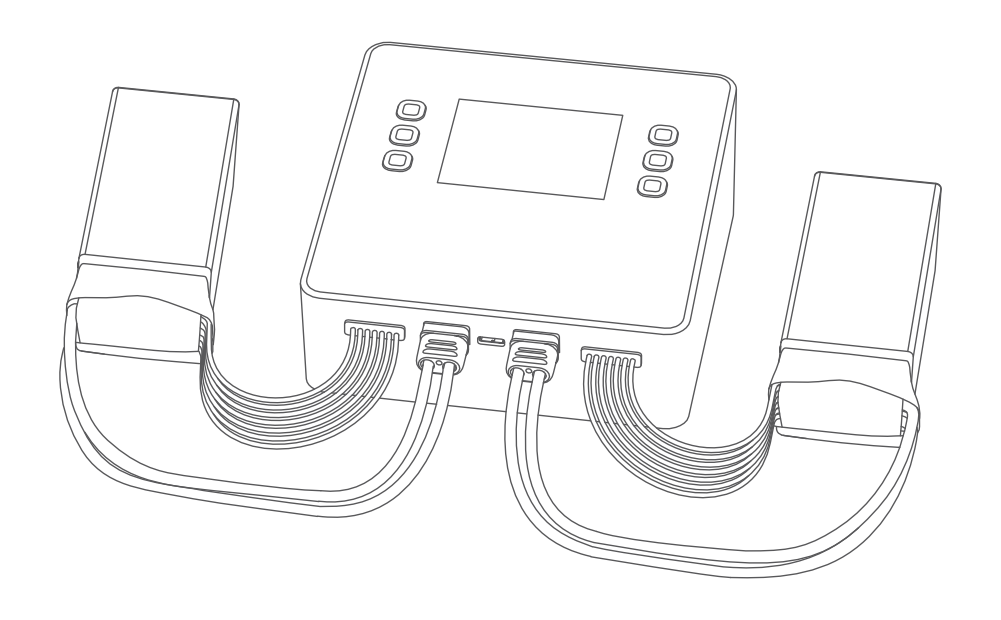
Dual task charges, discharges or prepares for storage two identical batteries (same chemistry, cell count and capacity) connected to CH1 and CH2 with the same settings. Power the charger, connect both batteries, then select this function in the advanced menu and set the parameters.
Both batteries have to be connected to the CH1 and CH2 outputs before you try to launch the DualTask mode.
Parallel task
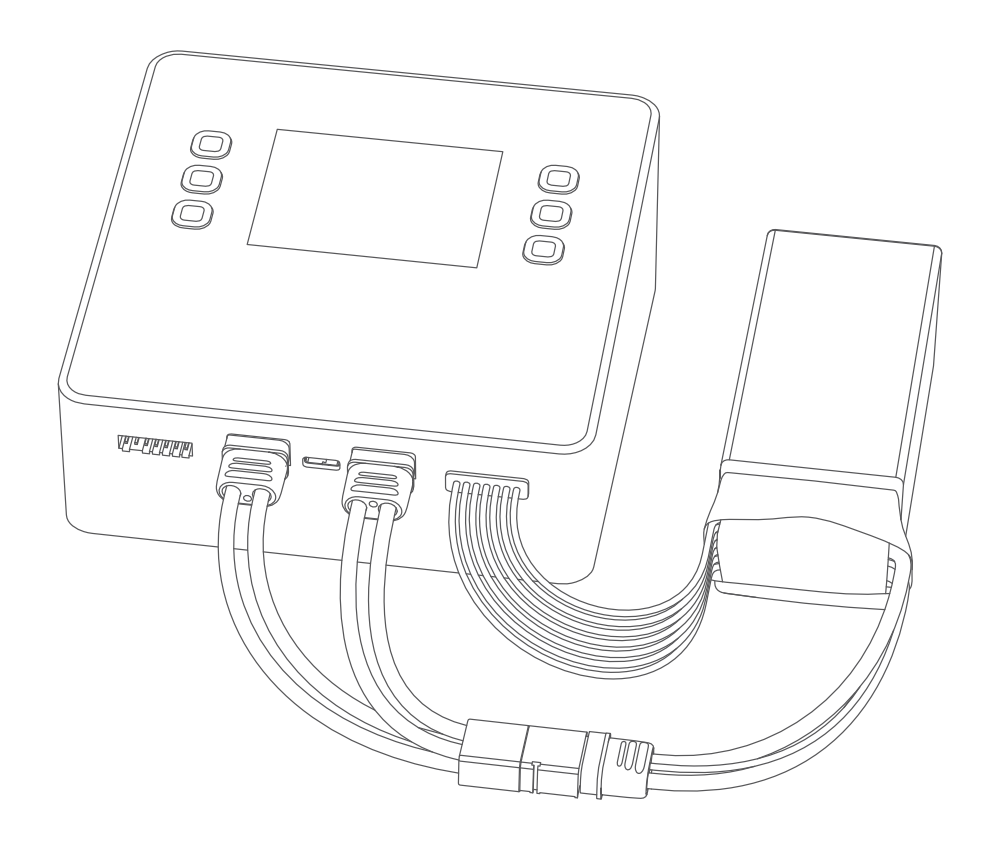
Use the combined-output cable. This mode combines both outputs for charging or discharging one battery.
Power the charger. Connect both output ends of a suitable combined-output cable to CH1 and CH2, then connect its single battery end to the pack. Connect the pack’s balance lead to either channel’s balance port. Select Parallel task in the advanced menu and set the parameters. The battery must be connected to both outputs before you start Parallel mode.
DC power CH1
Stop CH1 and disconnect its battery before connecting a load. Set the output to suit the connected device.
In DC power CH1 mode, channel CH1 acts as a regulated supply with adjustable output voltage of 2–30 V and current limit of 1.0–5.0 A.
System setting menu
Select System setting in the advanced menu to access the following settings:
Lowest input voltage: 10–31 V
If the supply voltage falls below this setting, all active tasks stop and a low-voltage warning appears. This protects the supply battery against excessive discharge, for example when using a car battery.
Max. input power: 100–1100 W
If the supply can deliver less than the charger’s stated maximum working power of 1000 W, set the input-power limit to the supply’s actual capability. This prevents overloading the supply and ensures stable operation.
Backlight
Adjust the backlight intensity.
Volume
Adjust the sound signal volume.
Completion tone
Select the completion tone.
USB charge
The legacy menu specifies 5 V / 2 A when enabled. A specification line also mentions USB PD 30 W, but the applicable hardware version is not identified; do not assume PD capability without checking your unit.
With USB charge set to Off, USB-C serves as the firmware-update port. With it set to On, the legacy menu enables a 5 V / 2 A USB output.
Split screen
There are 3 options of 60 seconds, 30 seconds and OFF for automatic split screen setting. You can choose to switch the display of the main interface from the single-channel parameter interface to Dual channel (split screen) parameter interface. You can also select „Off“ to turn off the automatic split screen function.
Language
Select the desired language of the menu.
Theme
Select the display style: black on white or white on black.
Keep trickle
After charging is complete, choose whether to continue trickle charging. The trickle charge function is enabled to maintain the lithium battery voltage in a fully charged state; this function is enabled by default.
Self-test
Perform self-test of the charger.
Calibration
The input voltage, output voltage and balance voltage of the charger can be calibrated with this task.
System info
Hardware/firmware version information.
BattAir
Only for C100 Duo Air
Batteries with the iSDT Bluetooth Smart module connected (with pre-set battery data and charge/discharge mode settings using the BattAir app) allow launching the charge or discharge process right away, without setting any parameters on your charger. You can find more information on the use of Smart modules in this video: BattAir Smart module demonstration
Appendix
EU declaration of conformity (European Union)
Hereby, KAVAN Europe s.r.o. declares that the KAVAN C100 Duo is in compliance with the essential requirements as laid down in the EU directive(s) concerning electromagnetic compatibility. The full text of the EU Declaration of Conformity is available at www.kavanrc.com/doc.
Recycling and waste disposal note (European Union)
Electrical equipment marked with the crossed-out waste bin symbol must not be discarded in the domestic waste; it should be disposed of via the appropriate specialised disposal system. In the countries of the EU (European Union) electrical devices must not be discarded via the normal domestic waste system (WEEE - Waste of Electrical and Electronic Equipment, Directive 2012/19/EU). You can take your unwanted equipment to your nearest public collection point or recycling centre, where it will be disposed of in the proper manner at no charge to you. By disposing of your old equipment in a responsible manner you make an important contribution to the safeguarding of the environment.
Guarantee
The KAVAN Europe s.r.o. products are covered by a guarantee that fulfils the currently valid legal requirements in your country. If you wish to make a claim under guarantee, please contact the retailer from whom you first purchased the equipment. The guarantee does not cover faults which were caused in the following ways: crashes, improper use, incorrect connection, reversed polarity, maintenance work carried out late, incorrectly or not at all, or by unauthorised personnel, use of anything other than genuine KAVAN Europe s.r.o. accessories, modifications or repairs which were not carried out by KAVAN Europe s.r.o. or an authorised KAVAN Europe s.r.o., accidental or deliberate damage, defects caused by normal wear and tear, operation outside the Specification, or in conjunction with equipment made by other manufacturers. Please be sure to read the appropriate information sheets in the product documentation.
Keep the charger out of damp or dusty environments. Prevent water, chemicals, fuel, oil or foreign objects entering the enclosure. These conditions and improper maintenance are examples of misuse.