KAVAN C20 Duo - Instruction manual
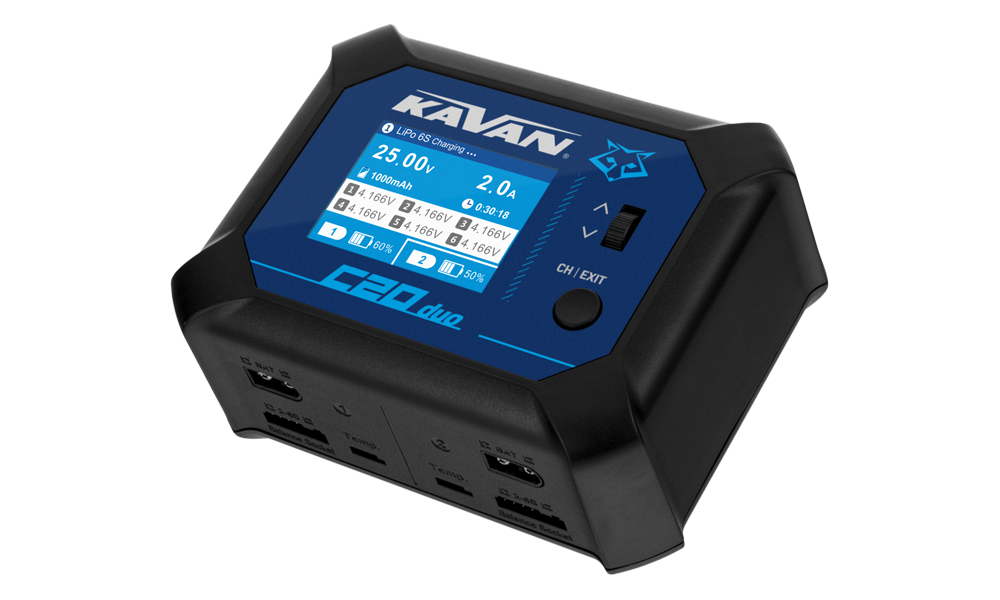
C20 Duo
Introduction
The KAVAN C20 Duo is a two-channel AC/DC balance charger and discharger. Each channel operates independently; identical packs can also use a shared task. AC operation provides 100 W total, while DC operation provides up to 100 W per channel. Read the entire manual and Warnings and safety notes before connecting a battery.
Charger set contents
KAVAN C20 Duo AC/DC 200 W Charger, AC power cable (EU plug), Instruction manual
Charger layout
See (Fig. 1).

Roller wheel
Short Press: Enter task settings/Confirm current settings/Start charging/Stop charging/Clear Warning messages.
Long Press: Enter System setting/Terminate current task/Start charging/Stop charging.
Scroll Up and Down: Select the required menu/Adjust parameter value.
CH/EXIT button
Short press: Switch the channel/Exit the settings
Long press: Stop charging/Clear warning messages
Warnings and safety notes
Wrong battery chemistry, cell count, polarity or charge current can cause fire or explosion. Never leave a charging battery unattended.
- Do not leave the charger unattended while charging. If any malfunction occurs, stop the process immediately and refer to the operation manual. Short-circuiting or overcharging can release corrosive chemicals or cause an explosion or fire.
- Monitor the battery temperature during charging. Slight warming near the end of charging (around 40 °C in the source instructions) is possible; stop charging and disconnect the battery immediately if it becomes hot. Always observe the battery manufacturer’s temperature limits. Allow the battery to cool before reconnecting.
- Do NOT attempt to charge incompatible types of rechargeable batteries or even dry (alkaline, zinc-carbon) batteries. This charger is designed to only charge and discharge Nickel-Cadmium, Nickel-Metal Hydride, Lithium-Ion, Lithium-Polymer (regular and HV), LiFePO4, and Lead-Acid batteries.
Never attempt to charge or discharge the following types of batteries:
-
A battery pack which consists of different types of cells (including different manufacturers).
-
Non-rechargeable batteries (Explosion hazard).
-
Batteries that require a different charge technique from NiCd, NiMH, LiPo, LiIon, LiFe, LiHV or Pb.
-
A faulty or damaged battery.
-
A battery fitted with an integral charge circuit or a protection circuit.
-
Batteries installed in a device or which are electrically linked to other components.
-
Batteries that are not expressly stated by the manufacturer to be suitable for the currents the charger delivers during the charge process.
-
Keep the charger well away from dust, damp, rain, heat, direct sunshine and vibration. Never drop it.
-
Do not allow foreign objects into the charger.
-
The allowable AC input voltage is 100–240 V/50–60 Hz or 11–18 V DC voltage. DO NOT try to feed the charger simultaneously using the AC and DC input.
-
This charger and the battery should be put on a firm level, heat-resistant, non-flammable and nonconductive surface. Never place them on a car seat, carpet or similar.
-
Keep all the inflammable volatile materials away from operating area.
-
Do not cover the air intake holes on the charger, as this could cause the charger to overheat.
-
Make sure you know the specifications of the battery to be charged or discharged to ensure it meets the requirements of this charger. If the program is set up incorrectly, the battery and charger may be damaged. It can cause fire or explosion due to overcharging.
-
Do not attempt to charge batteries at excessive fast charge currents. Check with your battery manufacturer for the maximum charge rate applicable to your battery.
-
Do not use automotive type battery chargers to power the charger.
-
After using a battery in a model, allow it to cool to ambient temperature before charging.
-
Connect the charger to its power supply before connecting the battery to be charged.
-
Do not charge inside a closed vehicle or while driving.
-
Do not disassemble the charger.
-
Children under 15 and persons unfamiliar with the charger and battery handling must be supervised throughout operation by a responsible adult experienced in using the charger and charging batteries.
Technical specifications
| AC input | 100–240 V / 50–60 Hz |
|---|---|
| DC input | 11–18 V |
| Lithium batteries | 1–6S LiPo/Li-Ion/LiFe/LiHV |
| Nickel batteries | 1–16-cell NiCd/NiMH |
| Lead-acid batteries | 1–12 cells (2–24 V) |
| Charging current | 0.1–10.0 A per channel |
| DC charging power | Up to 100 W per channel |
| AC charging power | 100 W total; CH1:CH2 allocation 100:0, 50:50 or 0:100 |
| Discharging current | 0.1–5.0 A per channel |
| Discharging power | Up to 10 W per channel |
| Balancing current | 500 mA per cell |
| PC connection | Micro-USB for firmware updates |
| Dimensions | 135×105×58 mm |
| Weight | 550 g |
Confirming the charging current
Make sure to know the maximum charging current of the battery before charging. Never use excessive current to charge to avoid damaging your battery, which will result in overheating or even explosion during the charging process. The charging and discharging rate of a battery is usually marked with a C value. Multiplying the charging C value and battery capacity equals the maximum charging current supported by the battery. For example, for a 5000 mAh battery with a charging rate of 1C, the maximum charging current would be 5000×1 = 5000 mA; therefore, the maximum charging current is 5 A.
For a lithium battery, if it is impossible to confirm the supported charging C value, please set the charging current below 1C, for the sake of its (lithium battery) safety (the same applies to NiMH/NiCd batteries; no more than 0.1C for Pb batteries).
Battery standard parameters
These are reference values. Always follow the battery manufacturer’s chemistry-specific voltage, current and storage requirements; use the lower permitted charging current if the limits differ.
| Parameter | Li-Po | Li-ion | LiFe | LiHV | NiCd | NiMH | Pb |
|---|---|---|---|---|---|---|---|
| Nominal voltage | 3.7 V/cell | 3.6 V/cell | 3.3 V/cell | 3.7 V/cell | 1.2 V/cell | 1.2 V/cell | 2.0 V/cell |
| Max. charge voltage | 4.2 V/cell | 4.1 V/cell | 3.6 V/cell | 4.35 V/cell | 1.5 V/cell | 1.5 V/cell | Type specific* |
| Storage voltage | 3.8 V/cell | 3.7 V/cell | 3.3 V/cell | 3.9 V/cell | Store fully discharged | Store fully charged | Store fully charged |
| Min. discharge voltage | 3.0 V/cell | 3.0 V/cell | 2.8 V/cell | 3.1 V/cell | 0.8 V/cell | 1.0 V/cell | 1.8 V/cell |
| Max. charge current | ≤1C or more** | ≤1C | ≤4–5C (A123) | ≤1C | 1–2C | 1–2C | ≤0.4C |
*) Sealed (gas-tight) gel PB batteries up to 2.27–2.30 V/cell. Classic lead-acid („car battery“) and valve-regulated lead-acid batteries up to 2.46 V/cell.
**) Some LiPo batteries may be charged at 5C or even higher rates – always follow the battery manufacturer's recommendation.
Main section
Connect the supply and battery
- Connect either the AC mains cable or a correctly polarised 11–18 V DC supply. Never use both inputs simultaneously.
- Connect the charging lead to the selected XT60 output before connecting the battery. Connect the lithium pack's balance plug to the corresponding channel, observing polarity.
- Check the battery chemistry, cell count and permitted charging current before opening the task menu.
Task settings
Power on the charger and connect a battery; the charger will enter the standby page. Short-press the roller wheel to activate the Program setting menu. The items in this menu are as follows:
| Battery | Battery type selection |
|---|---|
| Cells | Select the number of cells in the battery pack |
| Mode | Working Mode: Charge, Discharge, Storage (lithium batteries only) |
| Current | Charge: 0.1–10.0 A; discharge: 0.1–5.0 A |
| TVC | Terminal voltage control setting |
| Charge channel | Allows simultaneous charging of an identical pack in both channels |
| Start | Start charging/discharging program |
| Back | Return to previous screen or function |
Charging channel
This setting is convenient for charging multiple identical batteries (same type and number of cells, same capacity). You can select the channel to start. Red indicates selected, and grey indicates not selected.
For example: When identical batteries are connected to both channels, you can set both 1 and 2 to red; the charger will charge both packs simultaneously with the same setting.
If the batteries are not identical (same type and number of cells, same capacity), select the corresponding channel to set and start the charging separately for each battery.
Connecting the battery
Connect the charging leads to the respective XT60 output socket (CH1 or CH2), observing the correct polarity: (+) red cable, (−) black cable. For lithium packs, it is highly recommended to ALWAYS connect the balance leads and utilise balanced charging to ensure that the charger can accurately monitor the voltage of each cell.
Storage
When selecting the Storage function, the charger will automatically begin charging if the battery pack voltage is below the ideal storage voltage. Likewise, the charger will automatically enter the discharge mode if the battery pack voltage is higher than the ideal storage voltage.
Restoring an excessively discharged lithium battery pack
Automatic low-current recovery does not prove that an over-discharged battery is safe. Do not attempt to recover a damaged, swollen or excessively discharged pack contrary to its manufacturer's instructions. Stop if its condition is uncertain.
If the charger detects individual cell voltages that are too low to safely begin the regular charging process, it will automatically default to 0.5 A charge rate until the voltage has risen to a level that allows it to accept a fast charge rate safely.
Measuring internal resistance
The charger features the ability to monitor the internal resistance (IR) of each cell in a lithium battery pack. This feature is only operational when in the balance charging mode. Internal resistance can be useful to determine the overall „health“ and performance of a lithium battery; the closer the IR values are between the cells in the battery pack, the better the battery will deliver its energy.
The process of charging a lithium battery is dynamic; therefore, you will notice fluctuations in both charge current and IR during the charging process.
Due to the different measurement methods of the battery resistance, it is impossible to achieve the absolute data similar to professional resistance measurement instruments. Therefore, the internal resistance value is only suitable for reference with horizontal comparison, such as judging the consistency of the performance of one battery as time goes by or the performance comparison between different batteries. The charging current has some influence on the accuracy of the internal resistance measurement; a large capacity and low internal resistance battery requires a large charging current to accurately measure the internal resistance.
Start, stop and disconnect
- Confirm the task settings and select Start with the roller wheel.
- Monitor the battery and displayed values throughout the task. Stop if the pack becomes hot, swells or an error appears.
- Use a long press of CH/EXIT to stop the selected task. The roller wheel also provides task stop/confirmation controls according to the displayed menu.
- When the task is complete or stopped, disconnect the battery and balance lead, then the charging lead and power supply.
Working parameters display
Rotating the roller wheel up or down during charging will switch the information displayed on the lower half of the LCD screen between cell voltage, cell internal resistance (IR) and working parameters. Cell voltage and IR can only be displayed during the balance charging process.
Dual independent output channels, setting and working independently as follows: Channel 1 charging, Channel 2 stand-by.
The colour LCD display clearly shows the working status of both channels in real time.
System settings menu
Long-press the roller wheel to activate the System Setting menu.
| Language | Select the language of the menu |
|---|---|
| MIN input Voltage | Adjustable 10–12 V to protect the car battery |
| Power distribution | Adjust the power available to CH1 and CH2 in the AC mode |
| Capacity cut | Terminates the charge process once the pre-set capacity value is reached |
| Time cut | Terminates the charge process once the pre-set time value is reached |
| Temperature cut | Terminates the charge process once the pre-set temperature value is reached (requires the optional temperature sensor) |
| Backlight | Intensity of the display backlight - High, Medium, Low |
| Volume | Buzzer volume - High, Medium, Low, Off |
| About | Software and hardware version information |
| Factory Reset | Returns all settings to factory default values |
| Back | Return to the last program or menu |
Volume: OFF - the keypad/wheel sounds are off, the error sounds remain active.
Power distribution
AC input: 100 W total, allocated to CH1:CH2 as 100:0, 50:50 or 0:100 W.
DC input: 2×100 W; each channel has a maximum of 100 W.
DC power supply
The charger may also be used as 17.5 V/max. 100 W DC power supply. In the AC input mode, you can connect an appliance (a LED lamp etc.) to the XT60 DC input socket. Check the specification of your device - be sure the device may be operated at 17.5 V, AND the required input power is lower than 100 W (5.5 A). Due to the limited output power of the internal AC power supply, you should not use the charger for charging at the same time, especially if the appliance is an inductive load (like an electric motor; its starting current might be 5–12 times higher than the regular running current).
Warnings and error messages
Error message for abnormal battery connection
Unplug and reconnect all plugs to ensure proper connection and polarity. Check to make sure that all connectors are free of dirt, grease, or oxidation.
Appendix
Guarantee
The KAVAN Europe s.r.o. products are covered by a guarantee that fulfils the currently valid legal requirements in your country. If you wish to make a claim under guarantee, please contact the retailer from whom you first purchased the equipment. The guarantee does not cover faults which were caused in the following ways: crashes, improper use, incorrect connection, reversed polarity, maintenance work carried out late, incorrectly or not at all, or by unauthorised personnel, use of anything other than genuine KAVAN Europe s.r.o. accessories, modifications or repairs which were not carried out by KAVAN Europe s.r.o. or an authorised KAVAN Europe s.r.o., accidental or deliberate damage, defects caused by normal wear and tear, operation outside the Specification, or in conjunction with equipment made by other manufacturers. Please be sure to read the appropriate information sheets in the product documentation.
Keep the charger out of damp or dusty environments. Prevent water, chemicals, fuel, oil or foreign objects entering the enclosure. These conditions and improper maintenance are examples of misuse.
Recycling and waste disposal note (European Union)
Electrical equipment marked with the crossed-out waste bin symbol must not be discarded in the domestic waste; it should be disposed of via the appropriate specialised disposal system. In the countries of the EU (European Union) electrical devices must not be discarded via the normal domestic waste system (WEEE - Waste of Electrical and Electronic Equipment, Directive 2012/19/EU). You can take your unwanted equipment to your nearest public collection point or recycling centre, where it will be disposed of in the proper manner at no charge to you. By disposing of your old equipment in a responsible manner you make an important contribution to the safeguarding of the environment.
EU declaration of conformity (European Union)
Hereby, KAVAN Europe s.r.o. declares that the KAVAN C20 Duo is in compliance with the essential requirements as laid down in the EU directive(s) concerning electromagnetic compatibility. The full text of the EU Declaration of Conformity is available at www.kavanrc.com/doc.