KAVAN C14 Plus - Instruction manual
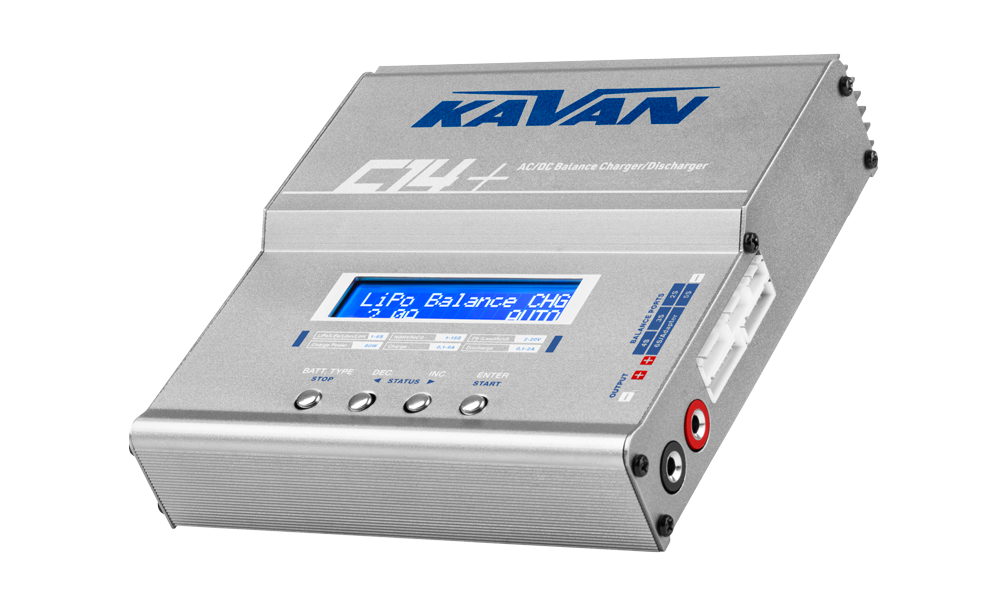
C14 Plus charger
Introduction
The KAVAN C14 Plus is an AC/DC balance charger and discharger with an 80 W charging limit, a 10 W discharge limit, twenty program memories and additional battery-test and power-supply functions. Read the entire manual and Warnings and safety notes before connecting a battery.
Charger layout

Charger set contents
- KAVAN C14 Plus charger
- AC power cable
- DC power cable
- Charging cable
- Instruction manual.
Features
- Adjustable charge/discharge end voltage for lithium and lead-acid batteries. Keep every setting within the battery manufacturer’s permitted limits.
- Measurement of the total voltage and the voltage of individual cells (for lithium batteries) even without charging/discharging.
- Measurement of internal resistance of individual cells (for lithium batteries).
- Power supply mode with adjustable voltage limitation (max. 6 A/80 W).
- Smart battery charging mode (lithium batteries with built-in protection circuits).
Optimized software
The operation of the KAVAN C14+ is controlled by state-of-the-art software providing safe and reliable charging/discharging of virtually all common types of model hobby accumulators. Clear and intuitive program menus offer wide possibilities of setting parameters of the charging/discharging process. They also offer advanced functions, like temperature, time or capacity cut-off enhancing the reliability of correct termination of the charging/discharging process.
- Battery memory (up to 20 different charge/discharge programs)
- Internal lithium battery balancer
- Fast and storage mode of lithium batteries
- Delta-peak sensitivity for NiMH/NiCd
- Cyclic charging/discharging (1–5 cycles of charge → discharge is operable for NiMH/NiCd batteries).
- Adjustable automatic charging current limit (for NiMH/NiCd batteries).
- Lithium battery voltage and internal resistance meter
- Power supply function
- Smart battery charger function
Warnings and safety notes
Wrong battery chemistry, cell count, polarity or charge current can cause fire or explosion. Never leave a charging battery unattended.
- Do not leave the charger unattended while charging. If any malfunction occurs, stop the process immediately and refer to the operation manual.
- Disconnect the battery if it becomes hot immediately. Allow the battery to cool down before reconnecting.
- Do NOT attempt to charge incompatible types of rechargeable batteries or even dry (alkaline, zinc-carbon) batteries. This charger is designed to only charge and discharge Nickel-Cadmium, Nickel-Metal Hydride, Lithium-Ion, Lithium-Polymer (regular and HV), LiFePO4, and Lead-Acid batteries. Never attempt to charge or discharge the following types of batteries:
- A battery pack which consists of different types of cells (including different manufacturers).
- Non-rechargeable batteries (Explosion hazard).
- Batteries that require a different charge technique from NiCd, NiMH, LiPo, LiIon, LiFe, LiHV or Pb.
- A faulty or damaged battery.
- A battery with an integral charge/protection circuit in an ordinary charging mode. Use Smart battery charge only when the battery manufacturer explicitly permits that method.
- Batteries installed in a device or which are electrically linked to other components.
- Batteries that are not expressly stated by the manufacturer to be suitable for the currents the charger delivers during the charge process.
- Keep the charger well away from dust, damp, rain, heat, direct sunshine and vibration. Never drop it.
- Do not allow foreign objects into the charger.
- The allowable AC input voltage is 100–240 V/50–60 Hz or 11–18 V DC voltage. DO NOT try to feed the charger simultaneously using the AC and DC input.
- This charger and the battery should be put on a firm level, heat-resistant, non-flammable and nonconductive surface. Never place them on a car seat, carpet or similar.
- Keep all the inflammable volatile materials away from operating area.
- Do not cover the air intake holes on the charger, as this could cause the charger to overheat.
- Make sure you know the specifications of the battery to be charged or discharged to ensure it meets the requirements of this charger. If the program is set up incorrectly, the battery and charger may be damaged. It can cause fire or explosion due to overcharging.
- Do not attempt to charge batteries at excessive fast charge currents. Check with your battery manufacturer for the maximum charge rate applicable to your battery.
- Do not use automotive type battery chargers to power the charger.
- Do not disassemble the charger.
- This appliance is not intended for use by young children or uninformed persons unless they were adequately supervised by a responsible adult person to ensure that they can use the appliance safely.
Please bear in mind the following points before commencing charging
- Did you select the appropriate program suitable for the type of battery you are charging?
- Did you set up adequate current for charging or discharging?
- Have you checked the battery voltage?
- Have you checked that all connections are firm and secure? Make sure there are no intermittent contacts at any point in the circuit.
Charge/discharge - recommended parameters
LiPo, LiHV and Li-ion batteries
LiPo, LiHV and Li-ion batteries should be charged at 1C – unless the manufacturer recommended a different value – always follow closely the instructions of the battery manufacturer.
LiFe batteries
Genuine A123Systems LiFePO4 nanophosphate batteries may be safely charged at 1–5C levels. Please follow the values recommended by the particular manufacturer with LiFe batteries of other brands.
Lithium battery long time storage
If your lithium battery is not supposed to be used for more than a month, you should use the Storage program to charge or discharge it to a safe part-charge state best suited for the long time storage.
Battery max. temperature limit
We recommend to set the cut-off temperature to 35–40 °C for the LiPo and Li-ion batteries; 40–45 °C for the LiFe cells.
The optional temperature probe (#KAV34.1014.1) is required to measure the temperature of your battery.
NiCd and NiMH batteries
Low internal resistance power NiCd batteries of the sub-C size (e.g. Panasonic N-1700SCR, generally all 1:10 RC car NiCd packs) can be charged at 1–2C rate (i.e. 1.7–3.4 A for 1700 mAh pack). The rest of NiCd and NiMH batteries should not be charged at a rate higher than 1C.
Delta-peak sensitivity
It determines the sensitivity of the delta-peak cut-off circuitry; adjustable within the range 4–20 mV/cell. The lower value, the higher sensitivity. The sensible value is 8–15 mV/cell for most of NiCd batteries and 4–10 mV/cell for most of NiMH batteries.
Discharge - the end point voltage
NiCd batteries: 0.8–1.0 V/cell, NiMH: 1.0 V/cell.
Battery max. temperature limit
We recommend setting the cut-off temperature to 40–45 °C for the NiCd and NiMH batteries.
Lead batteries
We recommend charging sealed lead-acid batteries at 0.1C and discharging at no more than 1C, unless the battery manufacturer specifies otherwise. The Pb terminal voltage is adjustable from 1.50 to 2.50 V per cell. Select the voltage required by the particular battery; do not use 2.45 V per cell indiscriminately for sealed gel batteries.
1C rate means such current that would theoretically charge a battery of a certain nominal capacity in 1 hour.
1C is 2 A (or 2000 mA) for 2000 mAh battery.
Battery standard parameters
These are reference values. Always follow the battery manufacturer’s chemistry-specific voltage, current and storage requirements; use the lower permitted charging current if the limits differ.
| Parameter | LiPo | LiIon | LiFe | LiHV | NiCd | NiMH | Pb |
|---|---|---|---|---|---|---|---|
| Nominal voltage | 3.7 V/cell | 3.6 V/cell | 3.3 V/cell | 3.7 V/cell | 1.2 V/cell | 1.2 V/cell | 2.0 V/cell |
| Max. charge voltage | 4.2 V/cell | 4.1 V/cell | 3.6 V/cell | 4.35 V/cell | 1.5 V/cell | 1.5 V/cell | Type specific* |
| Storage voltage | 3.8 V/cell | 3.7 V/cell | 3.3 V/cell | 3.85 V/cell | Fully discharged | Fully charged | Fully charged |
| Min. discharge voltage | 3.0 V/cell | 3.0 V/cell | 2.8 V/cell | 3.1 V/cell | 0.8 V/cell | 1.0 V/cell | 1.8 V/cell |
| Max. charge current | ≤1C or more** | ≤1C | ≤4–5C (A123) | ≤1C | 1–2C | 1–2C | ≤0.4C |
*) Sealed (gas-tight) gel PB batteries up to 2.27–2.30 V/cell. Classic lead-acid („car battery“) and valve-regulated lead-acid batteries up to 2.46 V/cell.
**) Some LiPo batteries may be charged at 5C or even higher rates – always follow the battery manufacturer's recommendation.
Technical specifications
| AC input voltage | 100–240 V / 50–60 Hz |
|---|---|
| DC input voltage | 11–18 V |
| Lithium batteries | 1–6S LiPo/LiIon/LiFe/LiHV |
| Nickel batteries | 1–15-cell NiCd/NiMH |
| Lead-acid batteries | 6–20 V (charging: terminal voltage 2.45 V/cell) |
| Charge method | Delta-peak for NiCd/NiMH / CC/CV for lithium/Pb |
| Charging current / power | 0.1–6.0 A / maximum 80 W |
| Discharging current / power | 0.1–2.0 A / maximum 10 W |
| Delta-peak sensitivity | 4–20 mV per cell |
| Balancing current | 400 mA per cell |
| Program memory | 20 programs |
| Dimensions | 137×144×40 mm (H×W×D) |
| Weight | 493 g |
Main section
Operating the charger
Here is the detailed procedure to make the charger work. All the screens and operations will take LiPo BALANCE CHARGE program for example.
Connection
Connecting to a power source
AC: Connect your KAVAN C14+ to the AC mains socket using the supplied AC power cable.
DC: Connect your KAVAN C14+ to a 12V car battery using the supplied DC power cable.
Connecting the battery
Before connecting a battery it is absolutely essential to check one last time that you have set the parameters correctly. If the settings are incorrect, the battery may be damaged, and could even burst into flames or explode. In order to avoid short circuits, always connect the charge leads to the charger first, and only then to the battery. Reverse the sequence when disconnecting the pack.
Balance ports (Lithium batteries only)
The balance cable attached to the battery must be connected to the charger with the black wire aligned with the negative marking. Take care to maintain correct polarity! If your pack features a different system of balance connectors (other than JST-XH) connect it via a corresponding balance adapter available separately.
Failure to connect as shown in this diagram will damage this charger. To avoid a short circuit between the charge leads, always connect the charge cable to the charger first, and then connect the battery. Reverse the sequence when disconnecting.
Getting started
Programming buttons
BATT. TYPE / STOP button:
Used to stop the progress or go back to the main menu and navigation within it.
DEC button:
Used to go through the menus and decrease the parameter value.
INC button:
Used to go through the menus and increase the parameter value.
ENTER / START button:
Used to trigger the charging process, enter parameter field or store parameter on screen. When you intend to alter a parameter value in the program, press the START/ENTER button to make it blink then change the value by pressing DEC and/or INC button. The value will be stored by re-pressing the START/ENTER button. If there is another parameter that can be altered in the same screen, when you confirm the first parameter value, the next parameter value will start to blink which means it is ready to be set.
When you intend to start the progress, press and hold the START/ENTER button for 2 seconds. When you are willing to stop the progress or go back to previous step/screen, press the BATT. TYPE/STOP button once.
When you power on the charger, it will enter the program you were using last prior shutting the charger off.
You can change the mode (balance mode, normal charge mode, fast charge mode, store mode or discharge mode), enter the desired charging/discharging mode, set the referred parameter and start the progress then.
Use the Program flow chart reference while learning the menus. It is highly recommended to have it handy while learning how to operate this charger.
Main menu (program select)
Once powered on the initial screen (KAVAN C14+ KAVAN Europe) is displayed; the charger enters the main menu then (PROGRAM SELECT). Here you can scroll through the lithium, NiCd/NiMH and lead battery charge menus, system settings menu, special functions menu and program memory menu using BATT. TYPE/STOP, DEC or INC buttons.
Lithium BATT
Lithium battery (LiPo, LiHV, LiFe/LiIo) charge/discharge programs. The battery type is to be selected in the particular function menu.
NiMH/NiCd BATT
Nickelmetalhydride and nickelcadmium (NiMH, NiCd) charge/discharge programs. The battery type is to be selected in the particular function menu.
Pb (Lead Acid)
Lead (Pb) battery charge/discharge programs.
User Settings
User settings menu for setting of general functions – buzzer, max. output power of the charger, capacity, temperature and time cut-off, charge/discharge terminal voltage, delta-peak sensitivity etc.
Extra Function
Special programs – Lithium cell voltage and internal resistance meter, power supply mode, Smart battery charge mode.
Load Memory
20 charging/discharging program memory. You can launch the selected program right away or adjust the settings first.
User program setup (User Settings)
User Settings
The charger will be operated with the default value of the essential user settings when it is powered on for the first time. The screen displays the following information in sequence and the user can change the value of parameters (used for all the charging programs) on each screen. Scroll through the main menu with the BATT. TYPE/STOP button to find the User Settings PROGRAM → menu and press the START/ENTER button to enter. You can scroll through the system settings menu using INC or DEC buttons. When you are willing to alter the parameter value in the particular function, press START/ENTER to make it blink then change the value with INC or DEC. The value will be stored by pressing START/ENTER once again.
Buzzer On | OFF/ON OFF/LOW/MID/HIGH | The beep sounds at every time touching the buttons to confirm your action. You can adjust the volume of the sounds in four levels. |
Beep 1min | Off/1–5 min/Always | Here you can set the duration of the charging/discharging completion sound signal. |
5min | 1–60 Min | A rest time allowing the battery to cool down between charging/discharging cycles. |
Cut-Off 10.0V | Off/1–5 min/Always | Here you can set the duration of the charging/discharging completion sound signal. |
| OFF/ON (30–90 °C) | The battery's internal chemical reaction will cause the temperature of the battery to rise. If the temperature limit is reached, the process will be terminated. Requires the optional temperature probe. | |
On 5000mAh | OFF/ON (100–60000 mAh) | This program sets the maximum charge capacity that will be supplied to the battery during charge. If the delta peak voltage is not detected nor the safety timer expired by any reason, this feature will automatically stop the process at the selected capacity value. |
On 240 min | OFF/ON (10–720 Min) | When you start a charge process, the integral safety timer automatically starts running at the same time. This is programmed to prevent overcharge the battery if it proves to be faulty, or if the termination circuit cannot detect the battery full. The value for the safety timer should be generous enough to allow a full charge of the battery. |
Limit 250 W | 10–80 W | Max. charging output power setting. Default: 80 W (max. available output power). |
Control Standard | Fast/Standard/Accurate | Accuracy of the lithium cell balancing; the higher accuracy, the longer balancing. Fast – quick balancing, less accurate. Standard – slower but more accurate. Accurate – slow but accurate. |
Voltage Control | Submenu: Lithium and lead battery charge/discharge terminal voltage setting, delta-peak sensitivity and terminal discharge voltage fo NiCd and NiMH batteries. Press the ENTER/START button to enter and BATT. TYPE/STOP to exit. | |
TVC 4200mV/s | 4150–4250 mV | LiPo battery terminal charging voltage. Default: 4200 mV (4.20 V). |
TVC 3200mV/s | 3000–3850 mV | LiPo battery terminal discharging voltage. Default: 3300 mV (3.30 V). |
TVC 4350mV/s | 4400–4300 mV | LiHV battery terminal charging voltage. Default: 4350 mV (4.35 V). |
TVC 3300mV/s | 3000–3950 mV | LiHV battery terminal discharging voltage. Default: 3300 mV (3.30 V). |
TVC 4100mV/s | 3750–4200 mV | Lilo battery terminal charging voltage. Default: 4100 mV (4.10 V). |
TVC 2500mV/s | 3000–3750 mV | Lilo battery terminal discharging voltage. Default: 3100 mV (3.10 V). |
TVC 3600mV/s | 3300–3800 mV | LiFe battery terminal charging voltage. Default: 3650 mV (3.65 V). |
TVC 2500mV/s | 2500–3300 mV | LiFe battery terminal discharging voltage. Default: 2500 mV (2.50 V). |
D.Peak 4mV | Default/4–20 mV/cell | When the charger detects the delta peak value reaches the value you set, the charger will say the battery is fully charged. Default: 4 mV/cell. |
TVC 800mV | 500–1000 mV/cell | NiMH battery terminal discharging voltage. Default: 800 mV/cell (0.8 V/cell). |
D.Peak 7mV | Default/4–20 mV/cell | When the charger detects the delta peak value reaches the value you set, the charger will say the battery is fully charged. Default: 7 mV/cell. |
TVC 1000mV | 500–1000 mV/cell | NiCd battery terminal discharging voltage. Default: 1000 mV/cell. (1.0 V/cell) |
TVC 2400mV/s | 1500–2500 mV | Pb battery terminal charging voltage. Default: 2400 mV (2.40 V). |
TVC 1500mV/s | 1000–1500 mV | Pb battery terminal discharging voltage. Default: 1500 mV (1.50 V). |
Default Setting | Restores the default factory settings. |
Programming the charger - manual program setting
Charging/discharging programs
Scroll through the main menu with the BATT. TYPE/STOP or DEC button to find the PROGRAM SELECT menu for the battery type you want to charge and press the START/ENTER button to enter. You can scroll through the battery menu using INC or DEC buttons. Please, note, you have to choose the desired type of the batteries in the menu first. You can set the charge/discharge terminal voltages in the User Settings menu (User Settings/Termination Voltage Control). Depending on the particular battery type, the operation programs are different for different batteries.
| Battery type | Program | Description |
|---|---|---|
| LiPo LiIon LiFe LiHV | Balance CHG | This mode is for balancing the voltage of lithium battery cells while charging. Requires balance cable connected. |
| Charge | This charging mode is for charging lithium batteries in the normal mode. | |
| Fast Charge | The process time will be reduced making the constant voltage phase shorter – the process is being terminated once the charging current decreases under 1/5 of the preset charging current (it is 1/10 for the other charging modes). | |
| Storage | This program is for charging or discharging lithium batteries which will not be used for long time to “storage” voltage. Requires balance cable connected. | |
| Discharge | This mode is for discharging LiPo/LiFe/LiIon/LiHV battery. | |
| NiMH NiCd | Charge | The charger will charge NiMH and NiCd batteries using the charge current set by the user. |
| Discharge | This mode is for discharging NiMH/NiCd batteries. | |
| Cycle | 1 to 5 cyclic and continuous process of charge>discharge or discharge>charge is operable for battery refreshing and balancing to stimulate the performance of your battery. | |
| Pb | Charge | This mode is for charging Pb batteries. |
| Discharge | This mode is for discharging Pb batteries. |
Main menu PROGRAM SELECT – selecting the battery type
Program memory selection and setting up the parameters will be shown using the LiPo charge as an example. The charge and discharge programs setting procedure is the same for all the lithium (LiPo, LiIo, LiHV, LiFe) and lead (Pb) batteries (Charge and Discharge only).
Press the BATT. TYPE/STOP button to scroll through the main menu; once you select the LiPo battery type program PROGRAM SELECT Lithium BATT press the START/ENTER button to enter.
Charging/Discharging mode select
6.0A 22.2V (6S)
Press INC or DEC to go through all the modes; stop at the LiPo Charge.
Charge parameters setting
Press START/ENTER; the battery type will start blinking. Press INC or DEC to select the desired battery type and press START/ENTER to confirm your setting (the battery type applies to all other charging/discharging programs).
The charging current value will start blinking, press INC or DEC to change the value (0.1–6.0 A) and press START/ENTER to confirm your setting.
6.0A AUTO
Balance CHG: There is „AUTO“ displayed instead of the nominal voltage/number of cells value. Once – after connecting the charging and balance cables of your battery – you press the START/ENTER button in order to set the parameters, the nominal voltage/number of cells value detected by the charger appears.
Program Start
CONFIRM(ENTER)
Press and hold START/ENTER for 2 seconds to start the program.
The charger is detecting the battery cells.
„R“ shows the number of cells detected by the charger and „S“ is the number of cells set by you at the previous screen. If both numbers are not identical, press BATT. TYPE/STOP to go back to previous screen to recheck the number of cells of the battery pack before going ahead. If both numbers are identical, press START/ENTER to start charging process.
Charging status monitor
CHG 038:38 2998
During charge process, real-time status will be displayed on the screen. 1st line – alternately battery type/number of cells, charging current, battery voltage, 2nd line – charging mode (BAL – Balance CHG, CHG – Charge, FAS – Fast Charge, STO – Storage, DSC – Discharge), elapsed time and charged capacity.
Information during operation
Press INC or DEC during charging or discharging process, you can obtain various information on the LCD screen.
INC (press START/ENTER to return to the charging status monitor):
3700 3700 3700 mV
The voltage of each cell in the lithium battery pack when the battery is connected with the balance lead.
DEC (returns automatically after 5 seconds):
ON 8000mAh
The Capacity cut-off function is ON; the terminal capacity value.
ON 240Min
The Safety timer function is ON; the time limit in minutes.
80°C
The Temperature cut off function is ON; the temperature limit in degrees Centigrade.
30°C
The external temperature.
The optional temperature probe (#KAV34.1014.1) is needed to show external temperature.
12.10V
DC input voltage of the charger.
25.20V(6S)
The final voltage when the program ends.
Manual program stop
During the charging process, press BATT. TYPE/STOP to stop the charging process.
Program complete
CHG 088:38 4968
When the charging process finishes, an audible sound will be heard. The battery type and FULL blinks alternately (charging process), resp. END (Discharging process).
4198 4202 4200 mV
Press INC to display individual cell voltages.
Main menu PROGRAM SELECT – NiCd and NiMH batteries
The NiCd and NiMH battery charge/discharge programs are basically identical. However, the default delta peak sensitivity values are different in order to suit the particular battery type.
Charging NiMH/NiCd batteries
6.0A
Press the BATT. TYPE/STOP button to scroll through the main menu; once you select the NiMH battery type program PROGRAM SELECT NiMH/NiCd press the START/ENTER button to enter.
Press the INC or DEC buttons to scroll through the NiMH menus; select the NiMH Charge.
Press START/ENTER; the battery type will start blinking. Press INC or DEC to select the desired battery type and press START/ENTER to confirm your setting (the battery type applies to all other charging/discharging programs).
The charging current value will start blinking, press INC or DEC to change the value (0.1–6.0 A) and press START/ENTER to confirm your setting.
Press and hold START/ENTER for 2 seconds to start the program.
CHG 038:38 2668
Real-time status display: 1st line – alternately battery type/number of cells, charge current, battery voltage, 2nd line – charging mode (CHG – Charge, DSC – Discharge, C-D/D-C – Cycle), elapsed time and charged capacity.
Discharging NiMH/NiCd batteries
2.0AS 10.0V(10S)
Press START/ENTER; the battery type will start blinking. Press INC or DEC to select the desired battery type and press START/ENTER to confirm your setting (the battery type applies to all other charging/discharging programs).
The discharging current value will start blinking, press INC or DEC to change the value (0.1–2.0 A) and press START/ENTER to confirm your setting. Press the START/ENTER button to set the discharge end voltage/number of cells. You can set the required voltage per cell in the User Settings/Termination Voltage Control menu – here you are choosing just the cell number. For NiCd, the recommended end voltage is 0.8–1.0 V per cell, or 4.8–6.0 V for a 6-cell pack. For NiMH, use 1.0 V per cell, or 6.0 V for a 6-cell pack, unless its manufacturer specifies otherwise. Press the START/ENTER button to confirm setting.
Press and hold START/ENTER for 2 seconds to start the program.
Real-time status display: 1st line – alternately battery type/number of cells, discharge current, battery voltage, 2nd line – charging mode (DSC – Discharge), elapsed time and discharged capacity.
Cycling
C-D Times:3
This is to set cycling with two options: Charge to Discharge („CH → D“) and Discharge to Charge („D → C“); the max. number of cycles is 5. You can use this function for balancing, refreshing and break-in (formatting) the battery. To avoid rising temperature there is a brief cool-off period; you can set it in the „Cycle Waste Time“ function within the User Settings menu. Set cycling with INC and DEC buttons, and press the START/ENTER button to confirm setting. Press and hold START/ENTER for 2 seconds to start the program.
To stop the process, press the BATT. TYPE/STOP button once. The audible sound indicates the end of the process.
Real-time status display: 1st line – alternately battery type/number of cells, charge/discharge current, battery voltage, 2nd line – cycle mode, elapsed time and charged/discharged capacity.
At the end of the process, you can see charged or discharged electric capacities of the battery at each cyclic process. By pressing the DEC button, the screen shows the result of each cycle in order.
Programming the charger - program memory load
The charger automatically stores 20 last used programs (numbered 01–20, the last used program is labeled „LS“ instead of a number). The stored programs could be loaded in the „PROGRAM SELECT/Load Memory“ menu anytime.
Scroll through the main menu with the BATT. TYPE/STOP button to find the PROGRAM SELECT/Load Memory menu and press the START/ENTER button to enter.
Load memory
6.0A 22.2V(6S)
2.0A 12.0V(10S)
2.0A 9.9V(3S)
Select the desired program memory using INC and DEC buttons. You can adjust the parameters (if necessary); once you are satisfied press and hold the START/ENTER button for 2 seconds to launch the program.
Special programs
Extra Function
Scroll through the main menu with the BATT. TYPE/STOP button to find the PROGRAM SELECT/Extra Function menu and press the START/ENTER button to enter. Select the desired special function using INC and DEC buttons.
Lithium battery voltage tester (Meter Lixx battery status)
Scroll using INC and DEC buttons to find the lithium battery voltage tester „1 → Meter Lixx Battery Status“ menu. Press the START/ENTER button and select the lithium battery type (LiPo, LiHV, LiIo, LiFe).
Connect the battery you want to test (both charging and balance cables); press and hold the START/ENTER button for 2 seconds to start the test.
Battery Status
LiPo
Capacity: 99%
4200 4195 4198
Press INC and DEC buttons to view the two screens: individual cell voltage and the other one displaying the battery type/ number of cells, the total pack voltage and capacity percentage.
Press the BATT. TYPE/STOP button to end the test.
Lithium battery internal resistance meter (Meter Lixx battery IR)
Scroll using INC and DEC buttons to find the internal resistance meter „2 → Meter Lixx Battery IR“ menu.
Connect the battery you want to test (both charging and balance cables); press and hold the START/ENTER button for 2 seconds to start the test.
Battery IR
C4: 9 10 11 m0
After a moment the display will show the internal resistance of the individual cells (in milliohms).
Press the BATT. TYPE/STOP button to end the test.
Lithium battery balancer (balancer lithium battery)
Scroll using INC and DEC buttons to find the lithium battery balancer „3 → Balancer Lithium Battery“ menu. Press the START/ENTER button and select the lithium battery type (LiPo, LiHV, LiIo, LiFe).
Connect the battery you want to balance (both charging and balance cables); press and hold the START/ENTER button for 2 seconds to start the balancing.
LiPo
Balancing…
3708 3700 3710 m
Press INC and DEC buttons to view the two screens: individual cell voltage and the other one displaying the battery type/ number of cells and the total pack voltage. Once the balancing has been accomplished the „Balance End“ notice is blinking on the display.
Press the BATT. TYPE/STOP button to end the test.
Power supply mode (digital power)
Scroll using INC and DEC buttons to find the power supply mode „4 → Digital Power“ menu.
Press the START/ENTER button; set the output voltage limit (5.0–27.0 V) and the output current (0.1–6.0 A).
Connect the load (appliance max. 80 W input power) to the output (+)/(−) sockets of the charger; press and hold the START/ENTER button for 2 seconds to start the power supply.
12.0V 2.0A
000:30 24W
The screen displays: the power supply mode (PWR), current and output voltage, time and the output power (max. 80 W).
Press the BATT. TYPE/STOP button to end the power supply mode.
Smart battery charge
Smart batteries are lithium battery packs featuring internal protection electronic circuits. The Smart Battery Charge mode allows setting of the charging time, charging current and max. battery voltage. Follow the instruction manual of your smart battery when selecting the charging parameters.
Scroll using INC and DEC buttons to find the Smart battery charging „5 → Smart Battery Charge“ menu.
Press the START/ENTER button; set the desired charging time (1–240 min), the charging current (0.1–6.0 A) and the max. battery voltage (5.0–27.0 V).
Press and hold the START/ENTER button for 2 seconds to start the charging.
Charge
4.0A 17.4V
BATT 000:05 0.0W
The screen displays: the charging current and battery voltage, charging time and the output power (max. 80 W).
Press the BATT. TYPE/STOP button to end the Smart battery charging.
Appendix
Warning and error messages
In case of an error the screen will display the cause of error and emit an audible sound.
TOO HIGH | DC input voltage of the charger is higher than 18 V. Check the input voltage. |
TOO LOW | DC input voltage of the charger is lower than the value set in the User Settings/Low Input VOLT menu. Check the input voltage. |
CHECK | The charged battery was connected with incorrect polarity. |
DISCONNECT | The charging cables and/or internal wiring/connections of the battery are broken. |
OVER VOLTAGE | The voltage of the battery pack is higher than the charging terminal voltage. Check the battery and the charging terminal voltage in the User Settings/Terminal Voltage Control menu. |
LOWER VOLTAGE | The voltage of the battery pack is lower than the discharging terminal voltage. Check the battery and the discharging terminal voltage in the User Settings/Terminal Voltage Control menu. |
CELL COUNT ERROR | The voltage of the battery does not correspond to the set number of cells. Check the cell count. |
OVER CELL VOLT | The voltage of a cell in the battery pack is higher than the charging terminal voltage; check the voltage of each cell and the charging terminal voltage setting please. |
LOWER CELL VOLT | The voltage of a cell in the battery pack is lower than the discharging terminal voltage; check the voltage of each cell and the discharging terminal voltage setting please. |
FULL BATTERY | The battery has been charged already; no need to charge again. |
CUTOFF | The battery temperature (measured by an optional temperature sensor) is higher than the temperature limit set in the User Settings/Ext-TEMP Cut-off menu. |
CUTOFF | The capacity is higher than the capacity limit set in the User Settings/Capacity Cut-off menu. |
CUTOFF | The charging time has exceeded the time limit set in the User Settings/Safety Timer menu. |
Program flow chart

Charge/discharge limit
Since the amount of heat the charger is able to dissipate is limited by the natural laws, the max. charge and discharge rates are automatically limited by the charger. Depending on the battery voltage (and the temperature of the charger as well as the ambient temperature), the charge/discharge current is being limited automatically so the output power of the charger does not exceed 80 W during the charging or 10 W during the discharging.
Max. charge current is:
If the battery voltage is 11.1 V, it will be:
Max. discharge current is:
If the battery voltage is 10 V, it will be:
Recycling and waste disposal note (European Union)
Electrical equipment marked with the crossed-out waste bin symbol must not be discarded in the domestic waste; it should be disposed of via the appropriate specialised disposal system. In the countries of the EU (European Union) electrical devices must not be discarded via the normal domestic waste system (WEEE - Waste of Electrical and Electronic Equipment, Directive 2012/19/EU). You can take your unwanted equipment to your nearest public collection point or recycling centre, where it will be disposed of in the proper manner at no charge to you. By disposing of your old equipment in a responsible manner you make an important contribution to the safeguarding of the environment.
EU declaration of conformity (European Union)
Hereby, KAVAN Europe s.r.o. declares that the KAVAN C14 Plus is in compliance with the essential requirements as laid down in the EU directive(s) concerning electromagnetic compatibility. The full text of the EU Declaration of Conformity is available at www.kavanrc.com/doc.
Guarantee
The KAVAN Europe s.r.o. products are covered by a guarantee that fulfils the currently valid legal requirements in your country. If you wish to make a claim under guarantee, please contact the retailer from whom you first purchased the equipment. The guarantee does not cover faults which were caused in the following ways: crashes, improper use, incorrect connection, reversed polarity, maintenance work carried out late, incorrectly or not at all, or by unauthorised personnel, use of anything other than genuine KAVAN Europe s.r.o. accessories, modifications or repairs which were not carried out by KAVAN Europe s.r.o. or an authorised KAVAN Europe s.r.o., accidental or deliberate damage, defects caused by normal wear and tear, operation outside the Specification, or in conjunction with equipment made by other manufacturers. Please be sure to read the appropriate information sheets in the product documentation.