Joysway Baiting 500 / Sweet Bait V3 - Instruction manual
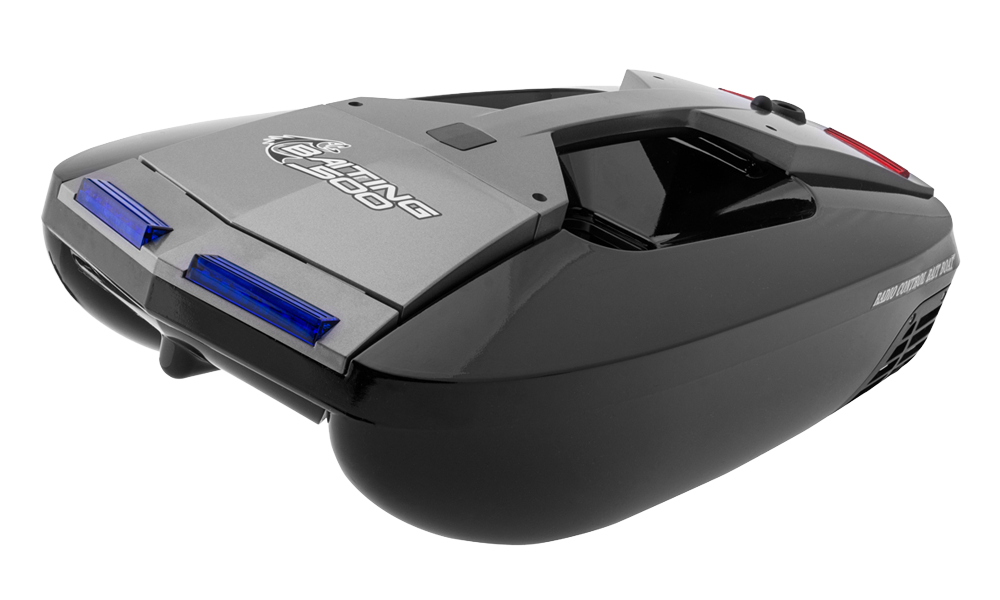
Baiting 500 V3
Introduction
Baiting 500 V3, called Sweet Bait, is a quiet twin-propeller bait boat for dry loose bait, hook delivery and magnetic line towing. Its modular construction allows replacement of individual assemblies. Optional camera and sonar equipment are not included.
Specifications
| Length / beam | 556 / 240 mm |
|---|---|
| Empty / fully loaded weight | 1650 / 2150 g |
| Bait load / maximum particle size | 500 g / 15 mm |
| Maximum speed: empty / loaded | 1.2 / 1 m/s |
| Turning radius / radio range | 1 / 200 m |
| Drive battery | NiMH 4.8 V 5000 mAh |
| Transmitter cells | 4× AA |
| Approximate runtime | 1.5 h |
| Accessory output | 12 V / 1 A |
Use only dry, freely flowing bait, up to 500 g per trip with pieces no larger than 15 mm. The source gives an example of 50 deliveries to a point 50 m from shore on one charge. These endurance and range figures depend on conditions. The hopper can also carry 1 or 2 fishing rigs.
Safety notes
Read all instructions before use. Keep hands clear of propellers and disconnect power before clearing or servicing them. Do not operate near swimmers, in strong wind, waves, rain, thunderstorms, flowing water, weeds or dense obstacles. Keep small parts away from children, especially those younger than 3. Never swim after a stranded boat or enter the water with the transmitter.
Remove boat and transmitter batteries for transport and storage. Protect the hull from falls and impacts and batteries from sharp objects, punctures and short circuits. Keep equipment out of heat, damp storage and direct sunlight. Keep the transmitter dry. After each outing, disconnect the battery and dry the open hull completely to prevent corrosion.
Independent use is intended for persons older than 15. Operate only on still water; rivers, streams and canals can carry the boat beyond control. If it stops, recover safely from shore or using a suitable full-size craft, never by swimming.
Main section
Charging the drive battery
- Remove the pack from the boat. Connect the supplied USB charger to a USB mains adapter or power bank rated at least 5 V / 2 A; the adapter is not included. The charger LED lights red when powered.
- Connect the NiMH pack. Blue flashing indicates charging; steady blue indicates completion. The detailed USB instructions give approximately 5 h. Disconnect promptly when complete.
Never charge overnight or unattended, or leave the battery connected longer than 7 h. Disconnect immediately if it becomes excessively hot. The introduction says 7 h for a full charge, while the USB section says 5 h; use the actual charger’s completion indication, not the longer time as a charging target.
Transmitter and boat startup
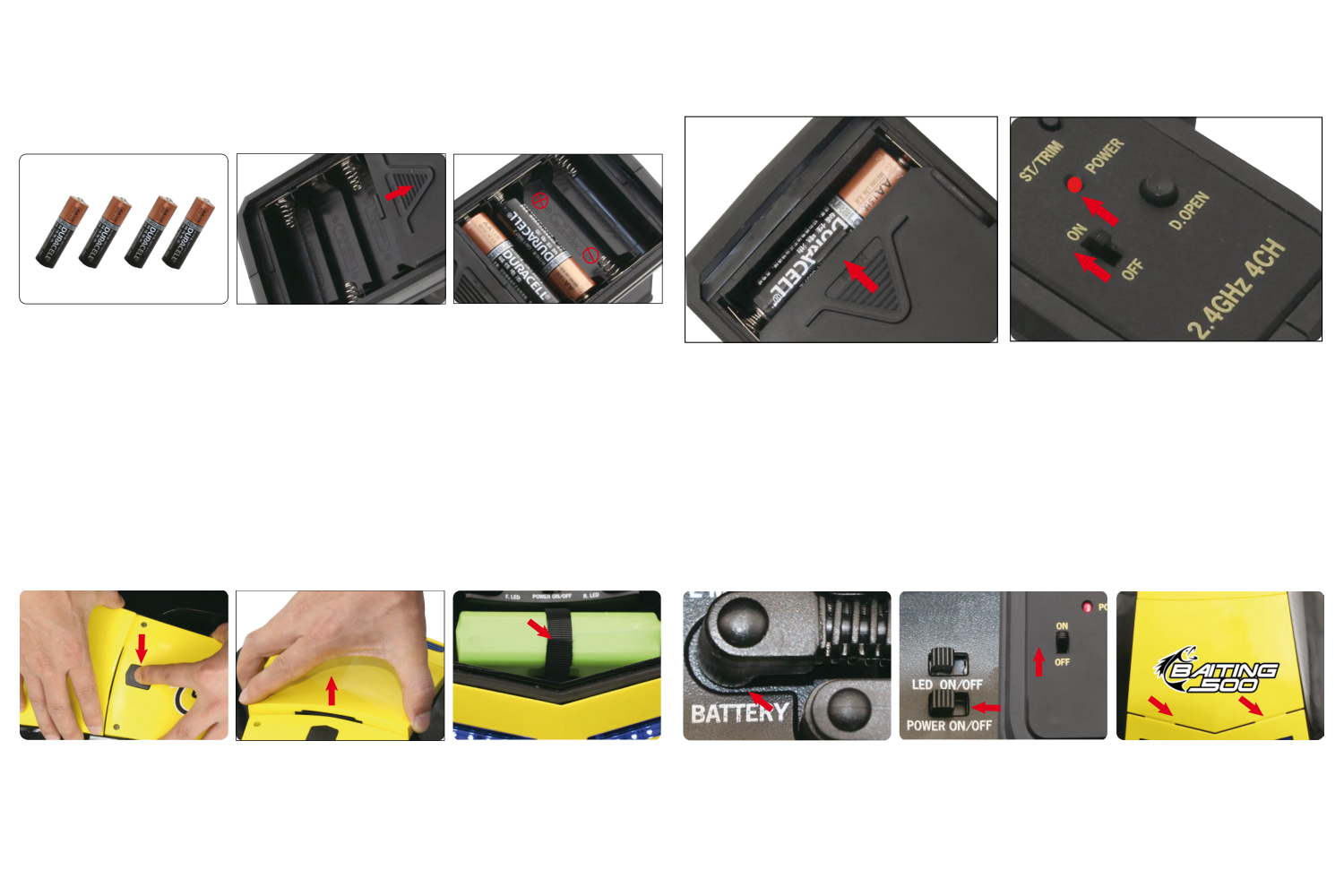
- Open the transmitter’s lower battery compartment. Fit 4 AA alkaline cells or NiMH cells with the marked polarity and close the cover. Switch ON; the red POWER LED should light. If dark, check polarity and charge. Switch off when not operating.
- Press the black hatch button and lift the cover. Secure the charged pack on its tray with the hook-and-loop strap. With boat POWER off, connect the pack to the socket marked BATTERY.
- Switch the transmitter on first, then the receiver-box POWER switch. Steady blue on the receiver indicates connection; flashing blue calls for binding. Complete the checks below, then insert the cover’s 2 tabs into the hull slots and close it securely.
Checking functions
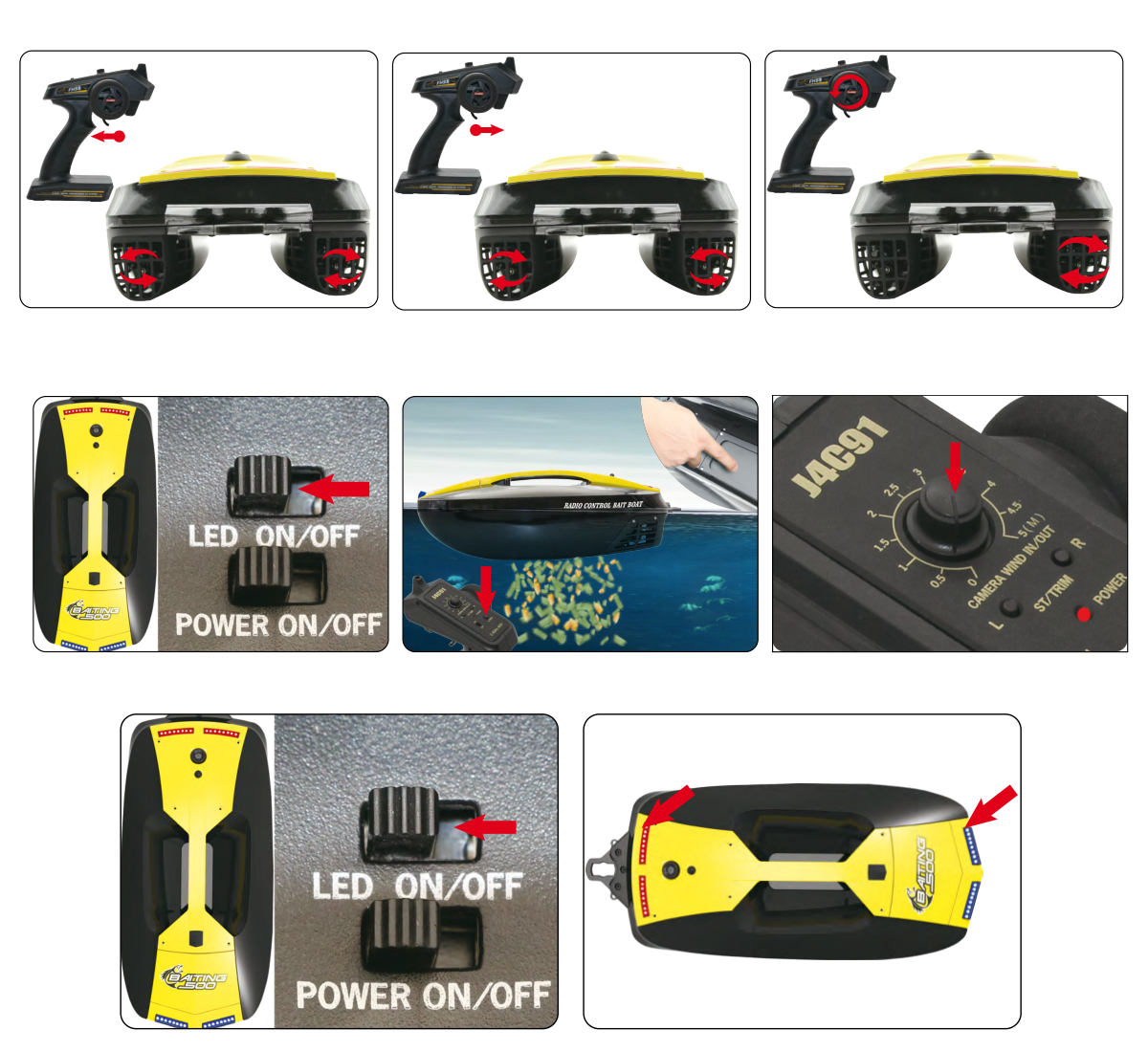
- Keep clear of the propellers. Pull the trigger: both propellers drive forward proportionally. Push it away: both reverse proportionally, with a lower maximum reverse speed. Turn left: the left propeller stops while the right drives. Turn right: the right stops while the left drives.
- Switch LED on the receiver box: front lights are blue, rear lights red. They help identify heading at night. Pull the hopper door from front towards rear until the latch clicks and gives the „DA“ indication. Press D.OPEN to check release.
Binding: identify the radio edition
Keep transmitter and boat within 30 cm, initially with both switched off.
- Switch off the POWER switch on the receiver unit.
- Switch off the transmitter.
- Press and hold the D.OPEN button, and switch on the transmitter at the same time. Hold D.OPEN for 2 seconds, then release the button.
- Switch on the receiver using the ‘POWER’ switch (to the ‘ON’ position). If the blue indicator light remains lit, pairing has been successfully completed.
Delivering bait and fishing rigs
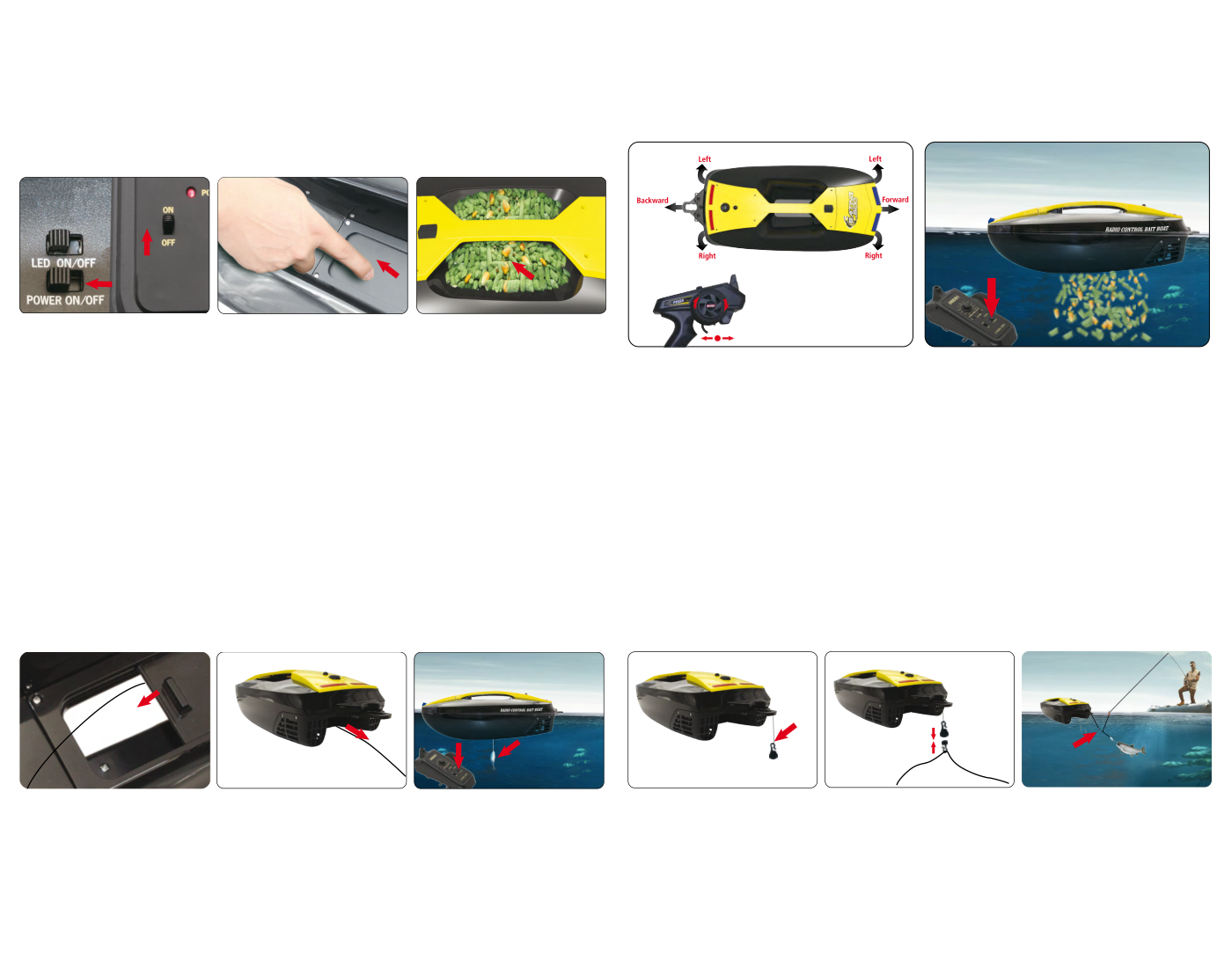
- Start transmitter then boat, check steady receiver blue and close the hopper door. Load up to 500 g of suitable bait. Launch, drive to the chosen point within reliable range, press D.OPEN to release and return. Refill only after recovering the boat.
- For hook delivery, pass the hooked rig upward through the hopper opening and close the door until it clicks. Lead the line straight aft, clear of propellers. At the chosen point press D.OPEN to release the hook and return.
- For magnetic towing, tie the larger magnetic half to the stern bracket with line no longer than 100 mm. Attach the smaller half to the fishing rig and join the magnets. Drive out; a fish strike or rod movement separates the magnets. Return the boat after release.
Hopper loading, fishing-line route and magnetic release. (Fig. 4)
Low drive-battery voltage makes the navigation LEDs flash even if switched off. Return immediately. The source quotes about 10 min or 400 m remaining, but this is an estimate, not a guaranteed reserve. Recharge or replace the pack ashore.
Optional equipment
Underwater camera 3901
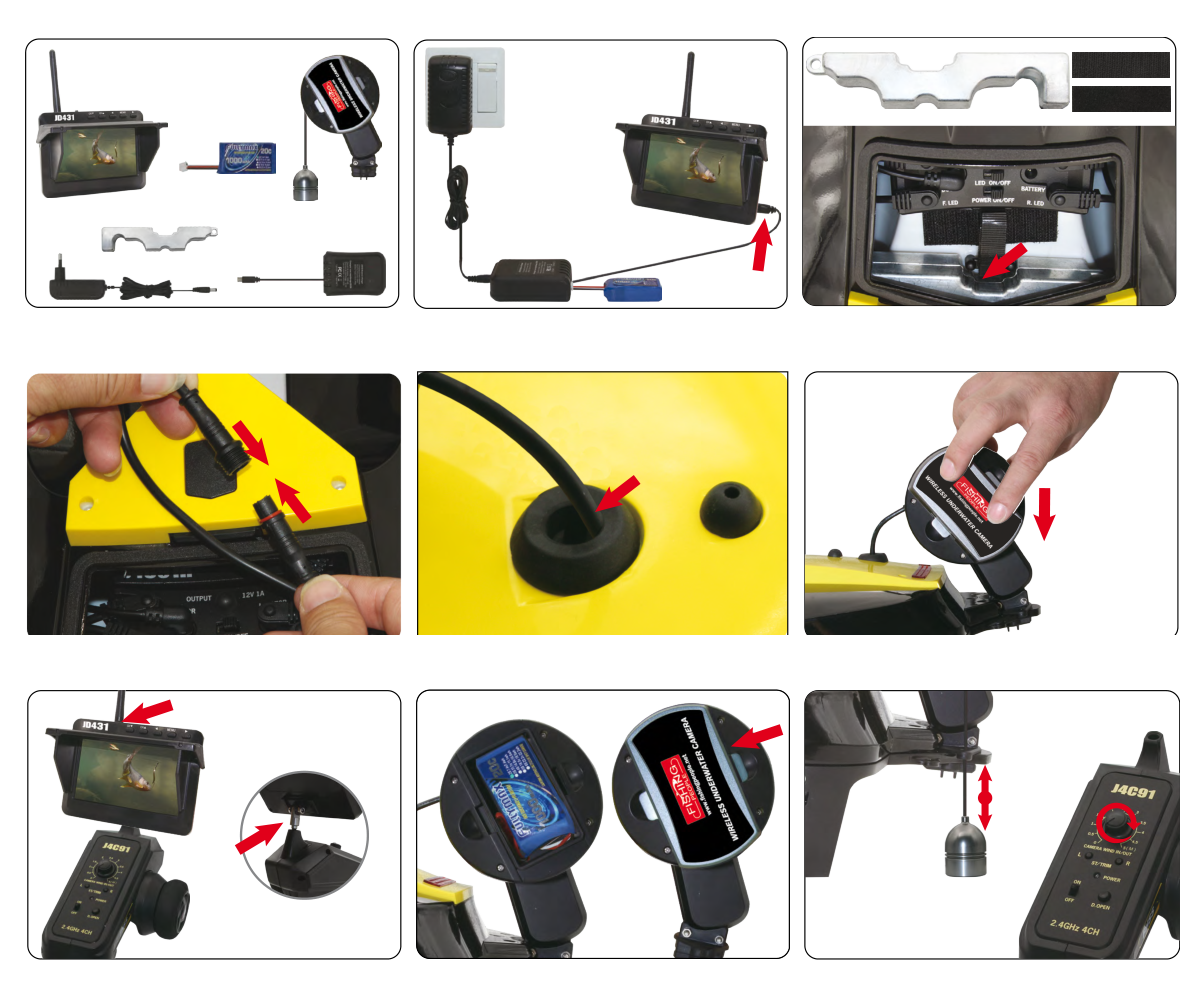
- For the radio version with CAMERA WIND IN/OUT, charge the camera-winch and display batteries according to their instructions. Fit the supplied self-adhesive balancing weight in the bow compartment.
- Route the camera lead through the large hole in the stern handle and forward to the battery compartment; join its waterproof connector. Slit the rubber plug, fit it around the lead and seat it in the stern hole to seal the opening. Mount the winch on the stern bracket.
- Attach the monitor to the transmitter and switch it on. Install and connect the winch battery and close its cover. Check the live camera image. Turn CAMERA WIND IN/OUT slowly to lower or retrieve the camera; rapid turning can tangle the line. Without a compatible camera this knob has no function.
Total camera line is 5.5 m; controlled travel and maximum immersion depth are 5 m. Use it to inspect depth, locate fish or watch bites when using the magnetic release.
Installing a wireless fishfinder
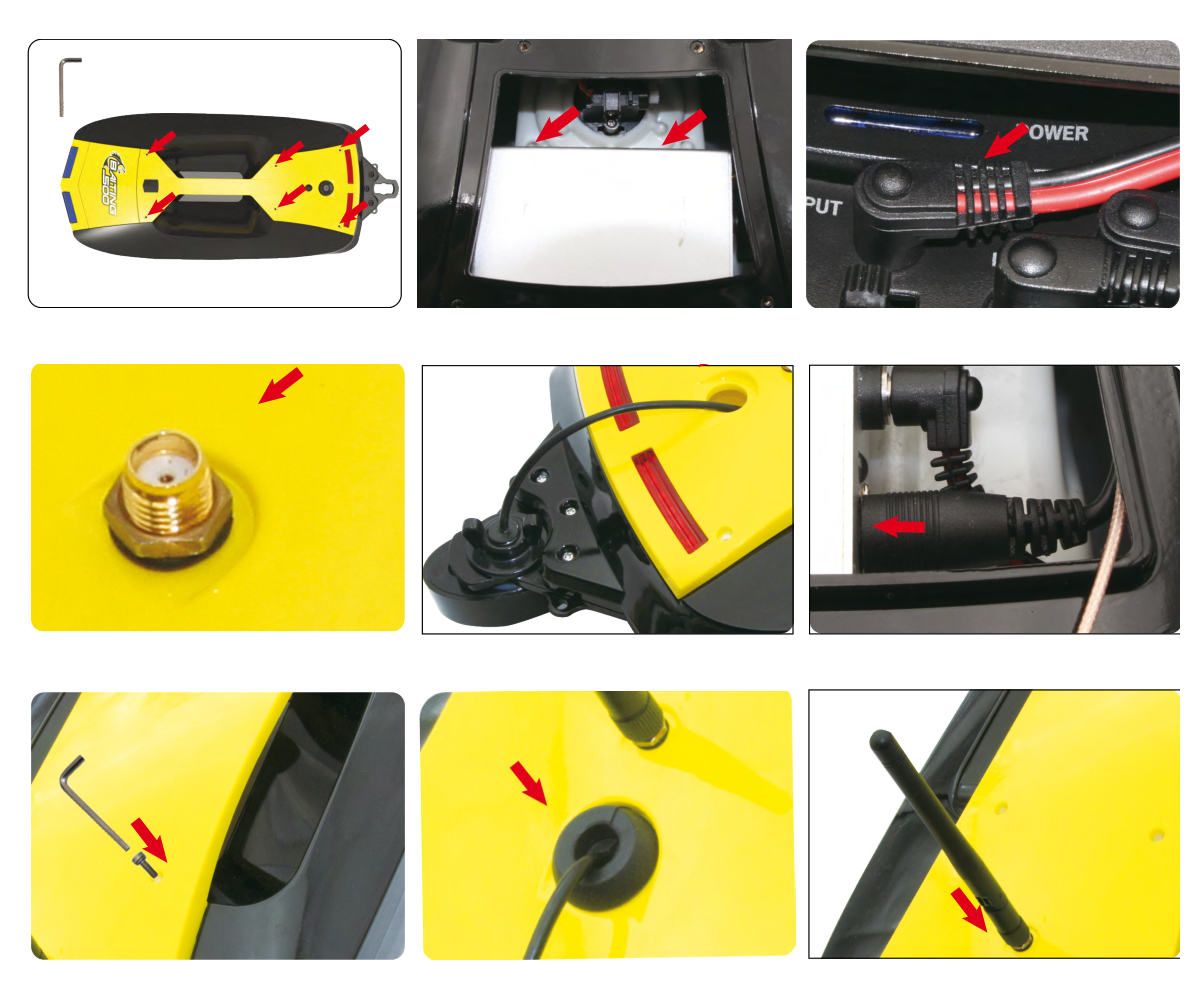
- Disconnect boat power. Remove the 6 handle screws with the supplied hex key and lift the handle. Secure the sonar control unit in the rear compartment with double-sided tape.
- Confirm the fishfinder accepts 12 V and no more than 1 A. Use the supplied connector: black wire is negative (−) on the outer contact, brown is positive (+) at the centre. Connect to OUTPUT 12V/1A on the receiver box, keeping power off during wiring.
- Mount the antenna connector through the small handle hole. Fit the transducer to the stern bracket, route its cable through the large hole and connect it to the control unit. Refit the handle with its 6 screws. Slit and fit the rubber plug around the cable to seal the rear hole, then screw on the antenna.
Alternatively, tow a compatible portable Wi-Fi fishfinder from the rear bracket using line no longer than 100 mm. Follow that accessory’s instructions.
Maintenance and storage
- Switch off the boat before the transmitter. Disconnect and remove the drive pack and remove transmitter cells when finished. Rinse the hull exterior, hopper and both propellers with clean fresh water; keep electronics dry.
- Remove weeds and foreign matter from under the propeller guards before the next run. The source suggests a brief reverse pulse may free weeds while afloat; stop if this fails and recover safely, then disconnect power before clearing by hand.
- Clean the hopper and leave its door open, especially during long storage, to avoid deforming the door or spring. Open the hatch and let the boat dry for 1 day. Store fully dry in the original box and foam packing. Replace worn or damaged modular parts; ask the retailer for service if unsure.
Appendix
Spare parts
| Part number | Description |
|---|---|
| 315101 | Yellow hatch |
| 315102 | Front and rear LED set |
| 315103 | Antenna and cable seals |
| 315104 | Bait hopper door set |
| 315105 | Hopper door lock set |
| 315106 | Receiver |
| 315107 / 315126 | Transmitter |
| 315108 | Left and right motor set |
| 315109 | Left and right propeller set |
| 315110 | NiMH 4.8 V 5000 mAh |
| 315111 | Mains charger |
| 315112 | Hook-and-loop fastening set |
| 315113 | Magnetic line-release set, 4 pieces |
| 315114 | Yellow handle |
| 315115 | Black hull with decals |
| 315116 | Front and rear hatch seals |
| 315117 | Left and right propeller guards |
| 315119 | Grey hatch |
| 315120 | Grey handle |
Recycling (European Union)
Electrical equipment bearing the crossed-out bin symbol must not be disposed of in normal household waste. Instead, it must be taken to a specialised collection and recycling facility. In EU (European Union) countries, electrical equipment must not be disposed of in normal household waste (WEEE - Waste of Electrical and Electronic Equipment, Directive 2012/19/EU). You can take unwanted equipment to your nearest collection or recycling centre. The equipment will then be disposed of or recycled safely, free of charge. By handing in your unwanted equipment, you can make an important contribution to protecting the environment.
EU Declaration of Conformity
Joysway Hobby International Ltd. hereby declares that the model Baiting 500 V3 / Sweet Bait V3 and other equipment supplied with it are in compliance with Directive 2014/53/EU. The full text of the EU Declaration of Conformity is available at the following website: https://www.kavanrc.com/doc. This 2.4 GHz radio equipment can be used without prior registration or individual approval in all countries of the European Union.
Warranty and post-warranty service
All Joysway products are covered by a 2-year warranty covering all manufacturing defects and faults. When making a claim within the warranty period, please always present a copy of the proof of purchase with the product and provide the service personnel with as detailed and complete information as possible about the defect found, your usage and other information that will facilitate the assessment of the claim and speed up its settlement. Please make your claim at the shop where you purchased the product.
This warranty certificate entitles you to a free warranty repair of the product supplied by KAVAN Europe s.r.o. within a period of 24 months. The warranty does not cover natural wear and tear due to normal use, as this is a product for modelling use, where the individual parts operate under much higher loads than normal toys are subjected to.
The warranty also does not cover any part of the equipment that has been improperly installed, roughly or improperly handled, or damaged in an accident, or any part of the equipment that has been repaired or altered by an unauthorised person (this includes the application of any waterproof sprays/coatings by the user). Like other fine electronics products, do not expose this equipment to high temperatures, low temperatures, moisture, dusty environments, violent mechanical shocks and impacts. Do not leave it in direct sunlight for extended periods of time.
Improper installation includes inadequate mounting, mechanical strain on cables and insufficient cooling.
Please claim warranty repairs from the shop where you purchased the product.
If possible, use the original packaging when returning the product for service. Include a dated description of its use and the fault, together with your full address and telephone number.