Toslon TF300 - Instruction manual
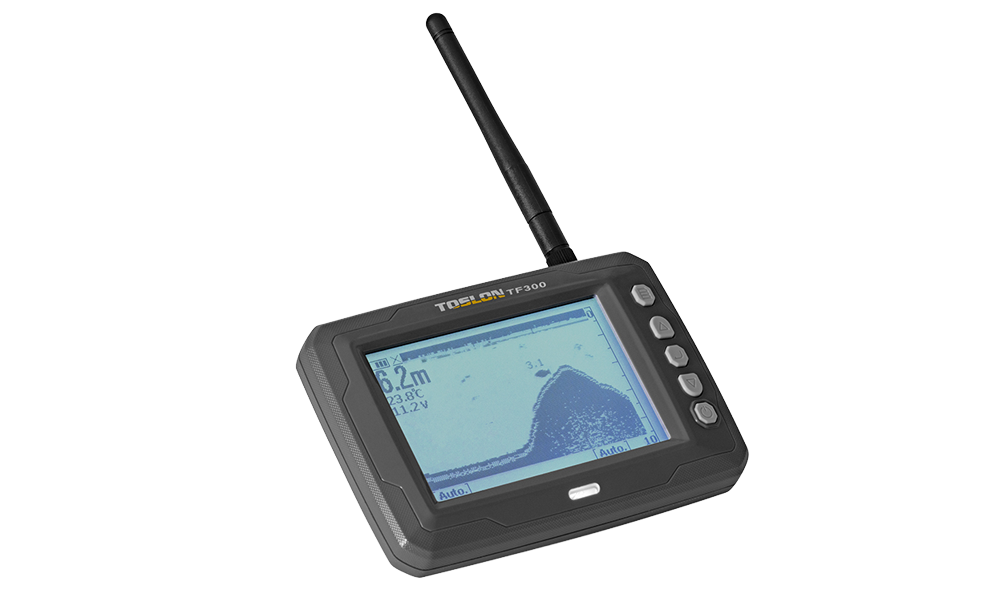
Toslon TF300
Introduction
TF300 is a wireless fishfinder (sonar) for bait boats, with a hull-mounted transducer, boat control unit (CCU) and separate display.
Specifications
| Parameter | Description |
|---|---|
| Display | 4.5" FSTN, readable in sunlight; 240×128 px, 4 grey levels |
| Maximum depth | 30 m |
| Sonar frequency / beam | 115 kHz / 60° @ −10 dB |
| Radio frequency / power | 2400–2483.5 MHz / 20 dBm |
| Typical radio range | 180 m; depends on weather and installation |
| Display battery | BL-5C lithium battery |
| CCU supply / consumption | 6–12 V DC / 2 W |
| Cable length | 0.5 m |
| Display dimensions | 134×92×24 mm |
| Operating temperature | −10–50 °C |
The display can show the depth of each detected fish above its symbol. Fish symbols represent interpreted sonar echoes, not a guarantee that every target is a fish.
Contents
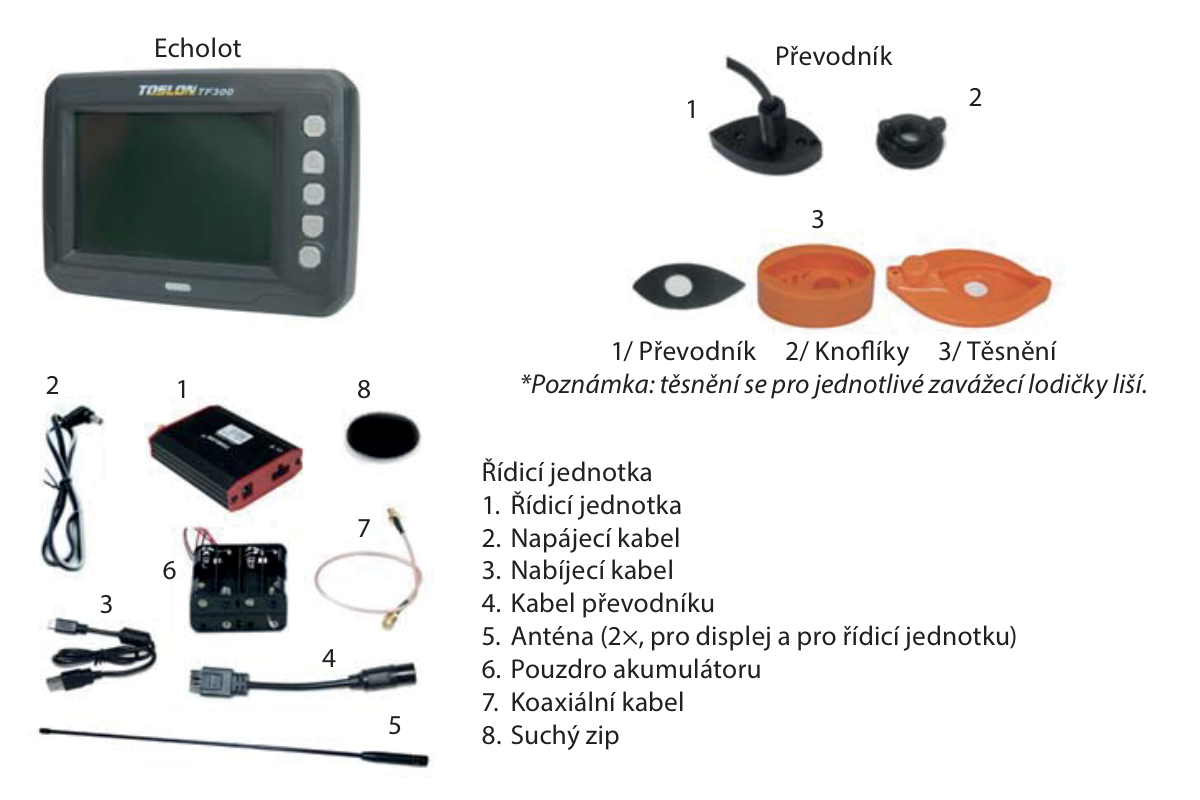
Check the display, transducer, fastening knobs and hull-specific gaskets, CCU, power lead, charging lead, transducer cable, 2 antennas for display and CCU, battery holder, coaxial antenna cable and hook-and-loop mounting pad. The correct gasket depends on the bait-boat hull.
Main section
Installing the transducer
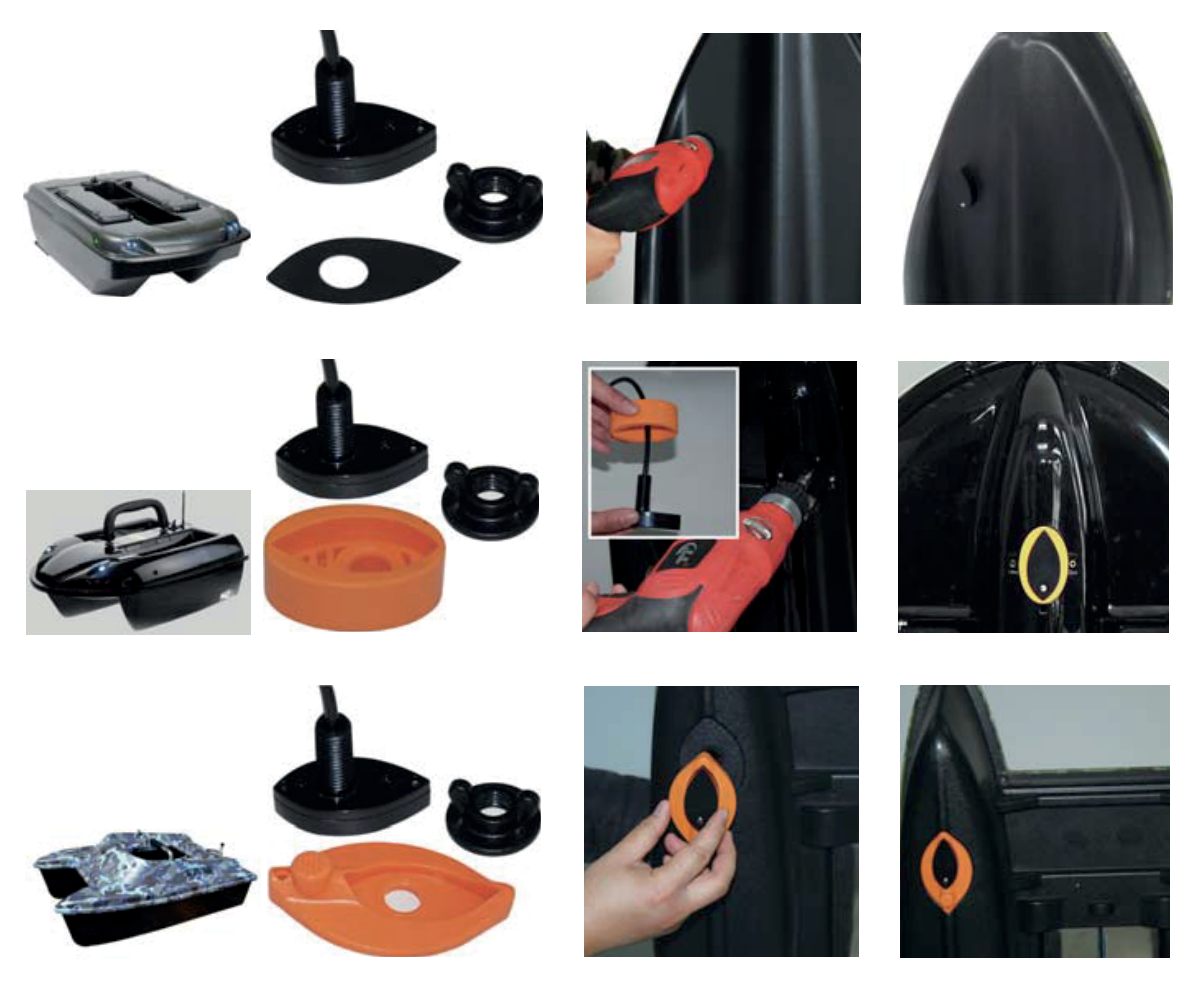
Disconnect boat power before drilling or wiring. Verify the mounting position and gasket against the actual hull before making a hole; drilling is permanent. The supplied guide does not specify a universal transducer-hole diameter. Do not use the antenna-hole dimension for the transducer.
- For a general hull without a prepared recess, such as the cited Carp Madness or Anatec Monocoque, fit the transducer through a correctly sized hole in the hull bottom with its matching gasket and fastening knob.
- For the cited Carplounge, Waverunner, Vegaboat, Carpboat and Anatec Catamaran hulls with an existing recess, use the gasket shaped for that recess. Seat and secure the transducer without distorting the seal. Check watertightness before operating.
Antenna and CCU wiring
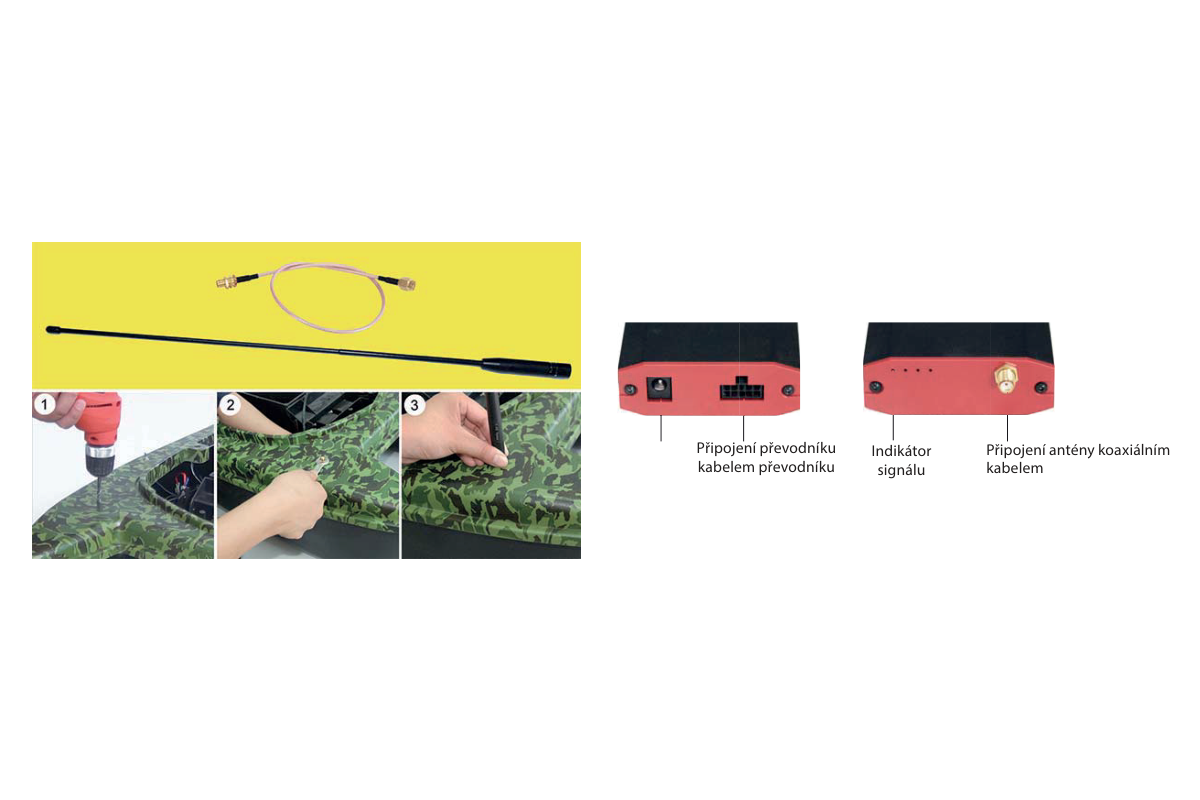
- Drill a Ø5mm antenna mounting hole at the selected position. Remove the coaxial connector’s nut and washer, feed the connector through from inside, then refit the washer and nut and tighten with a spanner. Screw on the boat antenna securely.
- Connect the transducer cable and coaxial antenna cable to the matching CCU sockets. Check supply voltage and polarity, then connect the power lead. Secure the CCU inside the boat. The signal indicator is beside the antenna connection.
Power supply
Recommended external CCU supply is 6–12 V; the absolute maximum is 14.8 V. Overvoltage can destroy the electronics. Do not connect a 4S LiPo: it reaches 16.8 V fully charged despite appearing in the source illustration. The display uses its BL-5C battery; do not apply the boat supply to that battery’s terminals.
| Source battery examples | Listed voltage range |
|---|---|
| 12V lead-acid | 10.8–14.8 V |
| 8× AA NiMH | 7.8–10.6 V |
| 8× AA alkaline | 7.5–12.8 V |
| 2S LiPo | 5.6–8.4 V |
| 3S LiPo | 8.4–12.6 V |
These ranges reproduce the source’s compatibility examples, not battery discharge limits. Follow the battery maker’s safe limits and the recommended CCU operating range. Use the appropriate charging equipment for each battery chemistry.
Display mounting and binding
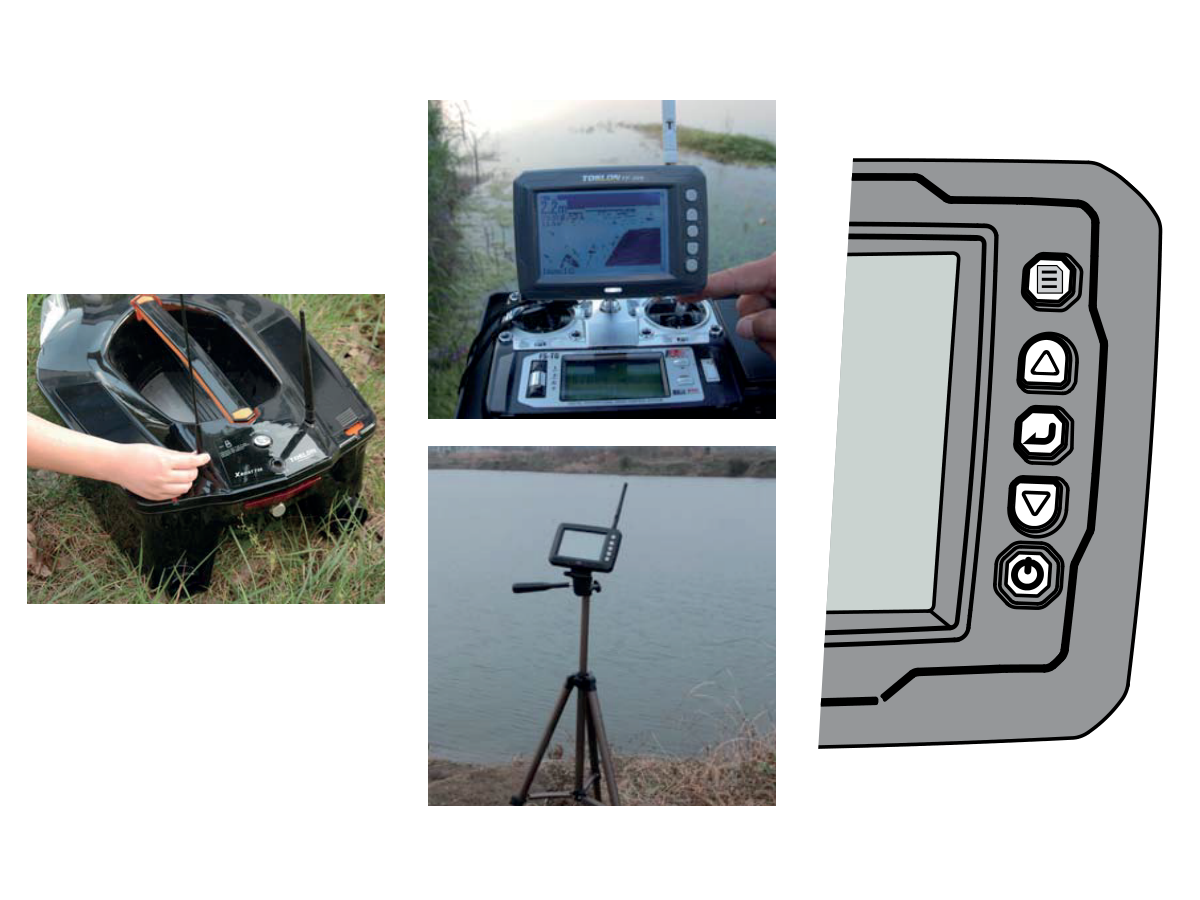
Mount the display on the boat transmitter or on a tripod. Fit its antenna and check that the boat antenna is tightly attached; a loose or missing antenna greatly reduces radio range.
- Switch on the boat transmitter and wait for its red TX indication.
- On the fishfinder, hold Power and Down together for at least 3 s.
- Switch on the bait boat/CCU. The display shows „CCU Bind“ while finding the channel. Release the buttons when the channel is found, then switch the fishfinder off and on again to use it.
Buttons
| Button | Description |
|---|---|
| Menu | Open settings; switch menus. |
| ⮝ | Move up; increase value. |
| Enter | Confirm selection; open the selected setting. |
| ⮟ | Move down; decrease value. |
| Power | Power on/off; leave a selection/menu; switch backlight on/off. |
Reading the display
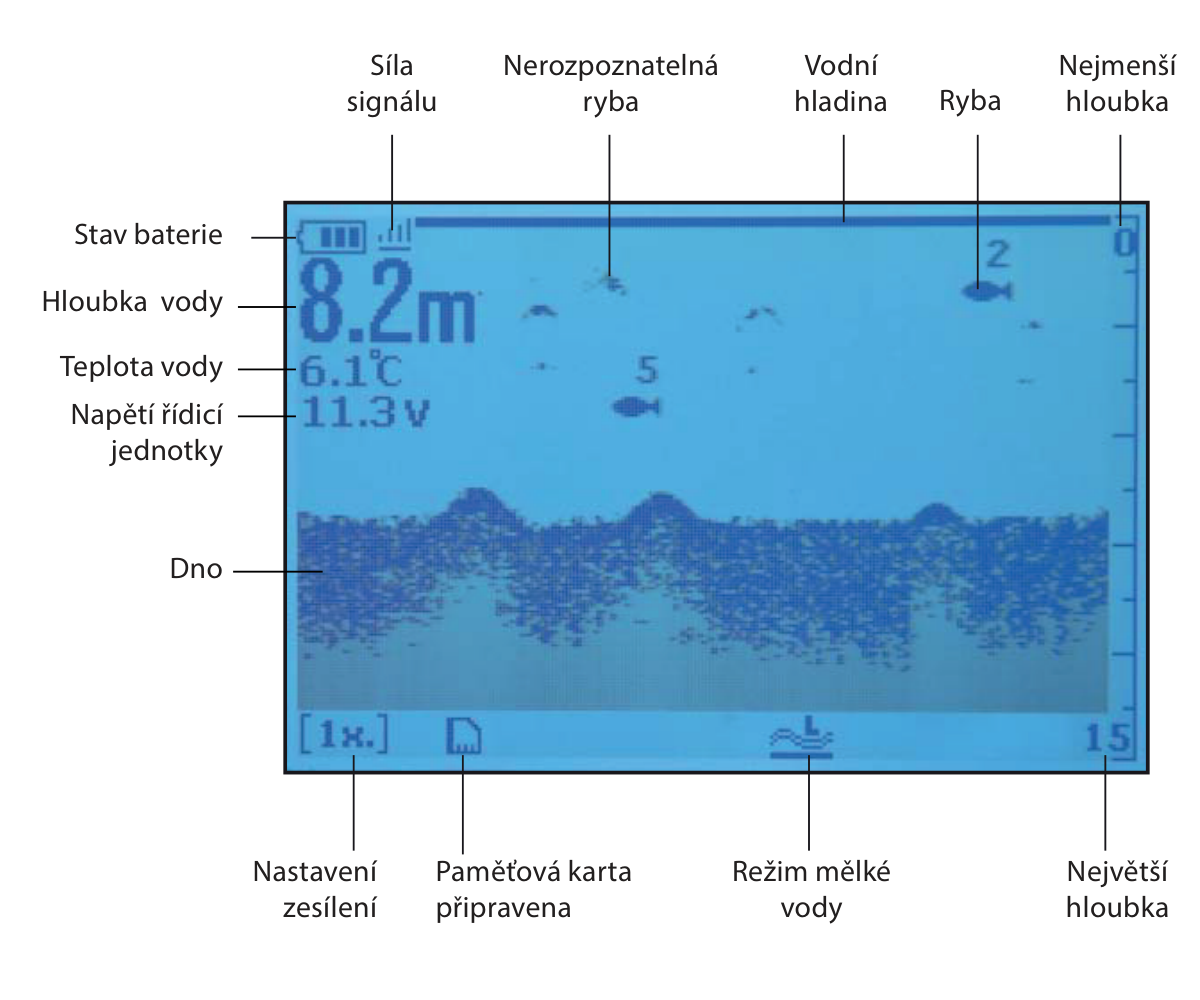
The display identifies radio signal strength, display battery state, water depth and temperature, CCU voltage, surface and bottom, recognised fish symbols and unrecognised echoes, upper and lower depth limits, gain, memory-card readiness and shallow-water mode. The depth of an identified fish may appear above its symbol.
Settings and menu reference
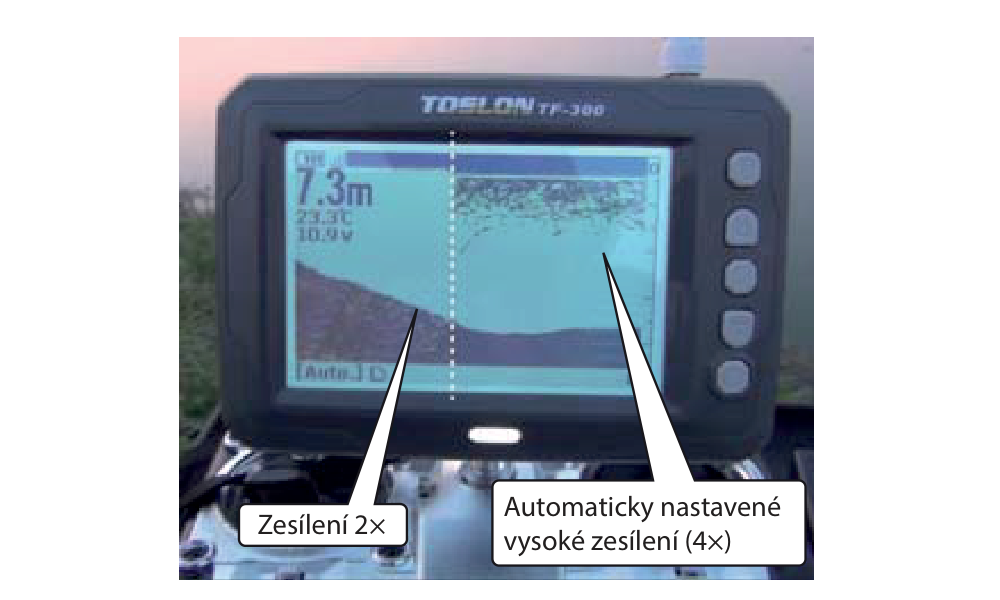
Default settings suit most conditions. Use the menu to adjust only what the current water conditions require. Sonar menus contain the first 5 entries below; display menus run from Units to Contrast, alarms from Shallow Alarm to CCU Alarm Vtg., and system functions from Beeper to Mode Select.
| Menu item | Description |
|---|---|
| Sensitivity | Echo detail level; increase in deep water and reduce in shallow water. |
| Fish ID. Sens. | Fish-display threshold. Higher settings show weak echoes as small fish or bait; lower settings suppress weak echoes and favour larger fish. |
| Surface Clarify | Reduces surface clutter by lowering receiver sensitivity near the surface. |
| Gain | Physical receiver gain. Higher gain detects smaller targets but excessive gain produces background noise. Unavailable in Shallow Mode. |
| Shallow Mode | Improves sonar operation in shallow water. |
| Units | Units for depth and temperature readings. |
| Depth Range | Displayed depth range. |
| Depth Offset | Offsets the depth reading to indicate depth from the waterline. |
| Color Invert | Inverts the sonar image colours. |
| Chart Speed | Speed at which sonar information moves across the display. |
| Contrast | Display contrast. |
| Shallow Alarm | Sounds when water is shallower than the selected limit. |
| Fish Alarm | Sounds when a fish is detected. |
| CCU Alarm Vtg. | Sounds when the CCU battery voltage reaches or falls below the selected threshold. |
| Beeper | Enables or disables key tones. |
| Language | Interface language. |
| Backlight | Backlight brightness. |
| Load Default | Restores factory settings. |
| Simulator | Simulates underwater operation for practice. |
| System Info | Displays device information. |
| Dev. Mode | Developer mode. |
| CCU Update | Control-unit update function. |
| Mode Select | Selects the sonar display mode. |
Dev. Mode and CCU Update are service functions. The supplied quick-start guide gives no update procedure or approved firmware package. Obtain model-specific instructions before using them; do not load firmware for another TF300 radio version.
Appendix
Recycling (European Union)
Electrical equipment bearing the crossed-out bin symbol must not be disposed of in normal household waste. Instead, it must be taken to a specialised collection and recycling facility. In EU (European Union) countries, electrical equipment must not be disposed of in normal household waste (WEEE - Waste of Electrical and Electronic Equipment, Directive 2012/19/EU). You can take unwanted equipment to your nearest collection or recycling centre. The equipment will then be disposed of or recycled safely, free of charge. By handing in your unwanted equipment, you can make an important contribution to protecting the environment.
EU Declaration of Conformity
Joysway Hobby International Ltd. hereby declares that the sonar TF300 and other equipment supplied with it are in compliance with Directive 2014/53/EU. The full text of the EU Declaration of Conformity is available at the following website: https://www.kavanrc.com/doc. This 2.4 GHz radio equipment can be used without prior registration or individual approval in all countries of the European Union.
Warranty and post-warranty service
All Joysway products are covered by a 2-year warranty covering all manufacturing defects and faults. When making a claim within the warranty period, please always present a copy of the proof of purchase with the product and provide the service personnel with as detailed and complete information as possible about the defect found, your usage and other information that will facilitate the assessment of the claim and speed up its settlement. Please make your claim at the shop where you purchased the product.
This warranty certificate entitles you to a free warranty repair of the product supplied by KAVAN Europe s.r.o. within a period of 24 months. The warranty does not cover natural wear and tear due to normal use, as this is a product for modelling use, where the individual parts operate under much higher loads than normal toys are subjected to.
The warranty also does not cover any part of the equipment that has been improperly installed, roughly or improperly handled, or damaged in an accident, or any part of the equipment that has been repaired or altered by an unauthorised person (this includes the application of any waterproof sprays/coatings by the user). Like other fine electronics products, do not expose this equipment to high temperatures, low temperatures, moisture, dusty environments, violent mechanical shocks and impacts. Do not leave it in direct sunlight for extended periods of time.
Improper installation includes inadequate mounting, mechanical strain on cables and insufficient cooling.
Please claim warranty repairs from the shop where you purchased the product.
If possible, use the original packaging when returning the product for service. Include a dated description of its use and the fault, together with your full address and telephone number.